@Spork
@musicullum
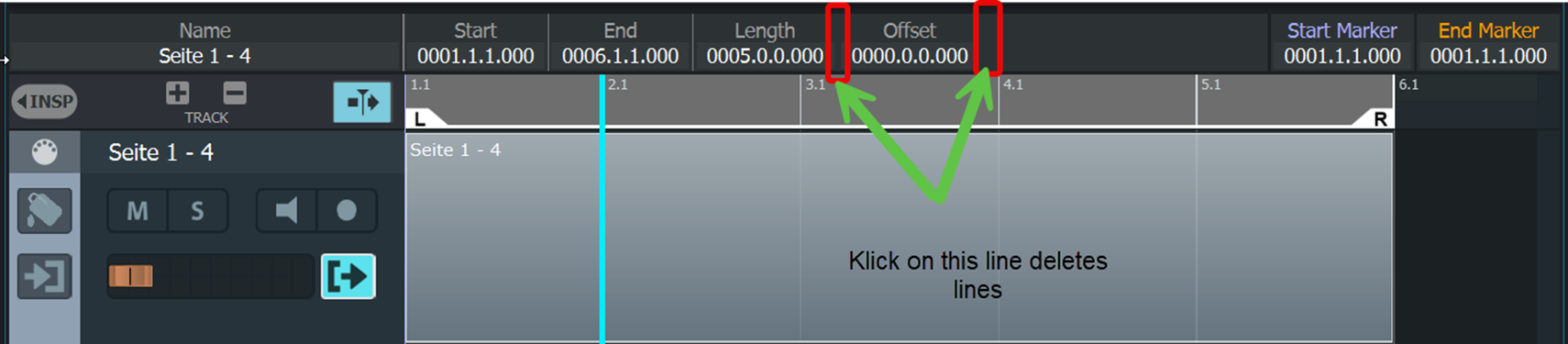
As you can see in the image, the two boundary lines can be removed by clicking on them.
I discovered this at random.
If you switch to another song and then return to the original song, the lines reappear.
Win 11
Herbert
@Spork
@musicullum
As you can see in the image, the two boundary lines can be removed by clicking on them.
I discovered this at random.
If you switch to another song and then return to the original song, the lines reappear.
Win 11
Herbert
Hi @Herbert_Schmitt,
wow, nice catch! How did you even spot that one? You’re right, those lines disappear, but only on Windows. It’s already fixed, so please give it another try with the next Pre-Release (2.2.71 ).
Have a nice time,
Michael.
Hello Michael,
That was a coincidence.
I accidentally clicked past the top bar. Then I saw that the line disappeared. Please check all lines. Other lines may also disappear.
Best regards
Herbert
The error I reported has been fixed in version 2.2.71.
You did a great Job.
Herbert