I tend to agree with @mducharme that the brand of video card’s being consistent with the brand of motherboard shouldn’t really matter. Quality of the card will, of course. Somewhat coincidentally, my last two video cards have been ASUS-branded, but I know MSI is highly respected, too. I do tend to find ASUS to be a company I can trust on the quality front, and one that often comes in at an at least reasonable price point for my needs. I also happen to have 2 ASUS monitors, and it was a combination of features and price point that made me go that way. Specifically, I needed the DVI connectors due to the older video cards I had, then, when my son gave me a hand-me-down when he upgraded his gaming card, I was also glad the same monitors had HDMI since the newer card only had one DVI. The new card I’m getting has no DVI and only one HDMI, plus three DisplayPort, but I learned you can just get a DisplayPort to HDMI cable (or adapter) to deal with my monitors’ lack of DisplayPort.
I don’t, and never have, though both the motherboard and video card I’m getting have features for that (the video card even has an “OC Edition” tag on it). But I also gather that components aimed at overclocking tend to be of higher quality than the similar models that aren’t.
Most of the time, I use the MIDI input, headphone outputs (mostly one, but both if I’m recording another singer), mic/line inputs, and a pair of outputs for my monitors on the 828x. There have been a few times where I’ve connected additional audio inputs, for example for digitizing cassettes, and I think even a few times where I used both additional inputs and outputs (maybe for a loopback connection to recording something to an audio track?). I don’t recall if I’ve used the lightpipe (ADAT) inputs to date, but I do still have a bunch of ADAT tapes (and an old blackface ADAT) I’d eventually hoped to dump to the computer.
FWIW, if you have any curiosity on the 828x, here is its page:
It’s decidedly a bit of overkill on the I/O side for what I mostly do, but, if it can still work reliably on my new system, there is no reason for me to change (and tight finances will more than second that “status quo” thing).
I’ve generally been happy with it running it over Thunderbolt 2. However, the one time I was running it over USB2 for an extended period (when I didn’t realize my motherboard’s CMOS battery had died and couldn’t initially figure out how to get Thunderbolt working again in BIOS), I found it was having issues staying connected with Cubase (I think it was Cubase 13 at the time). Thus, my nervousness about needing to use the USB2 connection for the 828x on the new system. But perhaps there was some issue on my current system that contributed to the cutting out. (By the time I needed to do that, my system was already 9 or 10 years old.)
I just looked up the MOTU M4, and it wouldn’t work for me due to only having one headphone output. (While that would be find most of the time, there are occasionally times where I need to record another singer and so need two headphone outputs and where just using a splitter wouldn’t suffice.)
I’ve never had any issue with headphone level on the 828x. The 828x doesn’t attempt to run off USB power – it’s got a built-in power supply that gets plugged into a normal power outlet.
MOTU recently introduced their 848, which upgrades the 828x in many ways, including supporting Thunderbolt 4. But it is about $1.6k, so way beyond what I can afford if I need to replace the 828x. I could decidedly go with something less feature-laden than my 828x as long as it at least has the MIDI input (my 88-key controller is too far away from my system to use it over USB – only use that for piano parts as I have a USB-connected MIDI controller on my desk), mic/line inputs, a maybe 4x4 on the audio in/out side.

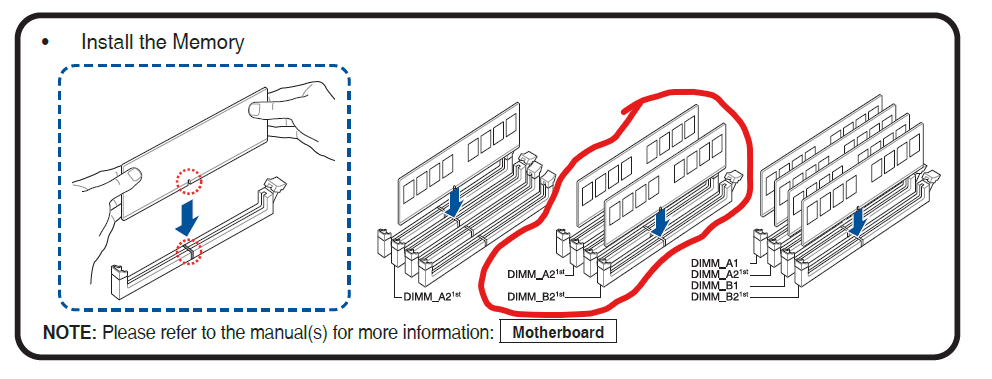
 (I’d originally estimated the actual PC build would take 1-2 days, and the migration of software, peripherals, drivers, and data would take at least a week. Today will be Day 5 on the build front, at least once the replacement memory arrives.)