Hi! First I would like to thank Mr M.C for share with the world this amazing job.
I’m was using the control with mackie method but my cubase sometimes crashes with it, so I’m trying this script and everythings seems to work very well. For me it have a lot of features I don’t use, so I would like to disable some functions to avoid miss use of some controls especially the faders. Sometimes my kid come here to my studio and he love to touch that faders (lol), and my unit seems to send some faders movements unexpectedly (I need to clean some contacts). To disable some functions is simple, but the cubase interface appears greyed to me as shown in this screenshot. I’ve tried to run as admin mode, reinstall the script, change the permissions on windows explorer and nothing helps. Anyone have some clue what is happening? thanks!
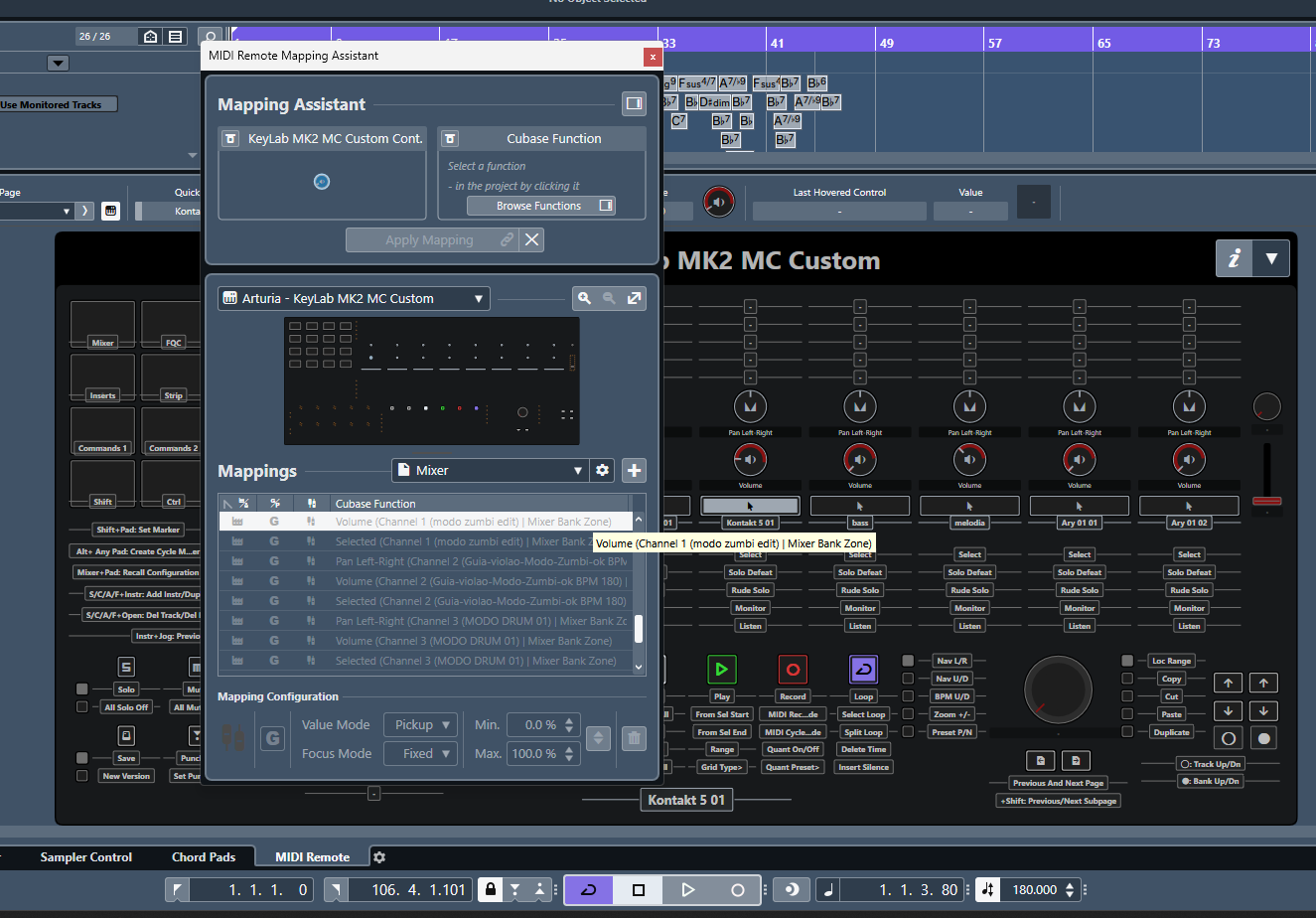
Hello and thank you for your kind words!
So, you want to totally disable the faders?
Yes. I don´t use them on my workflow and they can change the volume of my channels unexpectedly because my unit has a malfunction on those controls
Understood. OK, attached you’ll find an altered version where I don’t bind faders to their hardware instance. I have to note that taking faders out, is taking out at least half of the script’s functionality, but yeah, since you’re sure about it, I have no problem at all 
Arturia_KeyLab MK2 MC Custom_NO_FADERS.midiremote (928.5 KB)
Thank you very much for this. Worked flawlessly here!
I still have a question about the fact cubase doesn’t allow us to change the controls using the “Mapping assistant”. The only way to change the way things here is editing the script? If yes, were I can get knowledge to do this? Thanks again 
You can put the blame on me on this one
The script for the Keylab was my very first one, and to be honest, I hadn’t even realized that one could remap things using the mapping assistant, I thought that the assignments were locked. So I went for another way, of letting users alter some configuration files of the script to achieve similar custom assignments. In the future I plan to rebuild from scratch the whole script, but this means I have to find some more time than usual.
Anyway, when it comes to the commands sets, the transport controls, and even knobs, in most pages they are configurable.
There are four files involved:
-
mapOfCommands.js
Here we can define what each button will do in our commands sets, and even when we have pads Shift,Ctrl,Alt and Fn held. At the same time, we can define what knobs will do, and this is powerful because we can actually assign what they will do based on the direction of turn, i.e. we can have one command for left turn and another one for the right turn. -
mapOfTransportSectionCommands.js
Here we can define the assignments to our transport buttons when we have the state buttons (Pad Shift, Ctrl, Alt and Fn) held. -
mapOfMasterFaderAndKnobBindings.js
With this one we can define what the master fader/knob (the 9th ones) will do. This however needs a bit more advanced knowledge of the API, since it involves the concept of hostValues. However, I’m always here to help with this -
mapOfActionsOfKnobsByState.js
Here we can define the actions of our knobs when we have the state buttons held.
This is again pretty powerful, because not only we can assign custom commands to each knob turn, but we can also assign dedicated midi CCs to each one of them. This can be very useful in VSTs for example, which have internal commands for preset previous/next, and we can midi learn them using just one knob.
All in all, we can edit these files using a pretty standard text editor (even notepad will do) and we can inspect how things are already written there and just alter what we really want to. Again, note that I will always do my best to help with this, and there are actually other users here that can help.
Now, we have to note that the Keylab has 10 user MIDI modes. This is something totally out of my script, I don’t even use the relevant MIDI ports. This means, that we can take advantage of these user modes, and build up our very own midi remote, using the mapping assistant and these ports. This way we can complement the script of mine which uses just the DAW mode.
Thanks for the answer again. I had already changed some parameters in the mapOfGeneralSettings.js file. I´m just using the stripped down version. The idea to make the pads blink in the rhythm of the tempo is awesome, but the other pads functions like shift, ctrl and fn, etc are too much for me. I just use the transport buttons and daw commands. The jog to navigate back and forward is also part of my workflow. This is the way the controller works with the old Mackie control method, but this method is a little “buggy” for me. This is why I’ve asked for a way to modify some things, becouse I think is better to disable things I don´t use. The idea to make the pads to do different things than just midi notes is also interesting, because I don’t use them to play (I have an electronic drumkit for recording drums). I was just wondering If I could assign these pads for custom functions, for exemple, but without the need to change the page. But this would be an upgrade to my workflow and I believe I would need to put some kind of stiker on each pad LOL. But to use the pads as different controls than midi notes I would have to change to full version and use the virtual midi ports, right?
The way my script is implemented, uses pads for changing mapping pages and other stuff as well. Though it’s obviously doable to change their assignments, it would require a decent knowledge of javascript and at the end of the day I see no benefit in doing this, instead of creating your very own midi remote, using the USER modes of the Keylab. There, you can always change the midi messages of pads, and assign them to literally everything that the midi remote offers.
Not sure I understand this. Is my script behaving buggy with the jog? I haven’t noticed something like this all this time.
I’m sorry, my english is not my native language and sometimes I can get misunderstood. The jog works perfectly, I was just trying to say that this is a function that I use and can also be achieved using the old way cubase had to access the controller (the mackie control method) and that method is buggy for me. This is why had to disable that method and try your script.
I also tried to make my own mapping using the cubase mapping assistant but I couldn’t find a way to make the metronome button lit the led. The mapping works fine as a toggle if I map that button to the metronome state, but it doesn’t make the led work and this is important to me. Using your script all buttons give the correct led feedback.
For now, I believe that your script solution to use with keylab. thanks again
Yes, when it comes to feedback to the controller, things can get nasty with the Keylab, since it needs either Sysex or MIDI CCs to the DAW port.
Is message #18 in this thread still the ‘right version’ of the script to download?
It may be useful to put this on github or something like that, if the license is appropriate, so that there’s a canonical reference point and release process: you could have the various versions of the script available and tagged so people would know where to look. I found this thread from google, and I have no idea whether it’s current or not.
Hi, whenever I have a really new version, properly tested by me at least, I always update the original post. So no matter what I post, which I do mainly to alert followers of this thread, the most updated version I’m feeling safe with at my very own setup here is right there.
I had my new MKII 49 today - woohooo - but I run into a problem with configuring things. I need to import the XMl file (Arturia_KeyLab_MK2_MC_Custom_Generic_Remote_For_loopMIDI.xml) but I don’t see it in the downloaded script files? Am I missing something? Where can I see and download the needed .xml file? Thx for info - Johan
Hello, congrats on your purchase!
When we install the script, a dedicated folder is created by Cubase. You can open this folder, by going to Studio→MIDI Remote Manager. Then navigate to the Scripts tab and find and select the script KeyLab MK2 MC Custom .

In the low section of the window, you’ll see a section Script Path and in the right, a small folder icon. Click this and the folder of the components will open.

The xml file is there:

Note that this file is needed only if you plan to install the full version of the script. By default it’s not used.
Hi Minas
Congrats for this great job ! And thank you so much for sharing.
I just installed it (stripped-down version) with my new Keylab MKII 61 and it works like a charm so far (didn’t test much of the zillion features you put into it though…)
Just one quick question: once the script is loaded, the top left pad becomes red (not blinking). Is that normal ?
I am on MacOS 14.3 - Cubase Pro 13.0.30
Also could you please add a version number to the name of your midiremote files (and others, too) so that we know if they are the right (latest) ones to download ?
Thanks again !
Yes, it’s perfectly normal. The top left pad turns to red to indicate that we are in the mixer page. In fact, pressing this pad when we are in another page, will get us again to the mixer page. Furthermore, when we are in the mixer page, and we press this pad again, we open/close the mixConsole on our screen.
Generally, many pads are assigned to pages, for example, the second pad from the top is assigned to Focused Quick Controls, while the third one to Instrument Quick Controls.
if you open the UI of the script, you’ll see more for the assignments on our pads:

Sure, I can add this, no problem. Note of course that every time I update the script, I create a post here, so if you set this thread to “watch” you’ll always know when a new version comes out. This version will be there at the Original Post
Hello again Minas
I am experimenting a bit with the scripts. I have a minor, but annoying problem:
“sometimes” (unfortunately I haven’t been able to determine the conditions), if I select a track using the buttons (I believe that generates a note-on/note-off sequence), it does select the correct track, the button is blinking (I use that option for now) and everything goes well. But after a more less short period (a few seconds or more), it selects back the first track .
I looked at the midi traffic and I indeed see the note-on/note-off sequence causing the track 1 selection.
Have you seen that behavior before ? If not and if you have no idea why this happens, never mind, I’ll try to narrow down the conditions that make it happen and will get back to you then. I’ve never seen this until I used the midi remote scripts…
Hello, how do you check the traffic? Using a MIDI monitor, or by logging from inside the script?
Personally no, but I do recall another friend who got this issue. I don’t remember right now the real cause, but one suspect is my way of checking for track changed based on fader movement. In fact in a newer version of my script, I abandoned this approach.
Can you please give this version a try and see how it goes?
Arturia_KeyLab MK2 MC Custom.midiremote (928.5 KB)
I am using MIDI Monitor (great tool btw, been using it for 20 years or so…).
Not at my desk right now but will be in a couple hours. Will check the new scripts then…
Thanks !
Ah, then the activity you see is real, i.e. it comes from the device (the Keylab or another controller). By the way, have you deactivated Arturia’s Mackie device from the Studio setup? This is crucial, otherwise we’ll have conflicts.