You’re saving a Program or Layer preset?
Try saving a “Multi Program” preset? Multi Program presets save the entire state of a plugin instance….similar to what gets saved and embedded when you save an entire DAW project before closing it.
It’s done from here:
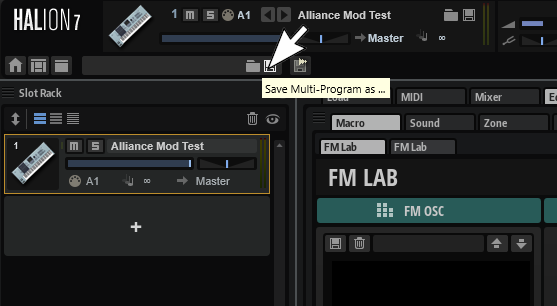
Are those two icons missing for you? Windows or Mac? What host are you using? Is it VST, or maybe AU in Logic, or the plugin format that AVID uses with their Pro Tools DAW (AAX I think)? If you’re using a different plugin type from VST, the way to save a Multi Program might directly come from Host instead?
I see the form area in your screen shot, but I don’t see the the two icons to Load/Save, and that’s a bit strange to me!
If missing, do you get help popups when mousing over the area they ‘should be’? If so the area should still be hot and work if you click there.


Try right clicking that top left area (Says “Init” in my screenshot above) and see what options you have. Maybe one to save a Multi Program? If not, clear the instance and see if that brings your load and save icons back? Are they also missing if you launch a Stand Alone session of HALion (Merely a test to see if the missing icons are a host problem, a problem with your installation, or maybe even a HALion bug)?
You can Load multis from that same area clicking the little folder icon, right clicking that area (That says Init in the snap shot above), or find it for reloading in the media browser with the filter set to “Multis” or “ALL”.

Once you reload it you should see its name in that blank in the top left.
If your host can launch VST3presets directly (I.E. Cubase, Nuendo, Live, etc.), again note that the preset type will be tagged as a HALion “Multi Program”.
I checked the test preset I made last night while forming my post, and it’s all there. Notice how once I’ve loaded it, the name for my “Multi Program” preset shows up in that top left area…
