Pre-recorded audio and video for synchronized playback should be triggered by dedicated appliances or show control (hardware) systems–not general purpose computers.
There’s no such thing. A mixing console just receives, processes, and sends audio. If your computer has the appropriate audio interface, it doesn’t matter what you use to mix the output from that interface.
Outboard audio gear processes audio signals from the computer’s audio interface and sends them down the chain, or returns them. If it can’t do that without drivers–it’s “in the box.”
Professional (enterprise-class) storage platforms manage their own RAID, metadata, and provisioning. They expose logical volumes to the host, and as long as those volumes are formatted with a filesystem the host supports, you can use them on any platform.
Initial backup takes awhile (maybe an hour) because it’s scanning and indexing all of the files before copying–not just cloning the disk. Subsequent hourly/daily backups can run in a few seconds or minutes, depending on what’s changed on the system disk.
You can boot-up a Mac from an alternate external system drive–but yes–it’s not cool that the SSDs in most Macs can’t be replaced.
Boot to an alternate system drive.
True, but I don’t associate Windows with stability and predictable performance. When I fire-up the DAW, I don’t want to think about the OS at all–and I definitely don’t want to be troubleshooting or researching issues it causes.
If Steinberg ever releases Cubase for Linux, I’ll probably build an Intel or AMD server with tons of RAM to run it.
That’s Linux.
If you look around in the forum and other places online, you’ll see that there are a lot of musicians and producers who aren’t interested in computers. Many don’t even know what “cores” are, and wouldn’t know how to diagnose a performance issue. They just want to record, produce, and mix–not develop sysadmin skills.
I agree. My £500 2025 Mac Mini M4 works great with an un-patched Cubase 14 and Waves16 in Sequoia 15.6.
Hook any professional storage solution you like up to it. Use Midi to control patchbay-routing. Run a customer’s OS from an external drive if you must. But the Mac blinkers are on because it won’t run Virtual Guitarist 2! Pathetic.
I won’t be visiting the Mac’s Software Update section until next August - when I will install this year’s Tahoe OS. Waves will be updated to 17, and I will then buy the Cubase 15 update. I can then look forward to another whole year of trouble-free operation.
A year in which I will seriously consider a pre-loved M3 Ultra Studio with 96GB and 1TB when it hits £3k.
Why did you post a definition of DAW? In no scenario did I claim the DAW was not processing and delivering audio or MIDI in some form or another. I said, people sometimes need more, or different abilities than mixing stuff down to stereo using software instruments and effect plugins!
Sequencers in DAWs have also been used to design and run light and pyro in coordination with audio since the mid to late 1980s. Countless sequences have been built with DAWs like Cubase, and there’s no shortage of cases where such DAWs did the streaming itself during the performance as well. Yes, plugins even exist making it possible to do different video over multiple streams from the same PC (provided you can slap enough video ports of the type needed on the motherboard).
Nothing in that obtuse response disregards the fact that DAWs are used in real time ‘performing’ situations every single day. They ARE used to ‘control’ all sorts of ‘out of the box’ equipment. Quite often, the best platform to get it done at the best price is a Windows PC.
The amusement park ride was just one of many ‘examples’. I picked that example because I thought it we obvious as to why it needs extended capabilities in connecting and communicating with all sorts of gear, much of which requires drivers that were flat out broken on Macs when they dropped doing Intel builds and supporting an OS for them. I could also get into fireworks shows and more. There’s just SO MUCH gear and software out there that doesn’t work with the new Mac, that an Intel/AMD PC is going to be the goto for some years yet.
Just stop. You’re being ridiculous now.
Honestly, digital mixers have been around since the 1990s. They have all sorts of bult in interfaces, remote and update APIs, onboard storage to manage, and more. Quite a few of them actually have a PC motherboard or two inside the thing help make it go. Some models can even host VST plugins natively, and it’s not unusual to need a PC of some kind connected (a connection requiring special drivers) to download/register, and install/update/upgrade things in the unit.
Plenty of analogue mixers out there also work with PCs and can require drivers and such to setup and maintain their ‘remote’ capabilities. They have firmware that can be updated via computer, and so much more.
There are SCADS of mixing console models, in every price range imaginable, that you hook to a USB, Parallel, or Serial port on a PC for a variety of reasons, and many of them require special drivers that do not exist for a modern Mac M system, and probably never will. It’s kernel level stuff that quite often needs the instruction sets built into Intel/AMD chips.
You have it backwards. If it can do its primary job without a host computer’s CPU and instructions, then it is OUT of the box. Many devices can do a lot on their own, but still might require a PC to get the most out of it.
Your VST and VSTi plugins are ‘in the box’.
A Montage and some effect pedals are ‘outboard’.
Seriously, AD/DA conversion, as well as signal processing, and real time monitoring can most certainly happen outboard. No drivers are needed for the kit to do it’s main job. It can work ‘continuously’ and stream over various media, using various protocols. STILL, Drivers are often needed to setup, service the kit, and control it remotely.
Drivers also come into play for what ever intermediary interface makes it possible for the PC to communicate with those industry standard formats. Typically they’re not all that demanding on system resources. Sometimes they can cause bottle necks and added latency depending on the system build and application, but you’re going to get that with any and every platform. How soon and how bad it happens can have pretty significant correlation with the grade/cost of the setup.
I.E. If your mixing console with tons of onboard processing capabilities streams over ADAT, it might not use the PC’s CPU much if any at all; but, you still need a device with appropriate drivers on the PC that can handle getting ADAT in and out of your PC.
The connectivity is NOT in the box. Also, if the mixer has onboard AD/DA conversion, and effects and EQ, etc….then that stuff IS being done ‘out of the box’ before it gets streamed to any listening devices.
Just stop. I’ve been swinging drive cages since I was barely an adult (long time ago). Changing platforms can be quite expensive.
PC motherboards exist all day that have ‘professional hardware raid’ built right in. As for the more upscale systems where more than what a typical PC motherboard provides is required, it can still be an expensive PITA to change platforms! If you’re already running a perfectly good SAS array from a PCIe slot, it’ll take some expense and cost to get that same array running on a modern Mac.
That’s a load of BS. There are untold millions of Windows systems that have run 24/7 for DECADES doing exactly what they were designed to do.
In the grand scheme of things, Mac has had their new M chips out for a very short time. Not even a full percent of the software that exist in the world will work with it once Rosetta is pulled.
Just because a current model Mac can only run a fraction of the software and hardware in the world doesn’t mean the Mac itself is ‘more stable’. Plus, people have PLENTY of issues with Mac software. It’s really new stuff that folks have tried to port over, and to get it working they sometimes have to strip out all sorts of features and legacy support. Sometimes the features and support get added back eventually, but sometimes it doesn’t; and, it takes time.
Case in point. To this day I have a number of VST plugins that the VST3 version took forever to halfway work. In more cases than one the VST2 version is also more efficient/faster, after all, it takes advantage of instruction sets and stuff ‘on the die’ of the processor. VST3 versions? Still buggy as heck, and the old VST2 version still flat out runs circles around it. Apple Silicon’s lack of Intel/AMD instruction sets breaks the ability to use those plugins.
You can still find businesses to this day that still use XP era software, and sometimes even on XP era hardware. The stuff has been running 24/7 for all this time, and is most certainly ‘stable’ and ‘high performing’.
Plenty of people run very stable DAW setups on Intel/AMD/Windows platforms. The vast majority users don’t have any issues.
I’m done with this argument. That’s not even what the thread is about. Please reconsider trolling PC threads with ignorant “Get a Mac” noise. I can assure you that most of the people in this thread are keenly aware of the advantages and disadvantages of several different computing platforms. I recognize some names in this thread who run a little bit of it ALL.
The point of the thread, is that Cubase (and Windows itself) needs improvements on multi-threaded performance with DAW applications running on the newest generations of Wintel hardware (namely systems with lots of processor cores that Cubase doesn’t even ‘seem’ to be touching. If the science out there proves it’s a wide spread truth, then why not? Can it be fixed?). There are suggestions all over the thread that ‘other DAWs’ on the same OS are doing a better job with multi-threading than Cubase. This is what the thread is about (not Macs).
For decades, Mac ran on Intel, and it was in the ‘exact same boat’.
Mac runs on ARM now, and that’s pretty new stuff. Not much truly native software and hardware for it yet though! It ‘buries’ any notion of ‘legacy support’ (which a lot of people NEED).
Windows is playing catchup on ARM, but they do support it now, and they’ll get to the point of rivaling the Mac with similar hardware to what Mac’s are using soon.
For me, in my modest setup, a modern Mac simply is not in the cards. I’ll have to replace my audio interfaces right out of the gate, and that will cost more than a decently speced out mid-range Mac on it’s own. I’ll also lose the ability to hook up quite a bit of outboard gear that I very much enjoy using. Aside from instant rendering on instrument/MIDI tracks, which I personally don’t need that badly, why pay $400 for a synth or sampler plugin when I have already have the sounds in front of me in the form of outboard stage gear?)
So what if I cannot theoretically run 100 more plugin instances (that exist and work properly).
For on the go computing, I might pull the trigger on a Mac Mini, or one of the Air laptops on impulse someday. It’d get the job done for gigs and general computing needs while traveling, and some are now competitive in price with PC options that can pull the same weight. Still, there are a LOT of things I don’t really like about the Mac options in that price range. Namely, I have a LOT of software that won’t run on the thing. Plus, I’ll have to pick up a new audio interface out of the gate. I already have 3 that work perfectly on ANY PC, and the older Intel Macs. They perform well, have decent pre-amps and such, and are paid for. It doesn’t make sense to quit using them at this time. Aside from getting ‘Mac M platform Drivers’, there’s nothing a new interface in the same class as my existing ones brings to the table.
One final post to follow up on some of the discussion where the assertion was made that the report I posted at my Substack could be misinterpreted or misrepresented in some way regards the comparative performance of Cubase against the other DAW’s in the report.
I have already explained in detail what the tests entailed and the report presented, but they say a picture is worth a thousands words.
So with all the discussion moving to whether there has been any performance improvements from Cubase 14 to Cubase 15 , and the dismissal from the Steinberg reps that they are not interested in discussing any performance issues with the engine when presented in “theoretical” test sessions, I’ll pop up some screens that will visually clarify exactly what is represented in the report, and the readers can come to what ever conclusion they deem fit.
This is the baseline MIX-EXT template, and for those that were wanting session details of the DSP MIX sessions.
35 x Tracks with a combination of Stereo and Mono Music Content and Sine Waves - 8 x FX Channels, 8 x BUS Channels , Varying DSP Plugin load depending on test session ( Standard/EXT), EXT version also has additional FrankCS plugins for incremental load. Plugins used include Acon Digital, Analog Obsession, TDR , Chowdhury DSP.
As is evident the session has a measurable load across ASIOGuard, thread management and scheduling across the TM is being assigned as per Steinberg’s routines.
The Baseline EXT session is then further loaded with FrankCS Plugins in the Mix Busses to bring the session to the nth degree pre overrun, ASIOguard is evidently at the brink of overloading, session managed an additional 11 FrankCS Plugins.
TM showing around 30% resources used, thread management and load balancing is as displayed.
Now these next set of screens will probably not sit well here, but they are necessary to give more clarity and a final detail of the points being made.
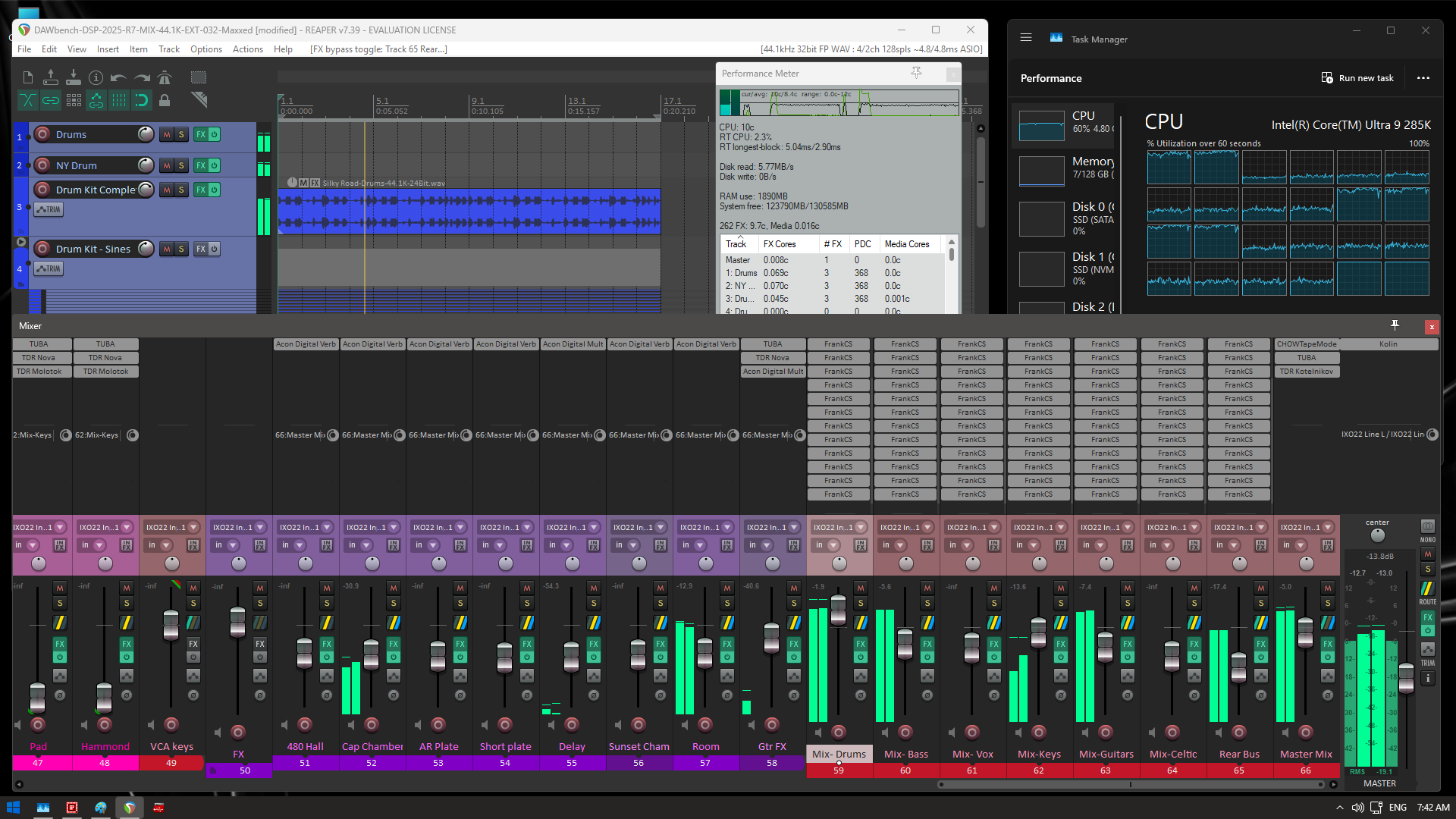
Its already evident that the thread management and load balancing is significantly different to Cubase , with Reapers routines handing the scheduling over to the Intel Thread Director/Windows Scheduling, where it correctly identifies and assigns the P-Cores primarily. For those wondering, the higher loaded cores are the P-Cores, and yes, that is the order of the P-Cores on the die and how they are presented in TM.
This where we sort the wheat from the chaff, so to speak, as its clearly evident that Reaper is able to use far more of the available resources, allowing an additional 85 FrankCS Plugins, by scheduling and load balancing more across the appropriate P-Cores, as well as also waking and using the E-Cores. Unlike Cubase that does not scale the number of plugins when raising buffer as performance is already dictated by the elevated playback buffer of ASIOGuard, Reaper scales per buffer within it AFX routines, so by the time we get to 512, there is an additional 25-30 plugins on top of that again.
Now of course there will be those that will dismiss this as just a theoretical test that has little to no relevance to Real World sessions , but it is based on a RW session and I have seen near identical behavior on screens being posted and even sent to me from end users of their RW sessions displaying the identical behavior.
Make of the above what you will, but its not easily dismissed, as that style of session is one used by a lot of end users in production environments.
Your third screenshot says Cubase 7 - is that a typo? It looks like a Reaper screenshot.
Either way, looks like you’re getting twice the load on Reaper, so I would infer the difference is about Reaper scaling to 2x Cubase load, approximately. That’s a pretty big difference. The first core also not being used in Cubase it looks like, I seem to recall reading somewhere that it was reserved for the GUI.
I see with Cubase you are determining the maxxed-out state with the ASIO guard meter. What is the equivalent on Reaper, out of curiosity?
Does the ASIO-Guard level in Cubase make a difference at all? (is this using normal or high?)
I notice that the baseline template shows 26% CPU usage on Cubase and 30% on Reaper if I’m understanding correctly. I’m not sure why Reaper is higher here? Although it is less important than the numbers under heavy load.
How much does the “Anticipative FX” in Reaper help things? I’m not sure what that is but that came up in a search on Reaper performance.
Ha, yeh it was a typo, fixed. Its clearly Reaper 7 in the screenshot
Those are both at the state where one extra plugin will tip the engines.
ASIOGuard is set to default, in the past when investigating the issues with ASIOGuard prematurely overrun, once it gets into that state, no level of ASIOGuard is of any benefit.
I wouldn’t be reading too much into that, it could have been fluctuating a bit when I took the screen capture, either way Its an average across the cores being utilized, and Reaper does have a higher utilization/ better load balance. The wheat from the chaff is what happened with the remaining resources when we applied the additional load.
Right, but how do you determine that the engines have been tipped? Audio dropouts or things of that sort? Or is it the meters themselves? The ASIO-Guard in Cubase and I don’t know what the equivalent in Reaper is.
I don’t go on meters, its when the audio drops out !
Reaper has far superior performance monitoring routines, essentially when the RT longest block exceeds the hardware bloc buffer , its about to tip.
Reapers AFX and how it works in comparison to ASIOGuard is waaaay too long of a discussion to have here. Easier to say its an extended buffering routine, but vastly different to ASIOGuard, and has its +/-.
ASIOGuard to me feels like an extended playback buffer, there is very little difference in scaling depending on hardware buffer ( when not track armed ). AFX does not behave in that manner, as it scales per hardware bloc buffer within the AFX buffer.
ASIOGuard’s original premise has been lost , it was meant to allow extended processing while still having a lower hardware buffer when track arming and playing instruments live.
Somewhere along the line it has instead become an Achilles heal where it collapses the engine prematurely under certain session logistics, with no known resolution.
To resolve the thread management and multi processor mess, they need to start first with ASIOGuard !
ASIO Guard is a Steinberg specific audio engine technology that was introduced in Cubase v7. Only someone who is knowledgeable about the Reaper audio engine could comment if there are any similar technologies being used.
ASIO Guard is supposed to improve real time audio stability and performance and make optimal use of the CPU resources. But as we see time and time again here on the forums it seems like that for some users it can also be the root cause of performance issues on their systems too.
How it works is that it’s supposed to pre-calculate buffer blocks and prioritize the CPU cores less time-critical path possible via a dynamic / automatic assignment process for the next ASIO block cycle.
As we can see there is plenty of CPU resources available in the test images above, so ASIO Guard should not be peaking / maxing. These kind of mysterious performance issues will typically be “justified” as having some kind of configuration issue with your operating system, the audio hardware in use, drivers and the general system setup.
The only way to get any kind of answer for these kind of mysterious performance issues is to create Windows trace files and for someone who is competent to thoroughly investigate your system / trace files. But this kind of in depth troubleshooting service isn’t really available around here on this forum.
All I can say from personal experience is, when Cubase had mysterious dsp / real time audio performance issues on my various computers over the years, FL Studio and Ableton Live seemed to be stable.
And as I mentioned previously a Steinberger here on the forum recently stated that:
“Our code was designed when schedulers were way less smart (and dedicated to audio processing) than today. But we can’t just switch the way we do our audio processing like we would, when we were building Cubase today from scratch. Changing such fundamental code takes time and caution to not break the rest which is working fine.”
Which would suggest that there is some kind of room for improvement in the audio engine, when Steinberg will get around to improving it ? who knows…
I have been a trusted friend and colleague of Justin for 15+ years, we have worked together extensively over that period. I have had him on my podcast twice where he goes into detail on AFX, so I am reasonably well versed.
Already done, and I have the answer, but not in a position to share it publicly !
I responded to that on the other thread, not repeating it all again here, except to say I am not buying any of that. They managed to do it for Apple , they can do it for Windows !
All this is very interesting, and should be some serious food for thought for Steinberg. I will update to 15 when this is addressed. Until then, 15 offers me no substantial reason to not remain on 14.
Thank you again for your hard, dedicated and important work.
I just came here (using Nuendo / Cubase since 2001) since I just swapped to my new super computer based on an AMD Ryzon 9950X3D - which took a lot of time since I have large projects and truckloads of plugins etc.. Coming from an i9 9900K. Benchmarks gave me someting about a 350% increase of performance - but Cubase 14 real world just about twice the power…
Like 15 years ago - TM says I am at 7% CPU - the project / asio meter is already 55%. And so on. One, two or maybe 4 cores are doing the work.. 31 (!) are barely used.
WTF? In 2025? I am really disappointed. I spend quite some time testing with Asio Guard / settings.. no difference.
I just used render in Place - it took almost that long like on my 7 years old system - checked TM - the render process just maxed out ONE core - having 31 doing close to nothing..
This is easily explained, 1 track runs on one core, always. Since core speed is about the same this will take about the same time. But a full project should use all cores (but not really more then there are tracks).
Not defending steinberg, but single track export can not use multiple cores, it is a linear not a parallel process.
Not a computer person here, wondering why that has to result in multi-track projects barely using more than one or two of many cores (an understanding I have based on many Task Manager pics posted here).
Why doesn’t Cubase distribute across many cores better?
Though this makes sense - but “rendering” (“render” in place” is something where other applications (film, 3d, etc) use all Cores 100% - thats where such a powerful system really shines.
I checked offline export and here the cores were a bit more in use - and quite equal spreaded - but only each second, maybe rendering does not use the “hyperthreading cores”.
But what I once checked (years ago, maybe even more then 10) - I once made a simple Cubase project without dedicated routing - just a few dozend stereo tracks - slammed them with Cubase only plugins (back these days Multiband Comp etc) - here the CPU consumption was quite ballanced on the cores and TM / Asio meter equaled in some way.
I have the feeling that the culprit is bad programming (cpu hungry third party plugins) in combination with with bad cpu handling via Cubase.
My projects are usually quite complex - 500 tracks - why not, lots of routing (most processing I have on busses / subgroups..) I feel that such large projects with international routing nightmare (subgroups sending to half a dozend FX tracks / other groups) is hard to “calculate” and is not comparable with just slamming 10 CPU intensive plugins on 10 stereo tracks..
Well - you could parallelize it in a sort of core-bucket-brigade fashion, if you were willing to introduce an extra buffer pr. plugin or “batch” of plugins? I suspect other DAWs are doing this ..
But yeah - in a realtime low latency scenario it’s a single core thing.