I want to change from full score to counterpart layout by w. I mark a note in the score. Then I press “w”. But dorico jumps to the first flow in the row and not the one where I Marked the note.
What must I do to make it run in the right way. Or is it a sort of “bug” of dorico - sometimes.?
Hi @elmar.raida, can you please post the Dorico file where this happens ? (You can also duplicate your project and create a cut down version of it, where the issue is still reproducible).
01_teil_03_FKS_komplex.dorico (2,7 MB) In all projects I teste up to now. In this one too. Thank you.
You have only one player, wired up to a full score layout and a separate part layout for each flow.


I believe the way that the “counterpart layout” command works is that it says “I see you have a note selected in a staff belonging to player A; let me find the first part layout assigned to that player and select the same note in that layout.” The problem here is that the first part layout which includes the piano only includes the first flow, so if you start in a different flow in the score, when Dorico switches to the part layout, it can’t find the note you’re looking for. In other words, I don’t think Dorico knows to look for the first part layout for that player that also includes the desired flow (but it would be nice if it did).
(I could be wrong, but this is what the behavior seems like to me.)
Hi @elmar.raida, what @asherber wrote in his reply is most probably correct. To reinforce this, I made a version of your project, where a new player is assigned for each layout (I copied the music from player 1 to all subsequent players, flow by flow). So now the switch with W works as expected:
[OT: there are issues in your page and flow heading template, where you could insert the composer tokens, which you can then fill in project infos, instead of using text to input them directly into the layout…]
I thank you Christian and asherber for the quick response. Thank you for the file I downloaded. I 've worked but I can’t re-build it although I see what you did. I get “tacet” in the layouts. It is often so that it takes time so understand the thinking of dorico after thirty years with Finale. I will try to check out where my thinking is wrong and why it does not work as in your perfect file. I write later when I succeeded
I haven’t downloaded your file (I’m on Linux right now, so don’t have access to Dorico) so maybe I’m missing something, but I don’t think you need to create a separate layout for each flow.
I’m assuming you’ve done this because you want to be able to print your tune collection either as a whole with the tunes following each other, or as singles each on their own page. You can accomplish this with only two layouts, each containing everything. Alter the relevant layout settings to get each layout to look the way you want. (This one in particular.)
Thanks for your Co-Thinking. I think I need separate layouts, because I work stante pede in my piano lessons, use pictures for the different pupuls or create at once a new version with new flow and new layout with the picture. When I write big piano compositions, arrangements, you could be right. My problem at the moment is to re-build christians corrections. His file is perfect, but I cannot re-build it with players, flows and layouts. I work over one hour. I know this depends on my head as mostly with dorico.
For the moment I had no success, Christian, I continue tomorrow. I believe I did not understand, that you copy the complete music by copy and paste in every player. Otherwise it shows tacet. I try it later. Thanks up to now.
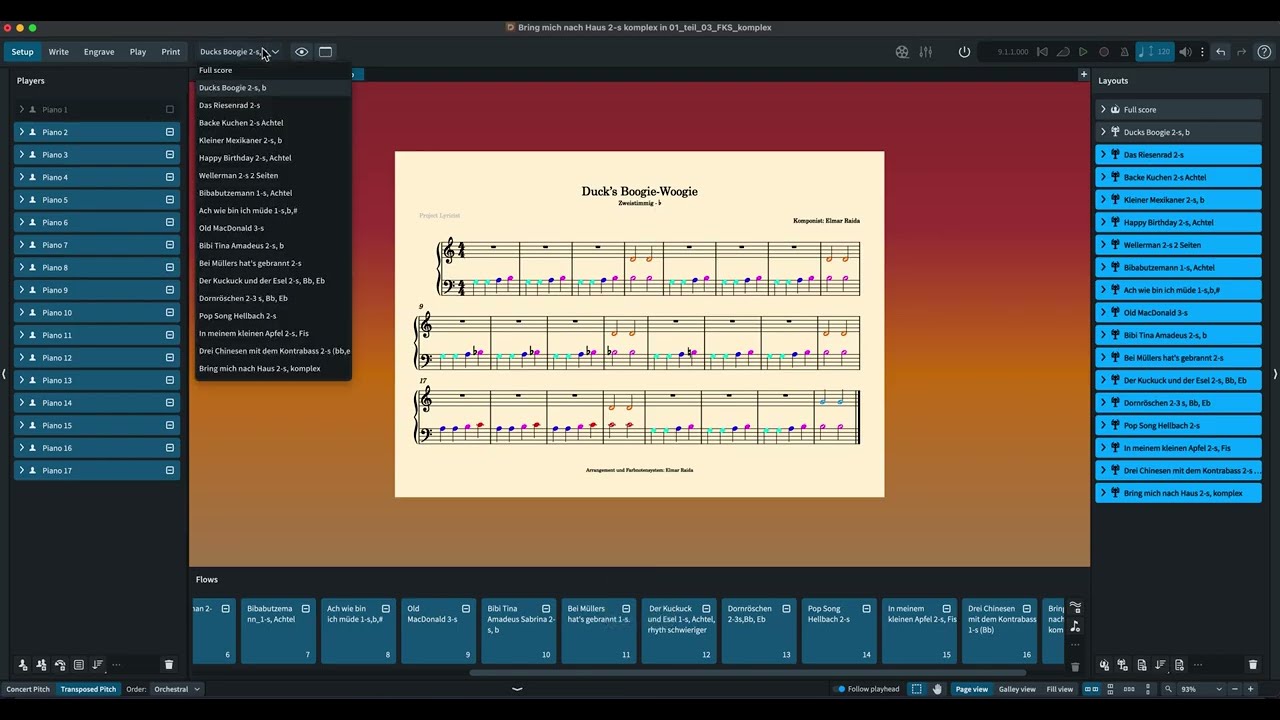
Hi @elmar.raida, It is difficult to explain all in words for me, and so I made a video to explain the process I followed. I hope it is clear enough. What you need in this particular project is a specific setup, where each layout has only one player and one flow checked, and the full score has all players and all flows checked, but with hide empty staves selected in layout options
Basically you
- create the needed players
- for each layout you check piano 1 and the needed piano player destination
- in each layout, in galley view, you copy the music from piano 1 to the destination piano grand staff
- (you need to activate the corresponding flows for the new players, because some of them are deactivated. To be sure you have all what you need just select all piano players, and check all flows for them)
- now you can select all piano layouts apart from the first layout (Ducks…) and uncheck piano 1 player
- for the full score you activate Hide Empty Staves in layout options (just for flow nr. 6, in the full score the hide empty staves doesnt work for some reason: you can use manual Staff visibility for that flow in full score)
- now your switch from part layouts to full score and back, using W will work
This is a specific setup for your needs. This is not how a normal setup would exist. As @asherber explained here.
Video explication:
I think you for all your work. I re-build it step by step till tomorrow. I believe the “w” command ist built for toggling between score and players for a big score and less for piano flows in a project. When I have 100 flows, I would need hunred players. I have a project with 50 flows + layouts. But your advices are wonderful to understand the thinking of dorico. Tomorrow morning I work on it. Now I have all the day lessons. I Thank you very very much
Christian R. I thank you for video and your work. It functions perfectly. I should say: The w-Command is switching between score and players and not parts, as I thought. And a matter of definition: What means: counterpart-layout or “Gegenstück-Layout”. I’m a really hard working learner, but dorico is difficult to learn after thirty years with Finale. The advantage: We have less competitors by using a really good program. Bad for selling dorico - good for us users who have to assert ourselves against competitors . I thank you very much, collegue!