Quite interesting figures in these specific tests, VI / higher latency is where you see a big difference. Checking the user’s cases I dealt with, Intel is still a bit ahead in terms of low-latency.
We’ll soon be getting two new AMD systems, eager to see how they compare.
it should not be necessary to disable one core, especially with that CPU.
I actually dealt with quite a few systems built around an i9-9900K and this is the first case where disabling one core helps.
Curious about this, I’m sending you a PM if you don’t mind.
Hi everybody,
Well this story about “one core disable because with 7 cores it’s better than with 8 cores” is worrying me.
The cores/thread number usage limitation should’nt have disapeared with Cubase 10 ???
Question for Fabio: I 'm planning to build a stong system with next gen Threadripper (november 2019) with let’s say 24 or 32 cores (so 48 or 64 threads) available.
Simple question: Cubase 10 (in a Windows 10 x64 setup) will be able to use all this power and threads availability ? Or shall we face any other limitation like 32 threads, or something like that ??
Thanks for clearing the question, I’m a little bit confused before spending a lot of money in a top level config
The “one core disabled” thing is by no means normal - it wouldn’t have even with Cubase 6 when using an 8 core / 16 threads CPU. The limitation has been of 32 logical cores from Cubase 5 up to Cubase 9.5 and removed in Cubase 10.
However, we’ve seen a few cases where this happened (with variable amount of cores, so it’s difficult to know why this happens without having a close look at the system).
As for the Threadripper, very difficult to say before-hand without testing.
Many cores certainly means a lot of thread synchronisation - this will surely hit performance: the lower the latency and the lower the single-core clock-speed, the hardest the hit. For those working with high latency and many VSTi, it might just work great - for others it might be wasted money. It very much depends on the use and workflow.
Fabio. Lets say i was a millionare and has limitless of money. I wanted to give you a new pc to build. Money is NOT a problem:)
What cpu would you buy today for that money. What cpu will you find is best here. Lets say you will use not more than 4 VSTI most of the time.
I guess it can be an overclocked I9 9900K because of the singlecore clock and it can be overclocked pretty easy to 5.0ghz…Or do you have another better suggestion? What will you buy for the money.
PS. Im no millionare and dont have limitless of money…It was just an imagination:)
I’m/we’re here officially, and Steinberg cannot openly recommend any specific piece of hardware over another… and then again, it very much depends on the use it is tailored to.
I personally tend to stick to the faster i5 or i7 since Gen. 3 and always pick up the ‘K’ version (currently in use: i5-4690K, i7-6700K and i7-8700K), so the i9 9900K would most probably be my choice at the moment. It is important to stress that I usually work on mostly audio, many plugin FX, very little VSTi and quite a low latency except while mixing.
An average of 4 VSTi and something like 120-150 FX plugins is my typical project… the i5 mentioned above deals with such a project with 40% to 60% performance (depending on the number and kind of plugins) at 512 and the project still runs fine down to 32. But using more hungry plugins might change the scenario completely! No doubt an orchestral composer would max that out way before the end of a project.
P.S. If I was a millionaire (nothing’s farther from the truth ), I’d get the i9-9900K, i9-9960X and Ryzen 3900X, just for the fun of building them a new home.
Guys may I ask… isn’t the Intel Core i7-9700k (the non hyperthreading one) a better choice compared to i9-9900k since Steinberg is recommending to keep hyper threading off?
Thanks for all this valuable information Fabio, I don’t know a lot about why vsti’s and cpu intensive plugins needing different resources. I was going to buy a very expensive i9 9980x
Set up but after seeing the results of what gigabyte achieved with the Ryzen 3950x / AORUS 570X master 16gb of 3200 ram oc to 3733 and the mobo oc to 1.412 v stable with the 360 liquid cooler this seems to be a cheap setup that smashes everything I’ve never used AMD before… when I start a mix I have GA5 / breaktweaker / Kontakt / massive / spire ect… and at the end of a mix I usualy have all my vsti converted to audio and all the plugins in off line mode and a lot of izotope neutron 3 and ozone 9 masking tracks treating drum busses ect which is where I’m maxing out my cpu atm for instance I put ozone 9 bass house preset on my master and it used 90% of my cpu…
So I’m wondering do you think the Ryzen 3950x would be ideal for this type of DAW usage ?
[Removed assumption that didn’t stand the test of time]
Honestly I still have to see how our 3900X does in the real world. If your aim is to keep more instruments ‘live’ at the end of the mix, it might do really good.
In general, big mixes with many FX don’t really need too many cores, with big VSTi templates you can certainly get more out of these CPUs. Also, CPU hungry plugins benefit from high-speed CPUs, as usually their load cannot be spread across cores.
Your case seems like a bit of all of this.
I have all Intel-based PCs at home and never used AMD before as well, but have a mid-range AMD 3700X at work - still have to do some serious test, but can’t see any difference in behaviour and the performance is on par with my Intels.
The project I mentioned previously uses exactly half the resources that it uses on the 4th Gen Intel (8 core 3.60 vs 4 core 3.50, make sense doesn’t it ) and equals the i7-8700k (6 core steady at 4.29 with TurboBoost). Also good behaviour with HT on and HT off.
Plugins that are very CPU intensive prefer speed
The i9 9980x is a great CPU, but runs at 3 GHz base, a single very heavy plugin could use most of one core and you’d be back to square one with 90% use of the CPU.
I’d recommend to think a bit about both usage and specs, have a look at the benchmark by SCAN posted previously (please check the difference with FX and VSTi in relation to the latency) and compare that to your needs / workflow.
I’m sorry for delayed aswer.
Fabio, I’ll aswer you PM too, thanks for asking BTW.
Well, with 7 cores on my system, instead of 8, I’m actually getting slightly less CPU realtime spikes.
But let me try to explain it better.
I used to have (or intent to) my system at 192khz with the lower latency possible (128) I have a thunderbolt RME fireface +, or at least 96Khz (at 64ms).
I realize that I got a lot CPU spikes running plugins at this sample rate, but the actual CPU from the system is running at 20% at maximum, so I don’t think I should get spikes, right?
I’m open to send any system data to be analysed If you guys need
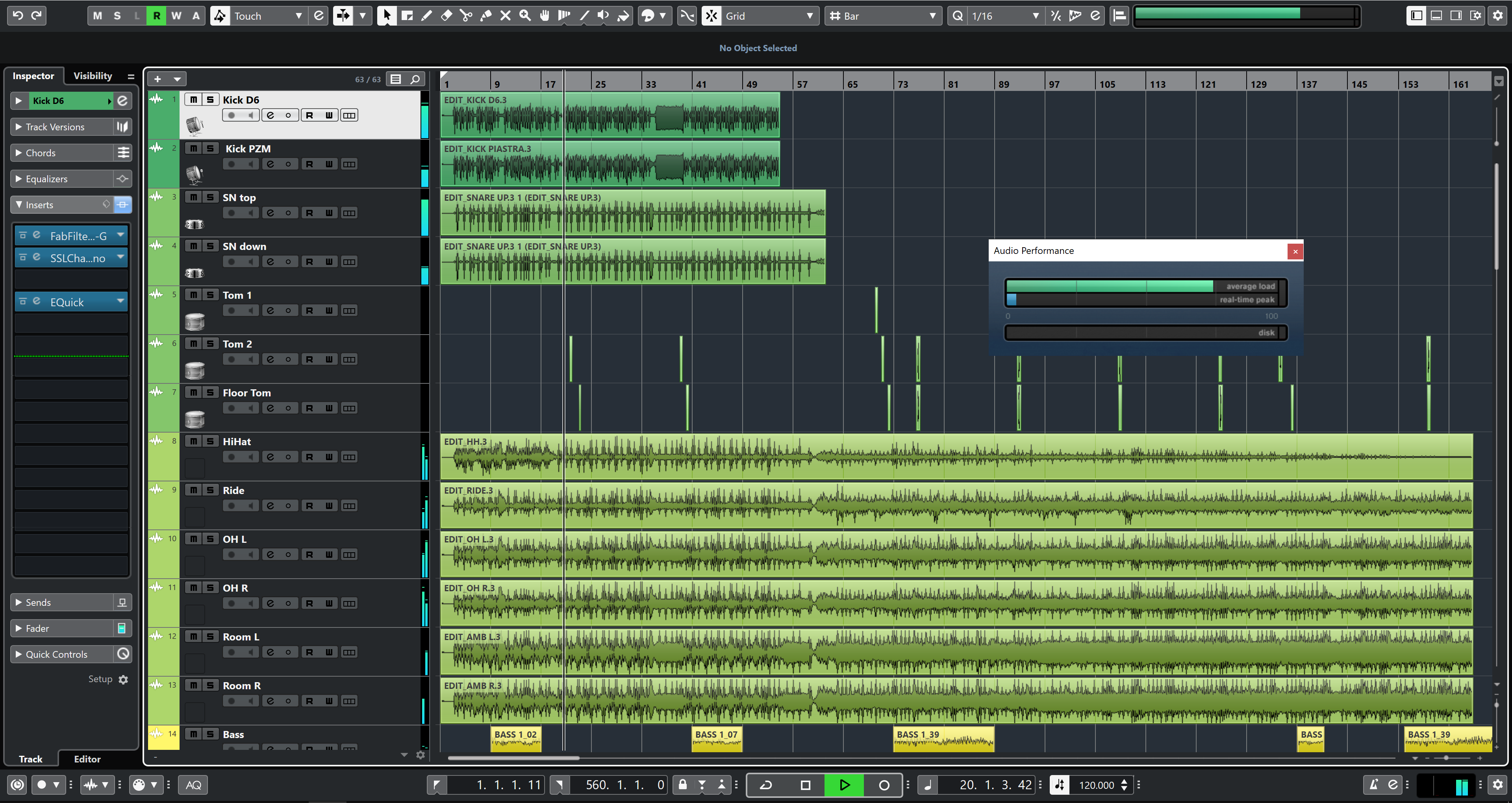
The comparison VST Performance in Cubase vs CPU Performance in Windows is not 1:1.
If you raise the buffer and lower the sample rate by degrees, you should see VST Performance getting closer to CPU performance. If you leave the sample rate alone and only change the buffer, you’ll see how CPU performance changes much less wildly than real-time (VST) performance does.
If you’re using such high sample rates, there are a few things to keep into consideration. Attached you find two images of the same project, 48k and 192k (64 vs 256 buffer, totalling a bit less than 7ms latency).
This is a full mix project, only audio, no VSTi, 120 plugins. Still plays back fine at 192k 128samples, which is the lowest setting allowed for me, also when recording 12/18 tracks at the same time. CPU performance in Windows stays at 34% at 192k and 18% avg. at 48k (but the VST Peformance reading is almost three times higher for 192k in Cubase)
If you have already optimised your PC, maybe have a look at the plugins? There are some which are indeed intensive - last times I’ve seen this one-core-maxed, it had to do with a mastering multiband plugin being inserted on the channel that was being recorded… at 32 buffer size… you don’t want to do that
By the way, the pics come from the Ryzen 7 3700X (8/16) system I have at work now.
Performance is pretty much in line with the i7-8700K system (6/12, but a tad faster).
Am about to get a crossgrade for Cubase 10 Pro on windows. Any idea if there are any GPUs I should avoid/get? Have been reading past forums and it seems like there might be likely spikes audio wise. Help is much appreciated.
I’ve done a little bit of research and it seems the amd is better than nividia because of the drivers and it seems as long as you are using an app that doesn’t require massive GPU performance the drivers are more important than the quality of the card ? I’ve gone with an amd 580 bla bla for the upcoming 3950x I hope I made the right decision
Hello everyone!
I am waiting for my 3950x system at the moment and was wondering if the registry fix can still be obtained somehow, as I am still on Cubase 9.5. I tried to write a PM to our Moderator but I am not allowed, apparently since I am a new user .
 tend to stick to the faster i5 or i7 since Gen. 3 and always pick up the ‘K’ version (currently in use: i5-4690K, i7-6700K and i7-8700K), so the i9 9900K would most probably be my choice at the moment. It is important to stress that I usually work on mostly audio, many plugin FX, very little VSTi and quite a low latency except while mixing.
 I’ve never used AMD before… when I start a mix I have GA5 / breaktweaker / Kontakt / massive / spire ect… and at the end of a mix I usualy have all my vsti converted to audio and all the plugins in off line mode and a lot of izotope neutron 3 and ozone 9 masking tracks treating drum busses ect which is where I’m maxing out my cpu atm for instance I put ozone 9 bass house preset on my master and it used 90% of my cpu…
 ) and equals the i7-8700k (6 core steady at 4.29 with TurboBoost). Also good behaviour with HT on and HT off.

 .
.
