Would you not in general expect an older simpler programs to run faster on the same machine than newer more complicated ones?
If you’re asking me, I would ask you to define what “run faster” means. When it comes to operating systems, cpu architectures, and overall system design, I would never “expect” that, and particularly not in “general” terms.
Look at how many older (and some current) DAWS can’t even use efficiency cores on different platforms. Look at the difference just between MacOS Apple Silicon vs Intel. Look at the difference trying to get some NVIDIA drivers working on more modern OSs.
Yes, trying to play Prince of Persia on a PC with the tubo button engaged was indeed too fast to play, but nothing is anywhere near that simple now - and nor should it be in my opinion.
Oh man, when I got my first Pentium 233, trying to play some old DOS Ultima games on it that were made for an 8088 haha. Thank god someone made MOSLO back then. 
LOL - that’s actually why the “turbo button” had to be introduced - there were still apps using CPU ticks for interface clocking! Good times!!! 
The problem is that C14 runs much faster than C13 and C12 and is more unreliable. The only problem is performance. So don’t confuse speed with processor load.
Sorry, but even the biggest layman can see the difference (a lot of reports) in the performance of the same sessions in C11/C12 and C14, so whatever you write - it won’t bring anything new.
And the test I conducted very CLEARLY shows that C14 (the higher the latency - the worse - oh my god) will play LESS duplicate tracks than C11 and will crackles/mute audio, faster.
And what can that mean?? I’ll give you a hint - it has worse performance.
And that’s it.
Whatever you say, sir. I hope you’re getting what you need out of those tests.
Have a good one.
Neither my posts nor yours will change anything - all hope is that the gentlemen from Steinberg will bring the efficiency back to its former form.
That’s what I and hundreds of other users of this forum wish for themselves.
I just wanted to bring this up one more time as there was no satisfying answer from anyone regarding the meaning of the performance meters (I’m referring to my post). I’ve made some small live capture of the same project location played in Cubase 12:

and under Cubase 14:
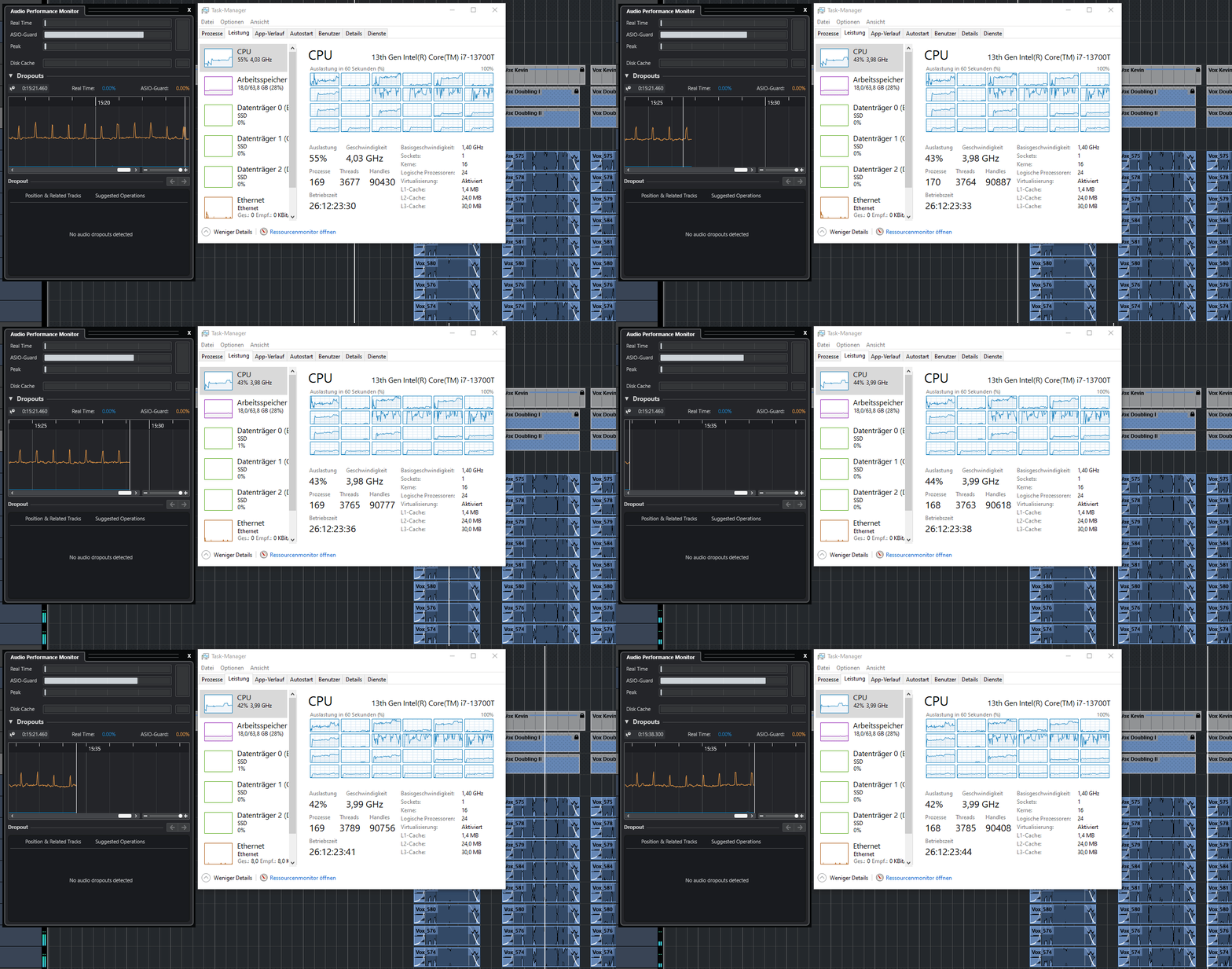
No one can deny that the ASIO guard load is significantly higher under Cubase 14 plus it spikes periodically. The CPU load doesn’t seem to rise a lot compared to Cubase 12.
But what do these meter indicate now? Is this all fine, or am I reaching a limit regarding adding plugins that’s gonna cause audio dropouts if I add more? Under Cubase 12 this - at least to me - looks a lot less problematic leaving more headroom (ASIO Guard is set to high for both).
Can someone shed some light on this?
Many users complain about degraded performance of Cubase but then someone without issues comes in and denies this. From the screen shots posted in different thread it looks like something changed for worse between 10 and 10.5. Latter differences does not look so drastic but it looks like the performance goes down a bit with every release.
I’m still looking for a maintenance release which would fix that.
thanks for pointing that out. I truly starting to believe you spoke the truth. You can have liek 100 people writing a thousand posts on how bad the situation has become and one single guy with a brand name denying and everything is good for Steinberg. They don’t that this is the exact same route Autodesk was following until Maya has become almost obliterated by Houdini. Maya plays no major role anymore anywhere in Film industry. And the Big studios only using Custom Build Versions of Maya which have nothing to do with the Release version. Speculative but it looks like they gave up to resolve Cubase because they are focused on other software tools, which is understandable but at the end of the day Users migrating to Reaper, Studio One, Logic Pro and Live and saying good bye to Steinberg… The Competition is almost on pair these days with the featureset.. Even Reaper thanks to the community has almost identical tools.
Hi all,
Quite sometime ago I believe I started this post after updating to CB14 and saw the metering going nuts and experienced a lot of performance and dropout issues. Today I finally found the solution to all of the (my) problems…
The process Lasso software (free version) is (my) solution!!! I installed the software and enabled the Probalance option (Just google the 1st video on ‘lasso probalance setting’)
After this I made a profile were I have assigned the CPU affinity for all the not important processes to the E-cores.
(and CPU priority for cubase to High)
immidately after this all the p-core where not doing anything anymore and where fully available for cubase. (also the E-core where almost not doing anything anymore) Before on Idle there still was a pretty high cpu load over 30% ??) after tweaking it went down to 1%.
After this tweaking, the performance meters are hardly visible anymore, Where before I had dropouts and cpu overloads etc.
This is a total game changer !!! (I was at the point of going back to Mac, but now this is probably not necessary anymore)
Process Lasso gives you (me) the perfect info on all the running processes and ability to optimize this.
It 100% changed my pc from not workable anymore to perfect stable very high performance!!
Do yourselves a favorite and look into this tool if you having perfomance issues op your pc.
A big shout-out to the developers of the Lasso tool !!!
I’m glad this tool is giving you the perception of “working,” but to be fair, you never had a problem to begin with. Not only did you state you didn’t actually have any audio or performance issues, you said you didn’t test anything either. I mean, you said you thought it was a “metering bug.”
It’s just a bit confusing why you would say things like “this is a game changer” and that you were about to “go back to a Mac” when you weren’t having audio performance issues in the first place.
Don’t get me wrong - it’s your system, so go nuts. Install whatever you want to. But I think at a minimum you should have done some level of testing before and after and shared results like others have done (actual value of those tests aside) before you recommend people just load some auto-tuning CPU tool which could very well cause them problems - particularly if there wasn’t an actual “problem” in the place.
Hello Thor,
I don’t understand why you attack me this agressive way. Yes, months ago I thought it was a metering bug, before it became clear steinberg changed the metering to a more ‘realtime’ accurate metering (which is fine)
At first it looked like I had no audio issues.
But working longer turned out there where a lot of issues. I’m not blaming this on steinberg, but Although I did all the recommended tweaking. The system didn’t ran as it did in the past (for what ever reason) After tweaking the core affinity (etc, etc) The problems were gone for me and the system is running Rock steady, better than ever and not having any problems even with 100+ track fullblown songs (now not even using 15% CPU now).
Again, yes this is not a Steinberg thing but a system issue. But before using this tool I was not able find the problem (or adress it)
So the only purpose of sharing my experience is to help people with the same issue. Again I never said it’s a Steinberg thing (in 99% ot isn’t) but off course system issues will become visible with realtime processes like cubase.
For me it changed the performance of the system 100% (I can’t tell why this changed in the past and on the moment of a cubase update)
But if help and info is not appreciated it’s fine. I will not post anything anymore.
At least this optimisation I found works perfectly for me but I don’t ask you to do the same. I only hope that others might find benefit from this info. For I me it pointed the way where to look for and it worked, that’s the bottom line.
I’m sorry you felt that was an “attack” or “aggressive.” I said I was confused to your post based on what you said before, and that you’re free to load whatever you wanted. I followed up with the fact that in the absence of an actual problem, it was my opinion that you provide some testing data.
You’re free to post whatever you want. Please don’t let my questions stop you from doing so. My suggestion, and “my opinion” as I stated, was that without actual testing data your advice to others may actually cause issues.
You do you. Don’t let my opinions get in the way of that.
For Your info.
This optimalisation can simply be ‘undone’ by stopping this tool or not loading the profile(s) you made. It’s not a permanent changes the register. Off course every tweak can ‘cause’ problems but these can simply be undone. So for me this tool is much saver than making all kind off registry changes etc, etc. But there are probably other way’s But this work for me in a save and understandable way…
This sounds interesting. I’ll try this out once I’m back in the studio. Nonetheless, I haven’t heard an explanation for the (visual) performance change of the ASIO guard meters I’ve posted above. I’ll keep you posted…
Hi Gsus2,
I haven’t seen an official statement on the changes of this metering. But in all the forums (also here) it’s said that the metering is changed to a more accurate representation. Which is off course fine with me. This should off course not be a reason to get issues. I might merely expose an existing issues. (which is a good thing)
I’m very interested in your finding.
For me it brought the solution I needed and understand (I know my way around, but I’m not an ‘IT specalist’) It totally changed my system performance.
FWIW, I posted this back on 06/05/25 - this is the “official” statement.
Ah, indeed. Thanks for posting the link! Seems I’ve overlooked that.
Okay, then I’m curious to see what performance improvements I can get using Lasso (after the tweaks that I have already done).