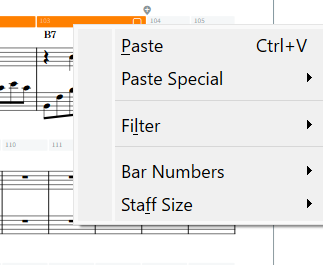
For practice, I’ve created an 8-bar piano phrase in E minor, complete with chord symbols over each bar, ending with a double barline. My goal is to repeat this phrase 12 times coming back to E minor key by transposing each repetition up by a semitone , ensuring that:
The key signature updates correctly with each transposition.
All chord symbols are properly transposed and reflect the new key.
I’m using Dorico 5.1 on Windows 11, and here’s the process I currently follow:
Select all the notes in the last copied phrase.
Manually select each chord symbol by holding Ctrl and clicking them individually (since Filter → Chord Symbols doesn’t seem to work).
Hold Shift and click the key signature (though I’m not sure if this step is necessary).
Place the caret at the start of the next section and paste the copied content.
Move the cursor to the first beat of the new section (or select the double barline) and paste everything.
Use the Transpose dialog to transpose the new section up an augmented second.
This process feels quite tedious, especially when working with larger scores that contain many chords and modulations. I’m wondering:
Is there a simpler or more efficient way to repeat and transpose a phrase like this?
Why can’t I select everything between two bars, including chord symbols, in one go?
Is there a better method to include chord symbols in a range selection without manually clicking each one?
Any tips or workflow suggestions would be greatly appreciated!
An augmented second is three half steps. If you just want one half step, you’ll want to choose either an augmented unison or a minor second, depending on how you want to spell things.
Dorico 6 has a new command, Add Chord Symbols to Selection (but you said you’re using 5.1).
I would probably approach this by duplicating the initial phrase 11 times, then transposing each one by the desired interval, but I don’t think that makes a big difference. Also, once you have selected the phrase with the system track, you can just hit R to replicate the whole thing, without needing to copy/move to next bar/paste.
I’d use duplicate Flow to create the required number of repetitions and then use the system track (as @asherber recommends) to select everything for simultaneous transposition.
As the manual indicates, you need to click in the little box on the right side of the orange system track bars in order to select the contents of the bars.
Could you please elaborate on that? I duplicated the flow, so now I have Flow 1 and Flow 2. I’m not quite sure what I should do next, or the purpose of having two flows instead of keeping everything in a single flow.
Select the second flow and transpose it. If you have the first flow music configured as you wish (say, on one line), then each replicated flow would replicate that and be ready for transposition. In layout options, one can allow multiple flows on each page and suppress the flow header (or not, as desired).