In the VSL Solo Strings Library the volume of violin 2 is significantly lower. Is that common practice? Unless it’s a setting that is preserved from the original Dorico String Quartet template that used when creating my own? I opened that template and replaced the instruments with the VSL and its Expression maps.
you don’t say whether you mean the Studio solo strings or the new Synchron solo strings but in a quick check opening the Synchron player, both violins have CC7 at 71 in the old set and both have 90 in the new one so I’m no sure whether you’re getting this from. If it’s a Dorico template, it’s presumably not something from VSL itself and certainly not something I would like to see.
Sorry, I meant the Studio Solo Strings library.
OK – but the setting doesn’t seem to be in the library itself. If you like you could post the playback template which is giving this result so I could check if I’m seeing the same- for the VSL libraries I use my own Expression Maps and settings.
In general, it’s not necessary (aka wrong) to mark second violins at a lower dynamic. Maybe this library suffers from this misconception?
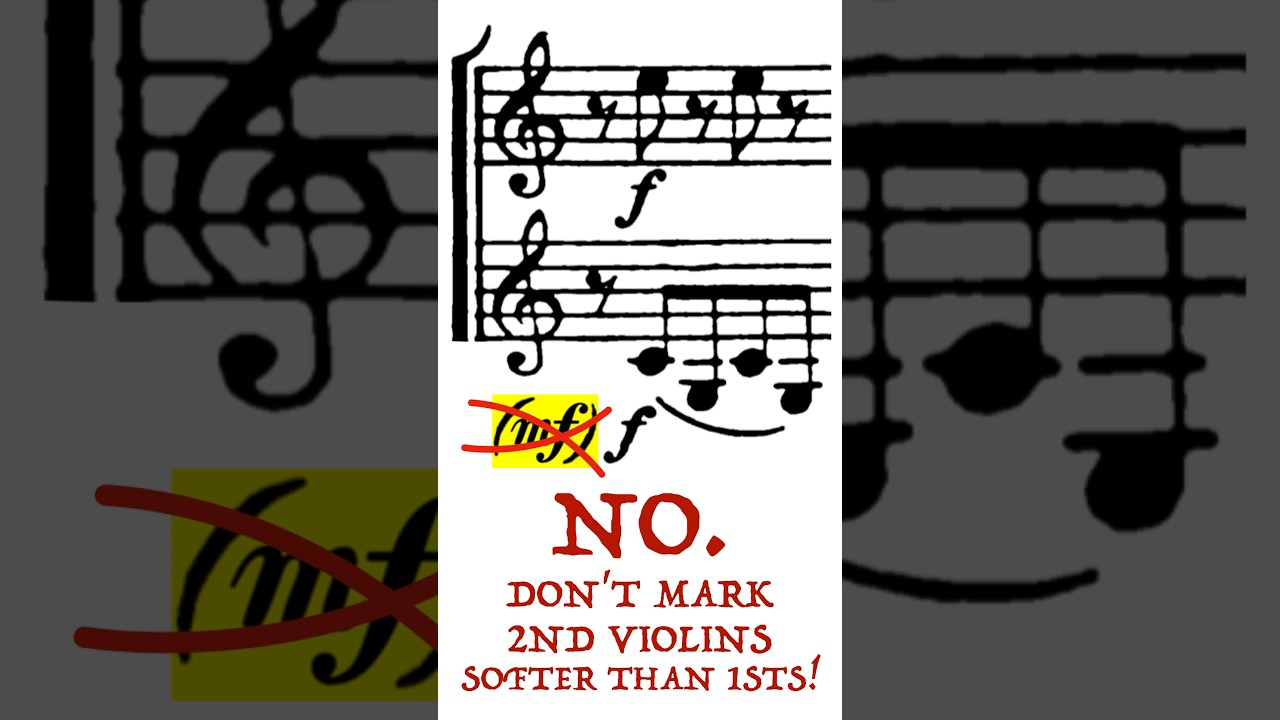
as I already said, it doesn’t.
Having said, that - just to be clear I’m talking about the actual default CC7 volume settings in the library. Normally Dorico changes CC7 to its own default of 100 in any case unless the Expression Map has an override.
If the library has actually been sampled with quieter playing than that’s a different matter and there might be something in that. Certainly violin 2 which was recorded much later than violin 1 has a softer character which could arguably be interpreted as quieter. If that it what the original question meant, then there may be a case to answer but that’s not how I interpreted it!
Thanks for the video, Peter! Good to know 
well, importing your Expression Maps into one of my quartets using the Studio strings, I can’t hear any imbalance and there’s nothing in the standard playing techniques in the maps either to suggest this that I can see. Would it be possible to supply a little Dorico project with specific examples of where you think the violin 2 is too quiet?
That shouldn’t be a problem. Maybe not today but tomorrow at least. 
no rush!
To go back to the original question: “Is that common practice?”, if it is, it shouldn’t be. Whether Violins II are lower in volume than Violins I is entirely dependent on musical context. If Violins I are carrying the melody, and Violins II are part of the accompaniment, then, yes, the difference makes sense. Otherwise, it doesn’t. In fact, in those rare cases where the roles are reversed, the volume difference should also be reversed. This should be left to the composer/arranger to decide, not imposed by the software.
I had an interesting experience with 1st v 2nd violin balance in a piece of my own in 1987(?) and still have recordings to remind me. I wasn’t able to attend either rehearsals or the first performance with the BBC Scottish Symphony Orchestra conducted by Jerzy Maksymiuk, but I heard the broadcast on BBC Radio 3. I was surprised when the (to me obviously primary on the page shown here) second violins were noticeably less audible than the firsts. I was able to attend rehearsals for the second performance by the same conductor and orchestra a few weeks later. The briefest (and simplest) comment from me had this adjusted immediately. I should add that the seconds were already marked mp against p of the firsts, but still the firsts were allowed to play out more strongly. I suspect that some automatic assumption regarding relative balance between firsts and seconds had taken charge without further analysis. (Crotchet = 69)

In the classical string quartet form, the four instruments are treated as equals. There is no sense in which the designation Violin II means a lesser accompanying instrument. It was Haydn who fully established the equality and independence of the players. It is a mistake to ‘mix down’ Violin II. Unless the composer has marked it such, the violins (and viola, and cello) are democratic equals.
It depends also on the seating arrangement and the acoustics of the room. Do the 2nd violins sit next to the first or vis-à-vis on the right?
Anyway it’s no common practice. Music is versatile and there are as many examples of dynamics equality as of “subordination”.
The most remarkable example for equality is the beginning of the last movement of Tchaikovsky’s “Pathétique”

which is usually being experienced as

I tend to view second violin as almost a distinct instrument from first violin, just like you have high-low specialisation with horns. They are democratic equals, but their strengths lie in different areas. I myself am mainly a viola player but I do carry a violin for emergencies, and it’s very much a second violin: sturdily built, with a strong low register but perhaps lacking subtlety on the E-string.
Here’s a short example. Maybe it’s not the volume of the track that is the issue. I’m not a violin player myself but if I were to describe what I hear, it’s like the second violins have less rosin on their bows. The sound is kind of muffled. You should be albe to hear it if you click alternately on violin 1 and 2. Also, if you have the first violins play the second part and the second violins play the melody (bars 4 and 5), the second part will become dominant and the melody will almost disappear, especially in the higher register.
Volume violin 1 and 2.dorico (1.4 MB)
All notes have a velocity of 70.
Here’s a screenshot of the Synchron Player. As you can see, both violin 1 and 2 have the same type of patch assigned.

Should I use the violin 1 patches for both parts? Still, there must be some purpose to the sound of the second violins?
ok – that’s quite a surprise! I don’t get results like that with my set-up but then I don’t use the VSL template which I don’t fully understand – first of all it should not be using velocity as the main controller as velocity, unlike with many other libraries, has no particular function here and cannot do a hairpin over a single note) but the secondary controller is set in the map to CC2 and in the actual instrument to CC1 so that means it will have no effect. But even correcting this in the player, the imbalance is still there and certainly there are not different levels set for these particular patches in the Expression Map
Try out my version if you like – here the two violins sound similar in volume I would say but then I don’t use the same patches as my EM NoteLength parameters are different (making my version a little shorter without a slur in this example). But when I do test the same patches as in your screenshot, the volume is much the same so it seems to be something connected with using velocity as the controller instead of a CC as I do.
Volume violin 1 and 2.dorico (1.5 MB)
Possibly someone else using the same set-up might be able to explain the logic of the VSL (although there has been some criticism of it here and I’m not sure if you’re using the latest version, either) template. If not, then I’d post on the VSL forum as surely someone there will be able to help.
I meant that I personally have set all velocities to the same value (70) (as well as left the volume sliders in the mixer at -6.03 which is the default), so that everything is as similar as possible when listening.