I’m facing the same issue on Cubase 14.0.32 as well.. Can’t confirm for sure but, if I remember correctly, this wasn’t happening before the .0.31 update.
1 Like
The problem is to find a way to replicate the behaviour on all machines. It happens to some people, it doesn’t happen to others. So what’s the root cause? Even to identify a pattern would be helpful already but this is hard if on one system the image files always get recreated while on others they never get recreated at all.
E.g. do all the files that get an image redraw end on a hexadecimal code in their file names?
1 Like
In some projects, just some of the audio events need time to re-create the images. The others are ready to work.
There is an admin, Mr. Martin, replied to this topic, but he couldn’t re-procedure the issue.
I am just a user, I cannot spend much time to figure out why this happens to my system and doesn’t happen to others. But since I am not the only one, this must be a bug.
I have to remind, the issue doesn’t happen in Nuendo 13 or Cubase 13.
I understand the sentiment but, as strangely as it may sound, at this stage it is not important whether it is a bug or not. It is more important to figure out how to trigger it.
I also understand that not everybody has the time or the desire to go on a bug hunt. Hopefully the other people, reporting in this topic, read this and maybe one of them is intrigued enough to go looking for a trigger.
At this moment I would start by looking whether it only affects files with this kind of naming scheme:

2 Likes
Same issue on Nuendo 14.0.32. New image files are created every time I open the project (a large, live show mixing project with many audio files)
That is not part of the original file names. It’s appended automatically by Cubase / Nuendo whenever new image files are created
Same here! This is very annoying especially when doing backup; all those small peak files take ages to transfer.
Hello, this isssue has been confirmed by admin/developer in another topic.
I have exactly the same issue/question with Cubase 14.0.32…
“Image construction error” in NU 14.0.32 (Intel) under Sonoma 14.4.1 here, no way to fix it (re-import audio, dummy-DOPing, etc.).
Same here. Cubase 14.0.32 on Monterey (MBP M1pro)
I’m tired of being a PAYING beta tester.
This seems to be caused when the audio files used in the project are not located in the associated project Audio folder, i.e. they are referenced to a different folder elsewhere. Move the files over to the project audio folder, delete all the image files, and open the project. Locate the missing files to the new folder. The project will rebuild the image files. Save, close and re-open and see if it happens again
1 Like
Hi,
This is a very interesting observation… Did you directly record to the other folder, or did you import the Audio file from the other folder?
Hi, I realized this last week when working on a new project, however those files have problem were created inside Nuendo 14, using “Convert tracks” tool. They are all inside /audio/merge folder which was created automatically by Nuendo.
Meanwhile, Nuendo 13 still works on those file without any problem. No new image was created.
It is exactly where the issue happens. I just move those files from Merge to Audio folder, then re-locate them. The new Images created using the exact name of the original files, instead of the weird name as usual.
Hopefully we have a fix soon but at least we can see a work-around.
Thank you.
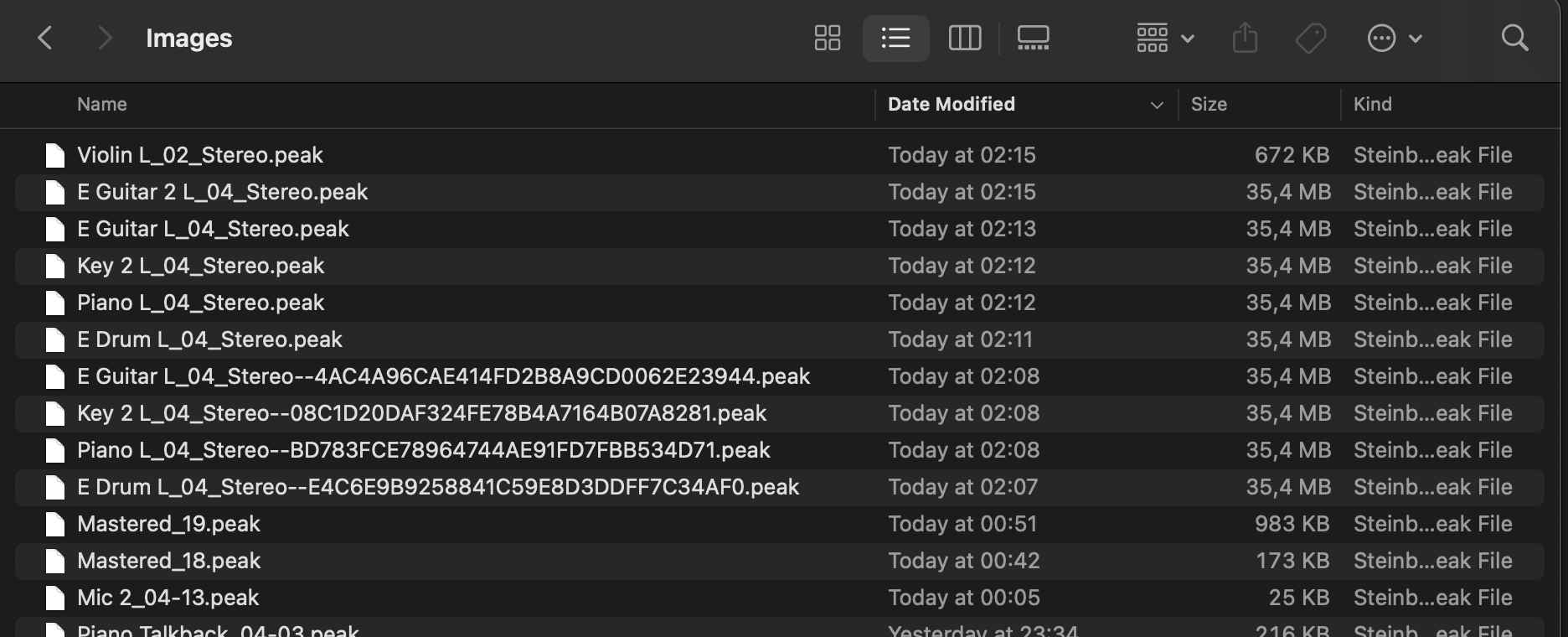
It was imported from separate folders (not recorded). I use this method to keep things organized.
Also when using SpectraLayers, and not checking the “Copy File to Project Folder” option when dragging layers in. The files will be referenced to the default location \Documents\SpectraLayers Edits, triggering this behaviour
1 Like
Hi,
Thank you all for the investigation work!
Now, I can replicate it and I have reported it to Steinberg.
4 Likes
Hello,
The problem persists in V14.0.40 Is the first time (since begining of V14) this problem happens in Nuendo “history”.
Hi,
Yes, this has not been addressed in Cubase 14.0.40 maintenance update.