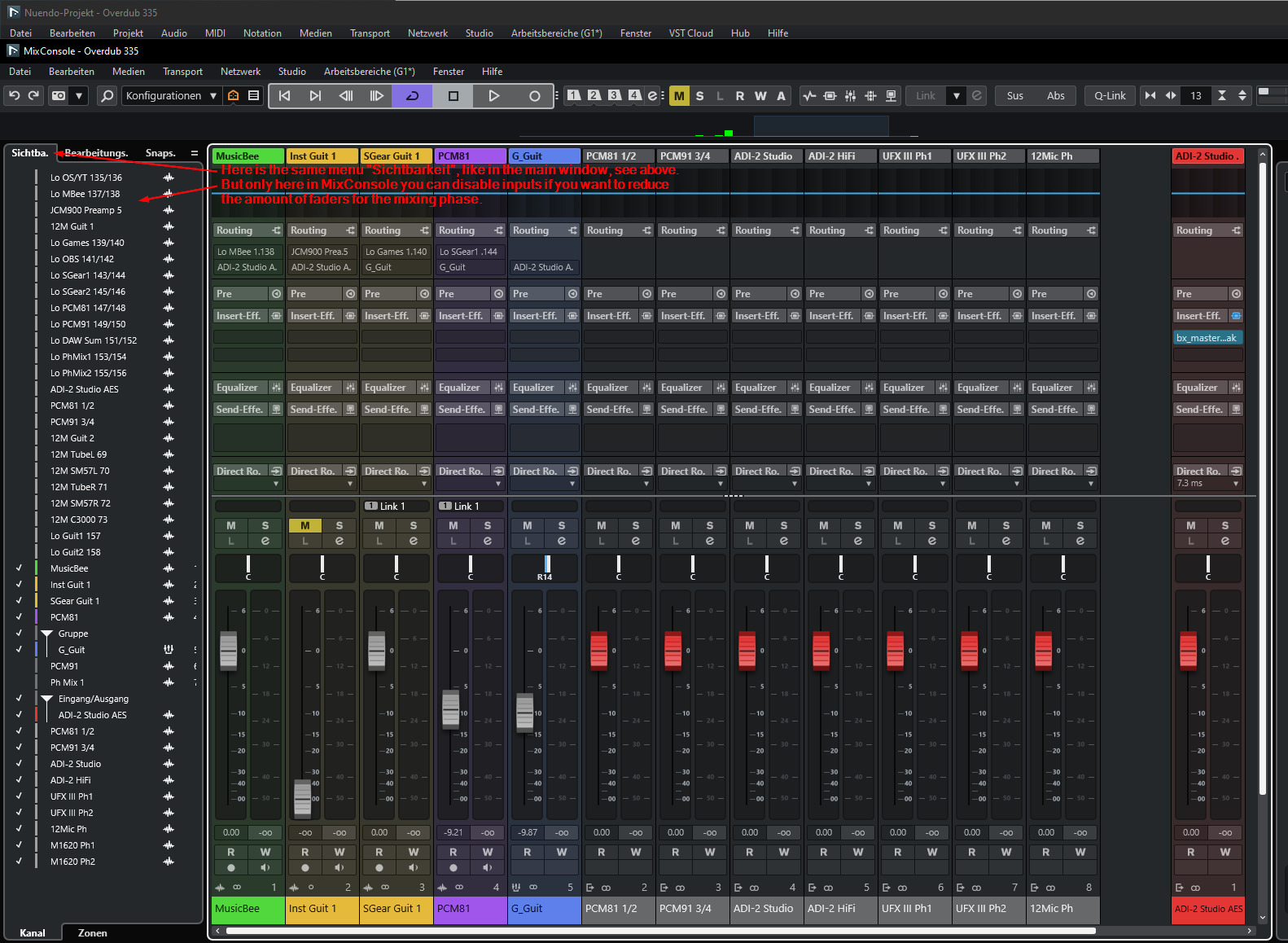
Currently you have “Sichtbarkeit (visibility?)” at two locations:
in the project overview and
in Mix Console (F3)
But only in Mix Console it’s possible, to hide the inputs of your recording interface. It would save a lot of time and avoid confusion, if this would also be possible in the main window.
Background story: I knew from the past, that hiding of inputs is possible.
But I didn’t find it in the main window, although the area there is also called (“Sichtbarkeit” (Visibility)). I thought already, this possibility has been ceased.
Surprise, surprise, after a long time found it days later in Mix Console (F3).
Please, could you kindly implement it also in the main windows? It is not logic to have “Sichtbarkeit (visibility)” in main windows and under MixConsole, but with a different functionality.
Many thanks for fixing this (for me) strange behavior.
What would be perfect for me are these two options:
a) that main window and MixConsole have different “Sichtbarkeiten” (Visibilities), but in both windows it needs to be possible, also to control visibility of Inputs.
b) that there is an option, to synchronize the settings of “Sichtbarkeit” between Main Window and Mix Console. So that the settings are the same, no matter where you change them, either in main window or MixConsole.
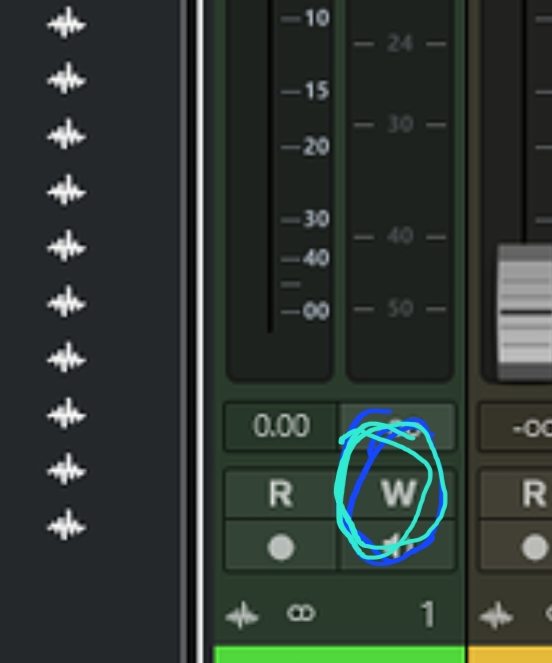
But I think this should be changed; it’s neither logical nor intuitive having to click on “W” to get the controls for visibility into the track list/main window.
It also looks too colorful, as “R+W” are now lit for all input channels.
The thing is that in Nuendo the input busses are invisible in the track list by default. They can only be made visible with the W trick.
I imagine that Steinberg figured that nobody needs automation on input busses and therefore decided to make them invisible.
Your issue seems to be collateral damage.
I think this is a weak argument, and it’s not about automation at all.
I only need a possibility to reduce the number of visible channels. Not more, not less.
And it is simply a fact, that you have two very similar, nearly equal-looking locations, “Visibility” in the main view and the MixConsole, where you can change the Visibility.
It makes no sense at all that it’s only possible in the MixConsole to hide inputs.
You need this also in the main track view.
Sometimes you need to see inputs in the main view when recording, to see the metering. But when you work on the Mix too many inputs are simply of no use.
You need there also the possibility to hide them.
Forcing the user to change to MixConsole for this purpose is not intuitive and a unnecessary complicated workflow.
Also having to click to “W” to every input for this purpose to “enable to hide” the visibility of channels in the main view is, .. errm “strange” …
Yes, I know I replied to another user. I did so because I was concerned that others might share a similar view.
As I already pointed out, the current workflow is too cumbersome and unintuitive — it should be improved. Therefore, I am still of the opinion that this should be fixed.
Your new idea to use templates is also only a workaround.
A template is static and does not solve the issue that the whole thing is confusing
to have two locations with the same name, same topic but different functionality.
Having to change to the MixConsole for changing the visibility of inputs is unnecessarily complicated and not logic at all. Still you would have the cumbersome operation with the “W” key.
Therefore, my opinion is unchanged. It’s better to address the root cause directly.
Whatever you want to call it, it’s not an error in programming, which is what a bug is.
It’s an old and well-known missing function, so rather than debating, just support the feature request. which can be simply expressed: Display Input channels in the project view by default. (just as output channels are displayed_)
It is not necessary to switch windows, for my W workaround, by the way.
Again, I have not argued for or against your feature-request. I simply described the status quo. Sorry, that you found this unhelpful.
FYI: I am totally indifferent to both your request and the status quo. Neither plays any part in my workflow. Good luck with your FR.
Output channels are not always displayed by default when created. In fact, it’s exactly the same thing where if they don’t show up you toggle W.
I don’t see how anyone would have coded this way on purpose. Why would the assumption be that users who create new i/o tracks don’t want to see them when they are first created? Granted, you actually “do” things on audio and MIDI tracks, but you also don’t necessarily do more on the Group tracks putting them on a similar ‘level’ as i/o tracks.
But ok, fine, let’s call it “missing feature” instead of “bug”. It’s just one of these many things about Nuendo that are small but annoying where you just sort of scratch your head and wonder why resources were spent on a new podcast app rather than fixing these sorts of things…. or any number of others.
Which reminds me to post my several lists of requests and" “issues” I’ve assembled…. some which should not be a thing in 2025 given where Pro Tools is at.
I’d like to restate the main point clearly, without drifting off-topic:
This is not about workarounds or using templates and other tricks to get around a limitation. The issue is that input channel visibility can only be changed in the MixConsole, while the Project window looks almost identical, yet offers no such control.
That creates a confusing inconsistency in the user interface logic.
When both areas (Project window and MixConsole) look and behave so similarly, it’s only natural to assume that visibility control works in both—but it doesn’t.
In my case, I only discovered accidentally that it actually works in the MixConsole.
When you come back to this later, it’s easy to forget where you adjusted visibility, because the menus look so much alike. That makes it feel as if the function was removed or descoped, even though it’s just hidden in a different place.
This leads to confusion, wasted time, and unnecessary discussions.
From my perspective, this is a design inconsistency that could likely be fixed with relatively little effort—simply by unifying the visibility logic in both views.
Suggestion:
Provide the same visibility controls for input channels in both the Project window and the MixConsole.
Goal: Consistent behavior and clear usability, regardless of which view you’re working in.
This isn’t a request for convenience—it’s about consistency and efficiency, both of which are essential for a professional workflow.
Personally I only ever want to look at the input faders in the Mix Console so I have a key command that I’ve been using for years to do this. May I suggest that you just use a second mixer window that displays only the input faders.
@Wheels: This is, in my opinion, too user- and use-case-centric. With such an approach, you will most likely never get it right for everyone.
Please consider the principles of “defensive programming,” which has been an established topic in software development for years.
It would be better to make this configurable for each major window (Track Window, MixConsole). It is already like this in principle, since both windows share the same controls in the same locations. The only problem is that in the main window it behaves differently and THIS needs to be fixed, nothing else.
If both windows allowed configuration of input and track visibility, you could set it up exactly as you want — for each template and each individual project, all of which may have their own specific requirements.
@chillipepper can I (in all sincerity) applaud you for your posts’ and the clarity and determination for getting this fixed. I would for other forum members (myself included) to be able to stay on point so strongly.
I totally agree with you, despite the fact that I don’t really use this option a lot. It just needs to be fixed.
But to be able to use this, you need to change to the MixConsole and need to know that this possibility is there (how to operate this).
This is at least better than the workaround by using “W”.
The only advantage of “W” is that after that you are able to find the inputs in the main window under “Sichtbarkeit/Visibility”.
The preferred solution is of course, to make it “unique” for all the windows with faders as I explained already. Its more intuitive and gives you more options if you can configure it for each of those views individually.