[OT] Today, one year ago Finale has been put into coma

I’d be amazed if they hadn’t already done that. The biggest musical instrument manufacturer in the world is part of a group that also has the top musical notation program in the world and they haven’t been bundled together? Why did Yamaha invest in this? Anyway, great idea. I’d suggest putting Dorico Elements (not SE or Pro) in there and enable new users to have it free for a year and then give them a half price deal to own it at the end of that.

FredGUnn:

Give students a reason to use Dorico right off the bat.

The perfect Marketing Objective - direct and concise. Coupled to your comments about inertia I think you’re absolutely on the right track here. The worry is that because of inertia, ongoing notational improvements by Muse will make life increasingly difficult for Dorico. So yes, targeting new users is so important.

Muse’s sounds are an important part of persuading people what to go for. Dorico SE is definitely lacking in this area - the Halion Symphonic Orchestra sounds don’t even make it into Dorico Elements, let alone Dorico SE. Nearly 20 years old, surely they’ve done their job by now? Use them to attract new users by bundling them free with all versions.

The points about lead sheets and basic piano music (I’d add guitar notation) are also key. I’m not sure to what extent those can meet most users requirements for notation and playback in SE and Elements but that should be the target.

Finally, it’s a small point but perception IS important. If you knew nothing about them and had to choose between Muse and Dorico SE - guess which one already sounds like you’re going to have to make do with less? (and that’s before you hear that there’s another version called Dorico Elements which still isn’t the full thing). Build from the bottom up. Call it Dorico, and call the others in the series Dorico Pro and Dorico Pro X.

1 Like

The speed issue mentioned by s_ferre is very real. There’s significant round-trip time between galley and page view, or between engrave and write modes. The program also slows down considerably if you have two files open. Closing one file before opening another involves a round-trip to the Steinberg Hub, which can take a while to open. Dorico is faster than Finale when all factors are considered, but the slowness of the interface eats up some of the time gained. A lot of this is due to Dorico’s dynamic design: it is constantly re-calculating everything. Re-calculating isn’t free.

Now, this reminds me of the early days of the Internet, when you’d watch your browser slowly paint web pages as HTML downloaded over a dial-up network. “WWW” stood for “World Wide Wait.” Dorico is not THAT slow — I am making an analogy. One could hope that with advances in hardware, Dorico will eventually be a lot speedier.

2 Likes

I am not sure what the Dorico team can do about the MuseScore issue. The fact is, for many use cases MuseScore is good enough. Actually, more than good enough. It’s also free. I wouldn’t touch it for my projects, but not everyone is engraving a 2-hour opera.

Although Dorico has a free version, it’s not as fully functional as MuseScore. Steinberg obviously has to be careful not to make the free version too good, or people would stop buying the paid versions.

The fact is, the professional versions of Dorico and Sibelius are for a relatively small set of musicians who are doing the most complex work to relatively high standards. I’m not sure what can be done to capture the market for casual use, when MuseScore has so much functionality for free.

2 Likes

A more parallel analogy is the early versions of Finale. I got my first typesetting job while using Finale v. 2.6.3 on a MacPlus. It was a good thing that it was only an input job, since screen redraws were painfully slow, 30 seconds or more for a full redraw. Coda was aware of it at the time, so they gave us the option of turning off a whole load of redraw elements, as well as an option to redraw only on command (apple-R). Especially with my tiny 9” screen, that was really useful. I can’t imagine what I would have done if I was doing the whole job, layout and all. I might still be working on it. (It was an opera.) Some of us were still using 2-floppy setups, although I think I might have graduated to a “massive” 20 MB hard disk by that time. Fortunately, I upgraded to a Performa 630 (UK), similar to a Quadra 650 in the US (just before the PowerPC Macs), shortly afterwards. I don’t think I have ever used any software that slow (other than when I took a programming course in HS and had to punch cards and send them off-site to compile.:grinning_face:

2 Likes

Redraw Screen command still survived to 27.4 – in case your 21st-century CPU/GPU couldn’t cope.

4 Likes

Update Layout did as well:

3 Likes

Actually command U is the first thing I do when I open a Finale file out of habit

2 Likes

Finale could, and did, automatically update its layout. But yeah, not always. And it still amazed me how often I found I had to invoke CMD-4 for note spacing, or CMD-D to redraw the screen when something was weird. Sometimes I’d make a change to a page layout only to have to invoke CMD-U since the distal part of the score was suddenly blank.

Even worse-since F27.x, at least for me, when using a SMuFL font the first system (along with the title, metronome marking and any text above the first system) would consist of empty staves upon opening the file. If I dragged on my trackpad to zoom in, the notes magically appeared. It was never resolved by MakeMusic, sadly. The first time it happened I nearly had a MI thinking part of my work was gone. Even worse; it would survive printing out (ie, the first system in the PDF consisted of empty measures).

I’m very very glad my long notational software nightmare is now over. Recently finished my eighth score in a year since switching to Dorico. That said, the early days of FInale remain fond to me. It’s sad how it lost its way over the past decade or so.

2 Likes

This was my experience as well. I used finale when I was younger, and then switched to Sibelius (7, I think; it had the infamous ribbon, which I actually liked) and was a happy Sib user, but then the Team was let go and the writing was on the wall. I followed Dorico’s development closely, and I distinctly remember one of the development diaries where Daniel featured Dorico’s superb multi-voice layout capabilities showcasing some Bach keyboard works. The default output blew. my. mind. It was gorgeous, and nearly effortless. And to be able to add and subtract any number of voices wherever you wanted without being locked in to layers the same way as the competition? Amazing. I decided that very day that I would buy Dorico the moment it was released, and I was good to my word and have happily been a(n exclusively) Dorico user ever since. Mercifully for me, my notational needs are fairly standard, so it did most of what I needed out of the box. Nearly seven years and thousands of files later, I cannot help but be grateful. I spend hours a day arranging and composing in dorico for my work, and I love it.

I recently produced a large worship aid for a vespers service and our bishop remarked to another priest, not knowing I was within earshot, that “these worship aids are practically works of art!”. That is in no small part due to the beautiful output I get from Dorico.

14 Likes

I am somewhat an outsider, though very similar to @MarcLarcher so maybe not… in that I never used Finale. My friend/mentor/colleague uses Finale exclusively but is retired and he’s already invested heavily in plugins for Finale, like Vienna Sound Library. He is still actively using it. I tried to sell him on Dorico but he wasn’t budging. Now that Finale is sunsetting, perhaps his thoughts will change. I want him to be able to keep writing and composing music.

I came from a very lackluster program called, IIRC, MusicTime. My buddy had it and it was about as basic as you could get. I think it took me the better part of a week just to figure out how to put a chord in a piano grand staff! It discouraged me, and I went back to pencil and manuscript paper.

A year or two later I was wanting to try Sibelius as Finale was, at that point, Mac only and I had a Windows machine. I watched a friend’s house and his sick pet for a week and as a “reward/payment” my friend bought me Sibelius v3. I loaded it up and started going at it. I would get out a book of scores and go to town learning how to input music in it (many people had suggested this was the fastest way to learn it, I think they were right).

When I learned of the Sibelius team basically getting “kicked out” and starting Dorico with the Steinberg team, I was immediately thinking “I can’t wait to see what they come up with!” I think I finally got Dorico v3.5 or maybe 3.6? It was a steep learning curve for me. I am not a full time composer, I do it for enjoyment and fun (as well as learning and creating music to share). Growing this part of my creativity is important and I finally now feel like I am getting to the level of “competent” thanks to forums, Daniel and John on the Steinberg/Dorico team. They are true heroes IMO. Great teachers.

The only wish list I have is that Dorico supported inputting lute tablature. I have a few works in the pipeline, one may lead to a commission (perhaps) of lute music, but many lutenists like to read both and make markings where they need to, etc. MuseScore does support this so I am glad I might have an avenue, but I would love to see the tablature option be able to be added to Dorico.

As it is, Dorico is my go-to music application. It is open, quite literally, ALL the time. I am sketching, editing, and musing ideas around all the while. Sometimes it’s a fragment, sometimes a larger idea strikes a chord (sorry, no pun intended!) and I also use it as a way to take my mind down a creative path despite work and life needs that can clutter your mind with stressful things, Dorico can be a great release and relax therapy, creating something from nothing and then sharing it with the world! Ready or not, here I come!

As they say, enjoy the journey as much as the destination. It can be tough sometimes, but the rewards are great and amazing when you see them there, at the end of a long session where you’re sweating mentally and you see what you envisioned becoming a reality right before your eyes.

Happy Composing!

~Gary

3 Likes

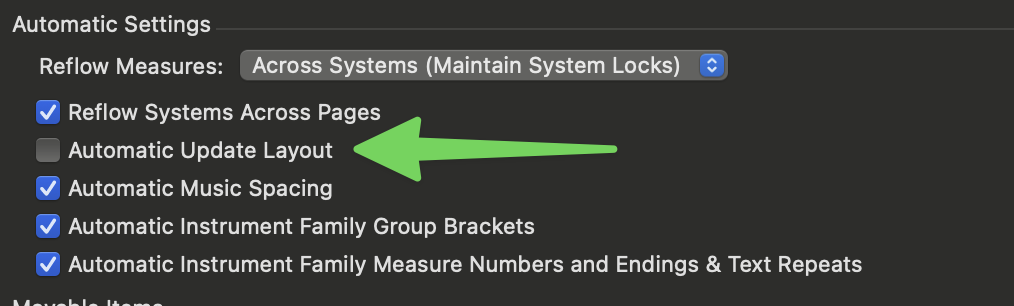
The Automatic Update Layout setting used to mysteriously become unchecked for me all the time. I never could figure out why.

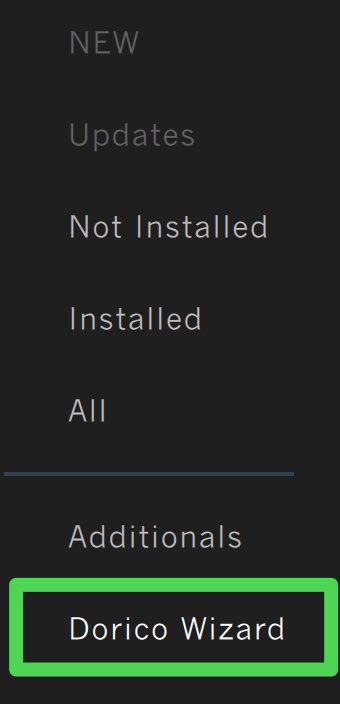
VSL stuff works great with Dorico! They even have a “Dorico Wizard” in the Vienna Assistant app:

Obviously other paid plug-ins like TGTools, Elbsound Perfect Layout, Patterson Plug-ins, etc, are all specific to Finale.

1 Like

Yes I noticed that too many times. The app had issues, what can I say. Reset and Use Current Settings (essentially the same things) in the Playback Options both stopped working a few years ago and also was never fixed. At least in Dorico I can change the tempo in the transport window to audition different tempi before committing to a metronome marking. Used to be able to do that in Finale until it broke. And even after totally uninstalling and reinstalling Finale, the smart shapes do not work; it defaults to slurs even if I select a hairpin. It was a mess when I was fixing an old score recently for playback and finally had to copy and paste from an earlier version of the file to have the hairpin there for me to edit. It’s broken.

2 Likes

Just out of curiosity, how can I approach this ‘automatic settings’ window?

Edit > Preferences > Edit :slight_smile:

2 Likes

On a Mac:

2 Likes

I’d like to add: buy editors like Alfred. Create a library of decently edited (in Dorico, of course) sheet music and sell it to cross-finance :wink: Dorico’s development while at the same time enabling users to start arranging without having to do the basic work of melody and chord entry all over again.

Being a guitarist, a guitar teacher and a hobby pedal steeler myself, I’d love Dorico to handle some guitar specific work more efficiently. E.g. barré deserves its own configuration and functionality. Let me enter “barré mode” in a pop-up window by inputting which and how many strings, the finger and the fret. Make barré follow until I deliberately exit “barré mode” (call up same pop-up window, enter x, maybe?). The barré line (dotted or full, according to my previously accomplished configuration) stops at that note and I carry on…

I use Guitar Pro from time to time. I don’t like its output at all (hence only from time to time), but at Arobas they put some effort into its playback capabilities – its sounds are somewhat close to the “original”, be it AC/DC, be it Lynyrd Skynyrd. AND again, like Muse, they have built a library of complete arrangements made in Guitar Pro (non editable) that open in Guitar Pro only.

In short, I think Dorico somehow needs to square the circle and go “pop” if it wants to maintain its classical focus, if not itself.

2 Likes