Hi,
I guess this has something to do with your timebase and musical mode. You probably see this clock icon in the inspector of the tracks that shift whenever you active/deactivate the tempotrack:

If you click on it once again you activate musical timebase and it turns to a note symbol

As a first step, please make sure that musical timebase is activated on all tracks (note symbol). Does it help? If not:
Please make sure that that Musical Mode is activated on your audio tracks via the info line at the top of your Project Window if you select an event
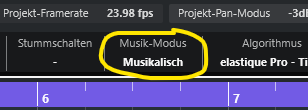
or in the Pool Window (cmd/ctrl+P).

Let’s take it from there and see what’s happening. There’s more to it but this might do the trick.
If you want to learn more about how musical/linear timebases and musical mode interact -@Raino provided an excellent overview: