The Score Editor manual’s instruction to change not length does not work correctly when you are editing existing material and wish to increase a note’s length. It seems to add another voice instead of shuffling the notes back, which is what I wish to do. The behavior is the same in step input, even when selecting move insert mode which seems not designed to alter existing notes.

That’s not adding a different voice. If it was a different voice, you’d have double stems there. There’s a single stem, so that’s one voice with overlap (where you’re holding the E4 and then adding the D4 to that as a dyad).
There’s something called “Move Insert Mode” with step input that probably does what you want.
Just so we are on the same page, I am trying to insert a half note where there is currently a quarter note (wishing to replace it) and the illustration is the result. When I turn on Move Insert Mode it does exactly the same thing (i.e. I select the quarter note on the staff and click the half note value in the toolbar). What Move Insert Mode will do is add notes to the line. This is not what I want. I want to change the value of an existing note.
I’m not quite sure I’m following.
What exactly did you start with and what are you trying to get?
I assume you started with E-D-F as quarter notes in that bar.
So if you make the E a half note, what do you want to happen with the D?
I just edited my last message but to repeat I want to change the value of an existing note not insert new notes. After making the E a half note I expect the measure to end on the F and the space at the end of my last bar to be filled with a rest. This is the behavior that Pro Tools follows in this scenario.
PS: this is how the midi editor behaves if you turn on Shuffle mode. I’d simply like to see the same behavior in the Score editor.
I’m afraid I’m completely confused.
So when you change the E to a half note, you want Cubase to know to delete the D and then also delete the E and D eighth notes at the end of the bar and leave a rest there? And Pro Tools does this by default?
I didn’t think this was very confusing. I want to change the E from a quarter note to a half note. I don’t want to delete anything. The other notes should retain their values and move back in time with the resulting discrepancy in the last bar filled with a rest. If you increase the value of a note (which Cubase will not allow in the Score editor) back-filling with a rest is fairly straight-forward. For example, you can decrease the note value and it will fill the space before the next note with a rest. But if you increase the value you get what I demonstrated in the illustration.
Oh so you want to move back the beginning of the note so that it starts on the last beat of the previous bar (in place of the rest) and be double the length so it gets rendered as two tied quarters?
It might be easier if you think instead that it is not possible to edit a note (if it is followed by another) by increasing its duration.
In Dorico, which the Cubase Score Editor is based on, it will do the same thing. Increasing the duration in this exact case will cause an overlap (where the new note starts as the old one is still sounding). It won’t move the onset back. It doesn’t necessarily have any concept that there can only be one note at a time. You have to move back the start of the note to the end of the previous bar and then make it longer. There’s no “shuffle mode” in Dorico, I’ve never used such a thing before.
And I’ve used Finale, SIbelius and Dorico for quite a few years. In the case of Finale, it would try to overfill the bar when changing that to a half note and error out and ask you if you wanted to enlarge the bar with a pop-up. In the case of Sibelius, it would nuke the D quarter note on beat 2. In the case of Dorico, it creates an overlap like you see in Cubase.
No, it doesn’t. I have Dorico 5 and I just tested it. It will move the notes in time and retain their values.
Dorico won’t move a note back in time without being asked to do so.
Actually sorry, Dorico does the same thing as Sibelius in this particular case:
So you are starting with this:
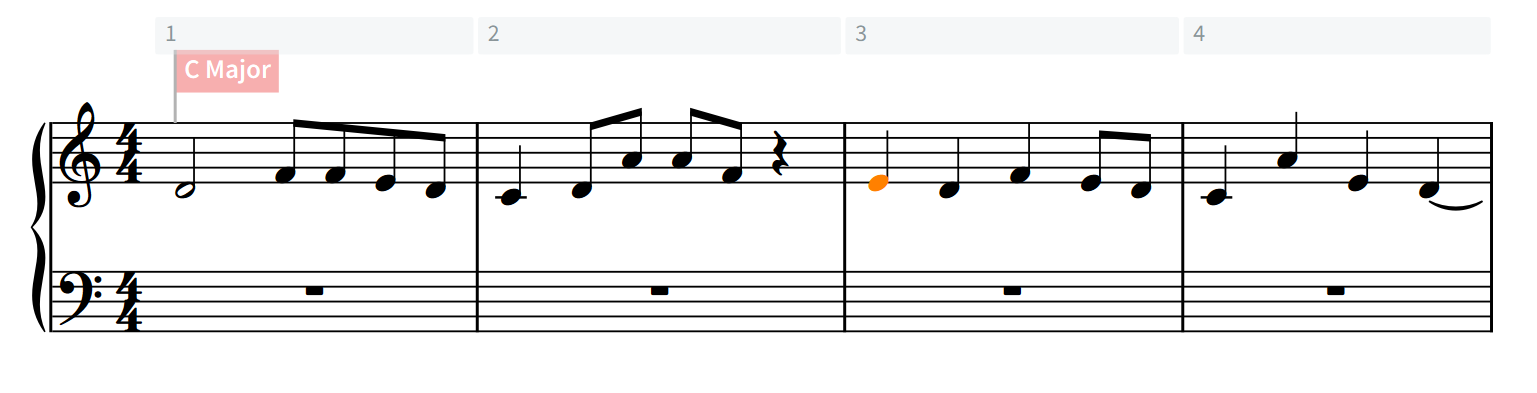
And you want to make that E on the downbeat of bar 3 into a half note.
When I do that in Dorico, I get this:

So the D gets nuked.
Do it again, but first put Dorico into insert mode. 
With Dorico in insert mode, changing the E from a quarter note to half note gives this:

But isn’t that what you said you didn’t want?
I thought you wanted to change the E from a quarter note to a half note without pushing the other notes a beat later in time, and without deleting any notes. This pushes them a beat later in time.
Maybe re-read what I wrote more carefully. It works perfectly in Dorico. Before and after - observe how the rests are added.


Ahh my apologies! I did read what you said but I misunderstood it. This makes sense now, sorry for the confusion.
I’m seeing the same problem. Strange that the behaviour is so different from Dorico in this regard. In Cubase I’ve normally been entering notes via the piano roll and just using the score editor to look at them.
I don’t know if this is helpful, but if you shift-select the rest of the line starting at the D, you can then drag and drop the notes later by one beat in time and then change the duration of the E. That’s the easiest and quickest way of making this edit I could find, although it is unfortunately still two steps instead of one.
Thank you for the tip and the feedback. It helped me better clarify the issue for anyone reading. Appreciate the help!