# Sending logs as a SysEx to an HTML based utility

**URL:** <https://forums.steinberg.net/t/sending-logs-as-a-sysex-to-an-html-based-utility/1006723>\
**Category:** Cubase\
**Tags:** tips-and-tricks, midi-remote\
**Created:** [August 26, 2025, 7:25pm UTC](https://forums.steinberg.net/t/sending-logs-as-a-sysex-to-an-html-based-utility/1006723 "2025-08-26T19:25:17Z")\
**Posts on this page:** 8\
**Page:** 1

<div class="post-metadata">

**Author:** ![m.c](https://dub1.discourse-cdn.com/steinberg/user_avatar/forums.steinberg.net/m.c/32/193959_2.png) [@m.c](https://forums.steinberg.net/u/m.c)\
**Post date:** [August 26, 2025, 7:25pm UTC](https://forums.steinberg.net/t/sending-logs-as-a-sysex-to-an-html-based-utility/1006723/1 "2025-08-26T19:25:18Z")

</div>

Though we can always console.log in the MIDI Remote Script Console, chances are, especially when dealing with complex situations, that we want to somehow copy/paste the output of this console.

Sometimes we want to grab a very specific processValue, and it can get tedious to rewrite it by hand, other times, we may want to inspect elements, such in the case of latest additions to MIDI Remote API.

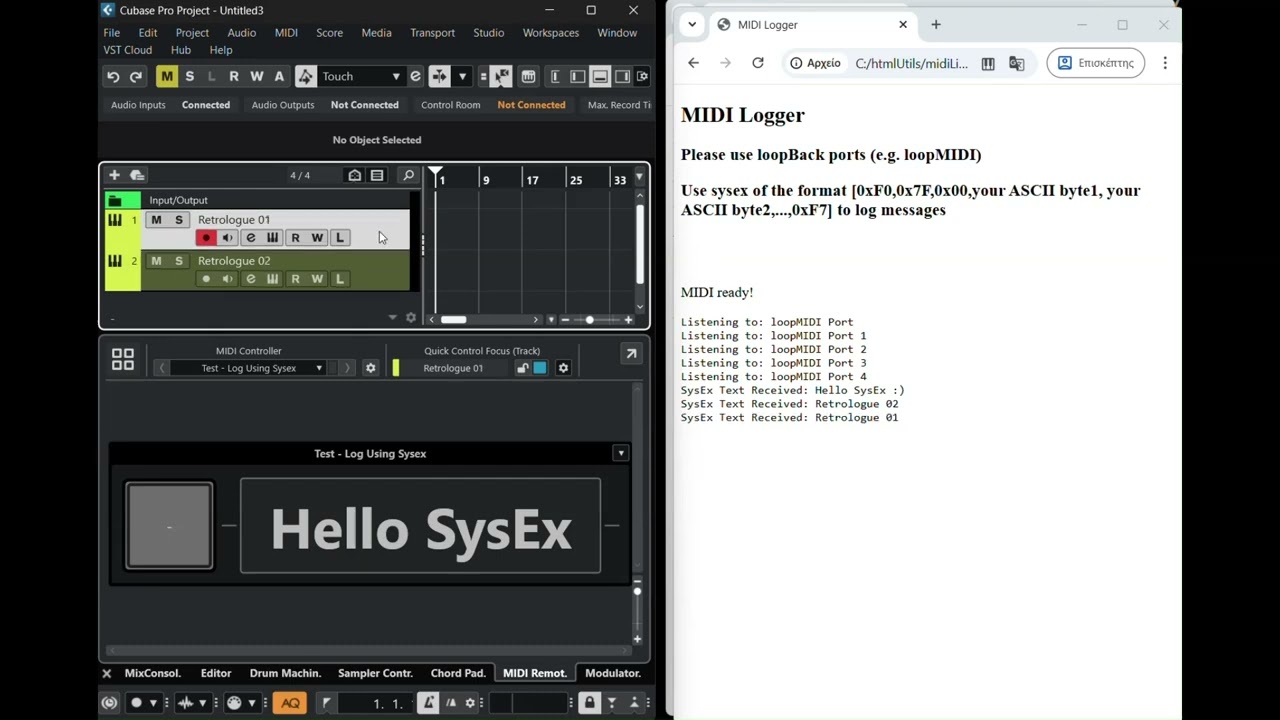
Anyway, I’ve prepared a tiny HTML file, which when opened in Chromium based browsers (Chrome, Edge, don’t know about others) will try to listen to MIDI Ports and log in its page, the MIDI Messages. At the same time, when getting a sysEx of the format [0xF0,0x7F,0x00,ascii code char 1, ASCII code char 2,…,0xF7], it will recognise its content as a string and log it properly.

Here’s the code of the HTML:

```auto
<!DOCTYPE html>
<html lang="en">
<head>
  <meta charset="UTF-8">
  <title>MIDI Logger</title>
</head>
<body>
  <h2>MIDI Logger</h2>
  <h3>Please use loopBack ports (e.g. loopMIDI)</h3>
  <h3>Use sysex of the format [0xF0,0x7F,0x00,your ASCII byte1, your ASCII byte2,...,0xF7] to log messages</h3><br><br>
  <p id="status">Waiting for MIDI...</p>
  <pre id="log"></pre>

  <script>
    const statusEl = document.getElementById("status");
    const logEl = document.getElementById("log");

    function logMessage(message) {
      console.log(message);
      logEl.textContent += message + "\n";
      logEl.scrollTop = logEl.scrollHeight;
    }

    function handleMIDIMessage(event) {
      const data = Array.from(event.data);

      if (data[0] === 0xF0 && data[1] === 0x7F && data[2] === 0x00 && data[data.length - 1] === 0xF7) {
        // Extract middle bytes (ASCII payload)
        const payload = data.slice(3, -1);
        const text = String.fromCharCode(...payload);
        logMessage("SysEx Text Received: " + text);
      } else {
        logMessage("Other MIDI: " + data.map(x => x.toString(16).padStart(2,"0")).join(" "));
      }
    }

    function onMIDISuccess(midiAccess) {
      statusEl.textContent = "MIDI ready!";
      for (let input of midiAccess.inputs.values()) {
        logMessage(`Listening to: ${input.name}`);
        input.onmidimessage = handleMIDIMessage;
      }
    }

    function onMIDIFailure(err) {
      statusEl.textContent = "MIDI failed.";
      logMessage("Error: " + err);
    }

    if (navigator.requestMIDIAccess) {
      navigator.requestMIDIAccess({ sysex: true }).then(onMIDISuccess, onMIDIFailure);
    } else {
      statusEl.textContent = "Web MIDI API not supported.";
    }
  </script>
</body>
</html>

```

And here’s a snippet demonstrating logging using sysex:

```auto
var midiremote_api = require('midiremote_api_v1')

var deviceDriver = midiremote_api.makeDeviceDriver("Test","Log Using Sysex","m.c")

var midiInput = deviceDriver.mPorts.makeMidiInput("anInput")
var midiOutput = deviceDriver.mPorts.makeMidiOutput("anOutput")

var detectionUnit=deviceDriver.makeDetectionUnit()

detectionUnit.detectPortPair(midiInput, midiOutput)
    .expectInputNameEquals("Bome MIDI Translator 1")
    .expectOutputNameEquals("loopMIDI Port")

var surface=deviceDriver.mSurface
var mapping=deviceDriver.mMapping

var button=surface.makeButton(0,0,1,1)
button.mSurfaceValue.mMidiBinding
    .setInputPort(midiInput)
    .bindToControlChange(0,0)

var label=surface.makeLabelField(1,0,4,1)

var page=mapping.makePage('Default')
page.setLabelFieldText(label,"Hello SysEx")

var selectedTrack=page.mHostAccess.mTrackSelection.mMixerChannel

selectedTrack.mOnTitleChange=function(activeDevice,activeMapping,trackName){
   
    logBySysex(activeDevice,trackName)
    
}

button.mSurfaceValue.mOnProcessValueChange=function(activeDevice,value,diff){
    if(value==1){
        logBySysex(activeDevice,"Hello SysEx :)")
    }
}

function logBySysex(activeDevice,textMessage){
    
    console.log(textMessage) 
    
   var sysexMessage = [0xF0, 0x7F, 0x00].concat(textMessage.split('').map(function(c) {var code=c.charCodeAt(0); return code<=127 ? code : 32;})).concat([0xF7])
    
    midiOutput.sendMidi(activeDevice,sysexMessage)

}

```

And here’s a short video demonstrating logging:

[![](https://img.youtube.com/vi/yJ7AYcf-sBA/maxresdefault.jpg "Logging MIDI Remote messages using Sysex and HTML - Cubase 12+") ](https://www.youtube.com/watch?v=yJ7AYcf-sBA)
---

<div class="post-metadata">

**Author:** ![Steve\_Day](https://avatars.discourse-cdn.com/v4/letter/s/49beb7/32.png) [@Steve\_Day](https://forums.steinberg.net/u/Steve_Day)\
**Post date:** [August 26, 2025, 10:37pm UTC](https://forums.steinberg.net/t/sending-logs-as-a-sysex-to-an-html-based-utility/1006723/2 "2025-08-26T22:37:30Z")

</div>

This comes at a perfect time! I was looking for a way to copy the float values from the Cubase log. I will inevitably have a question once I look over this and try to implement the code portion in my script – primarily, what does “your ASCII byte1” mean in relation to any random ASCII byte that may be passed? Is this just generic language to describe all ASCII bytes between 0x7F and 0xF7?

---

<div class="post-metadata">

**Author:** ![m.c](https://dub1.discourse-cdn.com/steinberg/user_avatar/forums.steinberg.net/m.c/32/193959_2.png) [@m.c](https://forums.steinberg.net/u/m.c)\
**Post date:** [August 26, 2025, 10:46pm UTC](https://forums.steinberg.net/t/sending-logs-as-a-sysex-to-an-html-based-utility/1006723/3 "2025-08-26T22:46:54Z")

</div>

Yes, just the generic ASCII table character codes, [https://www.ascii-code.com/](https://www.ascii-code.com/)

> [@Steve\_Day](#):
>
> the float values

Sure, say you have this value var a=0.113255. All you have to do is to convert it to string, var aString=a.toString() or var aString=“”+a, and then send this new variable using the sysex message function. The ASCII codes for numbers and dot are standard, you’ll face no issue with this translation.

---

<div class="post-metadata">

**Author:** ![jordikt](https://dub1.discourse-cdn.com/steinberg/user_avatar/forums.steinberg.net/jordikt/32/164538_2.png) [@jordikt](https://forums.steinberg.net/u/jordikt)\
**Post date:** [September 2, 2025, 1:16pm UTC](https://forums.steinberg.net/t/sending-logs-as-a-sysex-to-an-html-based-utility/1006723/4 "2025-09-02T13:16:16Z")

</div>

@m.c

This html console is awesome, thanks for doing it and sharing it !!

It would be very useful to me to filter the ports, to listen only to the cubase midi ports.

How could I implement a filter in the html code?

---

<div class="post-metadata">

**Author:** ![m.c](https://dub1.discourse-cdn.com/steinberg/user_avatar/forums.steinberg.net/m.c/32/193959_2.png) [@m.c](https://forums.steinberg.net/u/m.c)\
**Post date:** [September 2, 2025, 1:55pm UTC](https://forums.steinberg.net/t/sending-logs-as-a-sysex-to-an-html-based-utility/1006723/5 "2025-09-02T13:55:12Z")

</div>

> [@jordikt](#):
>
> How could I implement a filter in the html code?

Here:

```auto
<!DOCTYPE html>
<html lang="en">
<head>
  <meta charset="UTF-8">
  <title>MIDI Logger</title>
</head>
<body>
  <h2>MIDI Logger</h2>
  <h3>Please use loopBack ports (e.g. loopMIDI)</h3>
  <h3>Use sysex of the format [0xF0,0x7F,0x00,your ASCII byte1, your ASCII byte2,...,0xF7] to log messages</h3><br><br>
  <p id="status">Waiting for MIDI...</p>
  <pre id="log"></pre>

  <script>
    const statusEl = document.getElementById("status");
    const logEl = document.getElementById("log");

    function logMessage(message) {
      console.log(message);
      logEl.textContent += message + "\n";
      logEl.scrollTop = logEl.scrollHeight;
    }

    function handleMIDIMessage(event) {
      
      const midiPort=event.target;
      const midiPortName=midiPort.name;

      const data = Array.from(event.data);

      if (data[0] === 0xF0 && data[1] === 0x7F && data[2] === 0x00 && data[data.length - 1] === 0xF7) {
        // Extract middle bytes (ASCII payload)
        const payload = data.slice(3, -1);
        const text = String.fromCharCode(...payload);
        logMessage(midiPortName+": "+text);

      } else {
       
        logMessage(midiPortName+" - Other MIDI: " + data.map(x => x.toString(16).padStart(2,"0")).join(" "));
      
      }
    
    }
    
    function onMIDISuccess(midiAccess) {

      var arrayOfPortsToListenTo=["loopMIDI Port","loopMIDI Port 1"];
      
      statusEl.textContent = "MIDI ready!";
      for (let input of midiAccess.inputs.values()) {
        if (arrayOfPortsToListenTo.length==0 || arrayOfPortsToListenTo.includes(input.name)){

            logMessage(`Listening to: ${input.name}`);
            input.onmidimessage = handleMIDIMessage;
        
        }
        
      }
    
    }

    function onMIDIFailure(err) {
      statusEl.textContent = "MIDI failed.";
      logMessage("Error: " + err);
    }

    if (navigator.requestMIDIAccess) {
      navigator.requestMIDIAccess({ sysex: true }).then(onMIDISuccess, onMIDIFailure);
    } else {
      statusEl.textContent = "Web MIDI API not supported.";
    }
  </script>
</body>
</html>

```

You will find a `var arrayOfPortsToListenTo=["loopMIDI Port","loopMIDI Port 1"];`

Replace the port names included to the ones you want to listen to. You can have more than two obviously, and inside the function handleMIDIMessage you can alter how the log is shown.

---

<div class="post-metadata">

**Author:** ![jordikt](https://dub1.discourse-cdn.com/steinberg/user_avatar/forums.steinberg.net/jordikt/32/164538_2.png) [@jordikt](https://forums.steinberg.net/u/jordikt)\
**Post date:** [September 2, 2025, 4:21pm UTC](https://forums.steinberg.net/t/sending-logs-as-a-sysex-to-an-html-based-utility/1006723/6 "2025-09-02T16:21:04Z")

</div>

Thanks for the filter code, @m.c ! It works like a charm !

I have done different versions of the file for showing different ports and messages. Very useful!!

I have done a version that filters the ports and also shows the sysex messages and the standard midi messages in different colors:

 ![Captura de pantalla 2025-09-02 a les 18.09.28](https://europe1.discourse-cdn.com/steinberg/original/4X/3/2/b/32b2327378b57a4ac860e271fc4536f42f65b4eb.png)

This is the code if somemody wants to use different colors:

```auto
<!DOCTYPE html>
<html lang="en">
<head>
  <meta charset="UTF-8">
  <title>mc Logger - CubaseMidiApi - All MIDI messages</title>
    <style>
    .log-green {
      color: green;
    }
    .log-blue {
      color: blue;
    }
    .log-black {
      color: black;
    }
  </style>
</head>
<body>
  <h2>mc Logger - CubaseMidiApi - All MIDI messages</h2>
  <h3>Shows standard MIDI messages (cc, pb, note on, note off, etc)</h3>
  <h3>Shows sysex of the format [0xF0,your ASCII byte1, your ASCII byte2,...,0xF7]</h3><br><br>
  <p id="status">Waiting for MIDI...</p>
  <pre id="log"></pre>

  <script>    
    //link of the original code:
    //https://forums.steinberg.net/t/sending-logs-as-a-sysex-to-an-html-based-utility/1006723/5
    const statusEl = document.getElementById("status");
    const logEl = document.getElementById("log");

    function logMessage(message, type) {
      const span = document.createElement("span");
      span.className = `log-${type}`;
      span.textContent = message;
      logEl.appendChild(span);
      logEl.appendChild(document.createTextNode("\n"));
      logEl.scrollTop = logEl.scrollHeight;
    }

    function handleMIDIMessage(event) {
      
      const midiPort=event.target;
      const midiPortName=midiPort.name;

      const data = Array.from(event.data);

      //if (data[0] === 0xF0 && data[1] === 0x7F && data[2] === 0x00 && data[data.length - 1] === 0xF7) {
      if (data[0] === 0xF0 && data[data.length - 1] === 0xF7) {
        // Extract middle bytes (ASCII payload)
        //const payload = data.slice(3, -1);
        const payload = data.slice(2, -1);
        const text = String.fromCharCode(...payload);
        logMessage(midiPortName + " - Sysex: " + text, 'green');
        
      } else {

        logMessage(midiPortName + " - Other: " + data.map(x => x.toString(16).padStart(2,"0")).join(" "), 'blue');
      
      }
    }
    
    function onMIDISuccess(midiAccess) {

      //midi ports to listen to
      var arrayOfPortsToListenTo=["IAC Everybody > CubaseMidiApi","IAC CubaseMidiApi > Everybody"];

      statusEl.textContent = "MIDI ready!";
      for (let input of midiAccess.inputs.values()) {
        if (arrayOfPortsToListenTo.length==0 || arrayOfPortsToListenTo.includes(input.name)){

            logMessage(`Listening to: ${input.name}`, 'black');
            input.onmidimessage = handleMIDIMessage;
        
        }
        
      }
      logMessage(`-----------------------------------------------`, 'black');
    
    }

    function onMIDIFailure(err) {
      statusEl.textContent = "MIDI failed.";
      logMessage("Error: " + err, 'black');
    }

    if (navigator.requestMIDIAccess) {
      navigator.requestMIDIAccess({ sysex: true }).then(onMIDISuccess, onMIDIFailure);
    } else {
      statusEl.textContent = "Web MIDI API not supported.";
    }
  </script>
</body>
</html>

```

Please note that apart from the color changes, I have changed the following lines of code from the original:

I changed `if (data[0] === 0xF0 && data[1] === 0x7F && data[2] === 0x00 && data[data.length - 1] === 0xF7) {`

I changed `const payload = data.slice(3, -1);`

---

<div class="post-metadata">

**Author:** ![m.c](https://dub1.discourse-cdn.com/steinberg/user_avatar/forums.steinberg.net/m.c/32/193959_2.png) [@m.c](https://forums.steinberg.net/u/m.c)\
**Post date:** [September 2, 2025, 5:29pm UTC](https://forums.steinberg.net/t/sending-logs-as-a-sysex-to-an-html-based-utility/1006723/7 "2025-09-02T17:29:15Z")

</div>

> [@jordikt](#):
>
> Please note that apart from the color changes, I have changed the following lines of code from the original:
> 
> I changed `if (data[0] === 0xF0 && data[1] === 0x7F && data[2] === 0x00 && data[data.length - 1] === 0xF7) {`

Goot that you note that, because If someone tries to use it, it will not comply with the MIDI Remote snippet I posted, so they have to change it accordingly.

---

<div class="post-metadata">

**Author:** ![Aurasphere](https://dub1.discourse-cdn.com/steinberg/user_avatar/forums.steinberg.net/aurasphere/32/158595_2.png) [@Aurasphere](https://forums.steinberg.net/u/Aurasphere)\
**Post date:** [February 23, 2026, 9:09pm UTC](https://forums.steinberg.net/t/sending-logs-as-a-sysex-to-an-html-based-utility/1006723/8 "2026-02-23T21:09:49Z")

</div>

@m.c Great piece of kit. Im only grabbing 40 or 50 lines at the moment…as mentioned in other post, snip of the console window and get chat to format, remove redundants etc is fine but wow…this takes care of the really hard work…and great code!

Cheers
