I’ll try it now.
Yep, it still crashes.
I’ll try it now.
Yep, it still crashes.
This statement is incorrect and seems to be based on a misunderstanding of how PCI Express and GPU memory work.
PCIe version has no effect on the amount of VRAM a GPU can use.
If you install a PCIe 4.0 GPU with 16GB of VRAM into a PCIe 3.0 x16 slot, the GPU can still use all 16GB of its VRAM. PCIe does not limit VRAM capacity in any way. VRAM is located on the graphics card itself and is fully accessible regardless of PCIe version.
What really happens:
PCIe is backward and forward compatible.
A PCIe 4.0 GPU in a PCIe 3.0 slot simply runs at PCIe 3.0 bandwidth.
The only limitation is bus bandwidth, not memory capacity.
Real-world performance loss from PCIe 3.0 vs 4.0 is usually 0–5%, sometimes up to 10% in extreme cases (e.g. very fast GPUs with large data streaming).
You do not need to “double the VRAM” to compensate. That claim has no technical basis.
Example bandwidth (x16):
| PCIe Version | Bandwidth |
|---|---|
| PCIe 3.0 x16 | 15.8 GB/s |
| PCIe 4.0 x16 | 31.5 GB/s |
This bandwidth difference has nothing to do with VRAM size.
For reference, you can check independent testing from Tom’s Hardware, Gamers Nexus, and Hardware Unboxed – all confirm that PCIe 4.0 GPUs work perfectly in PCIe 3.0 systems with only minor performance differences.
Benchmarks & Technical Testing
Gamers Nexus – PCIe 3.0 vs 4.0 GPU Impact Test
https://www.youtube.com/watch?v=KkfrYxy3SKw
Conclusion: Negligible difference in gaming performance, no impact on VRAM usage.
Hardware Unboxed – PCIe Scaling Analysis
https://www.youtube.com/watch?v=P3aAtQ7nzvE
Tests RTX 3080 and RX 6800 XT on PCIe 3.0 vs 4.0 – VRAM fully usable, small performance difference.
Tom’s Hardware – PCIe Bandwidth Benchmark
https://www.tomshardware.com/reviews/pci-express-scaling-analysis,4693.html
PCIe bandwidth affects only specific workloads, not VRAM size.
TechPowerUp – PCIe 4.0 Graphics Card Compatibility
NVIDIA GeForce RTX 3080 PCI-Express Scaling | TechPowerUp
Confirms PCIe backward compatibility and no VRAM limitations.
Linus Tech Tips – Do You Need PCIe 4.0?
https://www.youtube.com/watch?v=5A9BM5G2Wgk
Explains difference in PCIe versions clearly and busts myths.
PCI-SIG (PCI Express standards body)
https://pcisig.com/specifications
PCIe is fully backward compatible – no relation to GPU VRAM capacity.
NVIDIA GPU FAQ – PCI Express Compatibility
Error | NVIDIA
NVIDIA states PCIe GPUs run normally at lower PCIe versions.
AMD Radeon PCIe Compatibility
Drivers and Support for Processors and Graphics
AMD confirms PCIe 4 GPUs work fine on PCIe 3 boards.
Robert, your investigation was quite beyond mine. Thanks for this detailed info. Bus speed seems the credible answer and looking at your varied data I stand corrected.
In my PC I was running an AMD Radeon 570X with 6G of VRAM and it wasn’t getting the job done very quickly, although it didn’t crash SL. At the time (SL11) the best VRAM usage was 3.5G. Just prior to SL12 I switched to a used AMD WX7100 Pro (3.0) with 8G of VRAM. It cost $85 on eBay, btw. In the first incarnation of SL12 I could only use 4.5G of VRAM - but this performed much better than my old card and didn’t crash the program. Then Robin sorted the VRAM usage to use practically all the VRAM (7.8G of the 7100’s 8G). The new SL12 is working well here and the stems are much improved over the SL11 results. I can live with what I have - BUT - having read your report, I will perhaps keep an eye out for an 4.0 AMD card with more VRAM. Of course it’s doubtful I’ll find something at $85. 
Quick update:
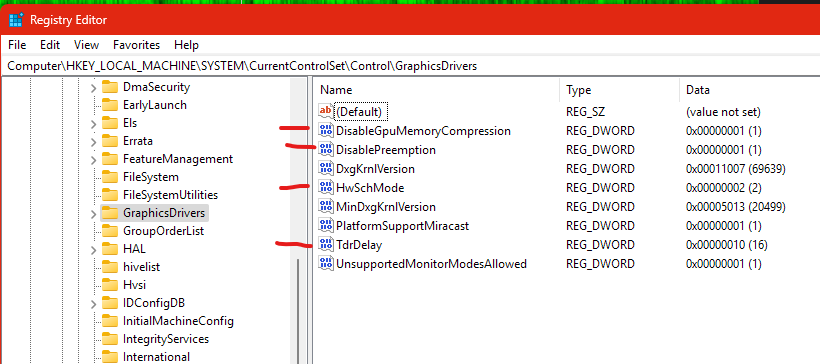
I made some changes to the Windows registry by adding:
EDIT: Path: “HKEY_LOCAL_MACHINE\SYSTEM\CurrentControlSet\Control\GraphicsDrivers”
DisableGpuMemoryCompression - 1 (added dword32)
DisablePreemption - 1 (added dword32)
HwSchMode - 2 (changed from 1)
TdrDelay - 16 (added dword32)
I am now able to run a full “High” quality unmix of everything, including Sax/Brass layer. However, the mouse cursor is now VERY laggy when doing so. Could be something to do with the HwSchMode key being changed from 1 to 2. The VRAM usage is now 15.4GB/16.0GB instead of being 15.5GB/16.0GB, this is while I have the same Brave browser windows open as per my previous tests.
I’ll experiment further.
Current system setup:
Windows 11 x64 24H2 / SpectraLayers 12.0.30 / MSI Nvidia GeForce 5070Ti 16GB
Hi!
Same here.
Nvidia 4060 (8Gb) latest Studio Drivers 536.67
SpectraLayers 12.0.30
I’ve got 3 dumps, but not informative (Probably caused by : unknown.dll)
Rolling back to v11
regards, Alex
That didn’t work for me. In the same boat. Getting system reboots. Have set the cpu violate to 1.400 in bios and tried turning off intel speedstep. No dice.
Tried your settings. Still crashed on some files but not on others. I am using RTX 3070. Since I am using the trial version and merely experimenting with SpectaLayers 12 at this point, I probably will not investigate further. But leaving a comment to tell others to beware - depending on your rig, the app as it is right now could crash on you. Note that when I switch to CPU the problem vanishes.
I would like to add something.
Unmix works correctly in balanced mode (if select all stems).
In high mode, it only works if you select no more than 3 stems at a time.
Nvidia 4060 8Gb
regards, Alex
Would those registry settings be valid for win 10?
For me: Version 12 Pro in “Unmix Song” is much slower than in Version 10 I had before. I am disappointed!
Yepp, SL is disappointing.
This program is an ingenious concept. But the actual implementation feels like an all-time beta version of a brilliant developer.
For me, SL feels schizophrenic. Does it want to be a stem splitter or a spectral editor?
Clearly the answer is “both”, but SL12.x is still unstable because the developer didnt properly test the stem unmixing with video cards having 10GB or less of video memory before releasing v12. Ever since, he’s been chasing down crashes during unmixing, but the current release is still crashing. None of this relates to spectral editing, which also requires considerable ongoing development. Almost 5 months after v12 release, unmixing to stems remains a real time and cost burden for v12 iterations.
I think it depends on hardware installed. I made a few more tweaks for my system (below). I think most of them are available on both Win 10 and 11.
I would highly recommend asking an AI (a reliable one) what they all do and do some research before changing any settings. I did have a crashing issue where my PC would instantly restart under high graphics load due to these “ultra-super-duper max performance” settings causing voltage droop, so I dropped the graphics clock and power limit in MSI Afterburner which solved that issue. My graphics card uses the 12VHPWR cable so it’s a bit dodgy super-maxxing it!
fixed in 12.0.40!
regards, Alex