Steinberg Mobile Summer Update: New HALion Sonic Play, Instrument Updates & Cubasis 3.8.5 Available

Hi everyone,

We have a few exciting things to share today!

Today we’ve released a range of updates across the Steinberg mobile lineup, including the new HALion Sonic Play music workstation, Cubasis 3.8.5, and free updates for our Verve and Etude pianos, and our Iconica Sketch orchestral app.

We hope you enjoy the new releases and updates, and we’re looking forward to hearing what you create with them!

Please support us by rating our apps on the App Store and Google Play!

Enjoy being creative!

Lars

HALion Sonic Play iPhone iPad.pdf (2.9 MB)
New in Cubasis 3.8.5.pdf (2.7 MB)
Summer Updates - Verve, Etude, Iconica Sketch iPhone iPad.pdf (2.6 MB)

HALion Sonic Play Available Now

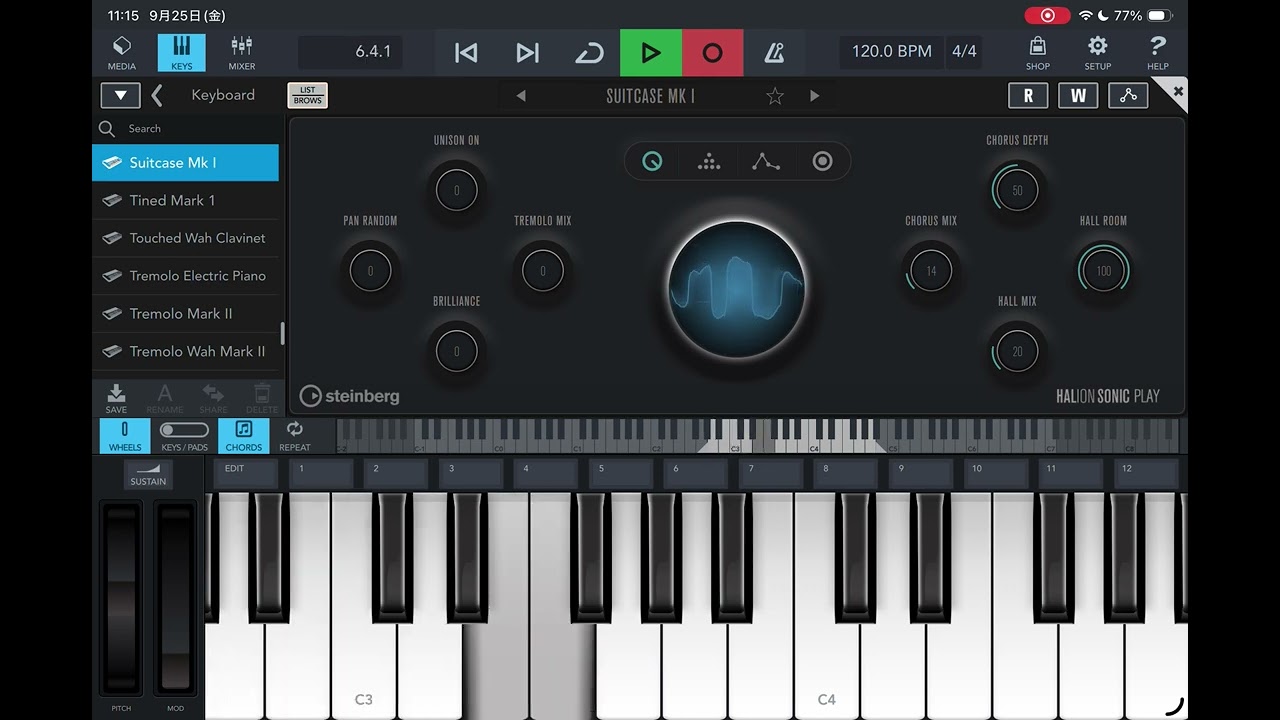
HALion Sonic Play is now available for iPhone, iPad, and AUv3-compatible hosts.

Our new music workstation app comes with 2,000+ sounds, covering everything from keyboards, synths, and guitars to orchestral instruments, drums, and much more. It also includes integrated arpeggiator, filter, and amp controls, making it a versatile companion for songwriting, production, and live performance.

Download HALion Sonic Play on the App Store

Verve 1.1, Etude 1.1 & Iconica Sketch 1.2

Free updates for Verve, Etude, and Iconica Sketch are available now.

These updates introduce user preset management with AUv3 support, an enhanced preset browser with search and favorites, a new scalable keyboard with chord pads and sustain support, plus various fixes and improvements.

Download Verve on the App Store

Download Etude on the App Store

Download Iconica Sketch on the App Store

Cubasis 3.8.5 Available

Cubasis 3.8.5 for iOS and Android is available now as well.

The update includes new features and fixes based on user feedback, while further enhancing overall stability and performance (see below for more details).

Download Cubasis on the App Store

Get Cubasis on Google Play

*On Android, all instruments are available via in-app purchase in Cubasis for Android.

Flagship Workstation Instrument for Mobile Music Creation |
HALion Sonic Play for iPhone, iPad & AUv3

New in Verve 1.1, Etude 1.1 and Iconica Sketch 1.2

  • Total Recall (State Saving): Instrument state is automatically saved and restored when closing and reopening the apps
  • Save and recall your own presets for quick access to your favorite sounds
  • New preset browser with Search and Favorites for faster sound browsing and workflow
  • Play and sketch ideas with a new scalable keyboard
  • New Chord Pads for quickly triggering chords and exploring harmonic ideas
  • Added Sustain support for more natural and expressive playing
  • Performance optimizations for faster loading and improved overall efficiency
  • Stability enhancements and bug fixes across the apps

Hi all,

We’ve published a dedicated support article explaining how HALion Sonic Play replaces HALion Sonic Selection, including what this means for existing users, the differences between the products, and answers to frequently asked questions.

:backhand_index_pointing_right: https://helpcenter.steinberg.de/hc/en-us/articles/35150006046738-HALion-Sonic-Play-replaces-HALion-Sonic-Selection

If you have any questions about HALion Sonic Play, this article is a great place to start.

Best,
Lars

Hi team,

I would like to report an issue with HALion Sonic Play when using it inside Cubasis.

The issue occurs when I connect a MIDI keyboard via Bluetooth. When I input a note with a soft velocity, the volume suddenly drops extremely low and stays that way. The only way to restore the normal volume is to change the preset. This strange behavior happens consistently across all presets.

Please note that this issue occurs only when running HALion Sonic Play as an AUv3 plugin inside Cubasis. It does NOT happen when running HALion Sonic Play in standalone mode.

Could you please let me know if there is any workaround or fix for this problem?

My Environment:

App: HALion Sonic Play (Latest version)

Host DAW: Cubasis (Latest version)

Device: iPad mini 7

OS: iPadOS 26.6

Connection: Bluetooth MIDI Keyboard

Thank you for your help.

Hi @taiya2_1_2

Thank you for the report.

Could you please let us know whether the issue occurs only when HALion Sonic Play is used as an AUv3 plug-in (selected from the Audio Units folder), or if it also occurs when using the built-in HALion Sonic Play instrument (located in the top-level instrument folder)?

If possible, please also send us a short video showing the issue, as this would help us investigate further.

Best regards,
Lars

Hello, Development Team,

Since I had not received a response for some time, I thoroughly investigated the cause myself.

In conclusion, the issue was caused by polyphonic aftertouch messages being sent to HALion Sonic. The Bluetooth MIDI keyboard I am currently using supports aftertouch.

On the iPad, an application called StreamByter can be used to filter specific MIDI messages. After filtering out the aftertouch messages, I was able to play HALion Sonic properly without the volume unexpectedly dropping.

Based on these results, it appears that a bug occurs when HALion Sonic receives polyphonic aftertouch messages. If possible, I believe this issue should be fixed in HALion Sonic. Alternatively, Cubasis should include a feature that allows users to filter specific types of MIDI messages.

Please make use of this information to help other users who may be experiencing the same problem.

Thank you.

Hi @taiya2_1_2

Actually you have not responded to my message above.

Best,
Lars

Hi Development Team,

This issue does not occur when using HALion Sonic as a standalone application. It only occurs when using the AUv3 version in Cubasis.

When I play continuous phrases, the volume starts fluctuating or pulsing. Once this happens, the volume does not return to normal unless I change the preset.

Here is a video demonstrating the issue:

I have also uploaded the MIDI file used in the video for your reference.

Best regards,

New Project (1).mid (1.4 KB)

Hi @taiya2_1_2

Thanks for your report.

Could it be that the keyboard you’re using sends Aftertouch data, which may be related to the volume changes reported in your post?

Best,
Lars

Hi Lars

Exactly. I’m explaining that the issue occurs when using a keyboard that sends Aftertouch data.

Best,

taiya212