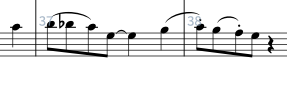
In the attached score, the tied notes over the bar line fail to sustain when Light 8ths Swing is indicated, even the duration is correctly shown in Play mode:
I have been unable to resolve the issue mentioned in the original post and wonder if anyone could suggest a reason why ties fail to sustain (across the bar line) when swing is indicated (see project included in the original post).
The problem here is I think that when swing is applied the position of the note and the position of the staccato “region” used for playback end up getting out of step with each other. The result is that the long note (the tied one) plays back as though it were staccato. I think this is a known issue but I will make a note of it (our ref: STEAM-5575).
I’m wondering if there might be a fix in the works for this issue. At the moment, I’ve been using “ord.” as a workaround to reset playback when notes are incorrectly truncated or sustained in swing time with slurs and staccato markings. While this usually helps, it’s not a reliable solution, and identifying the exact note or articulation that triggers the problem can be difficult and time-consuming.
For example, I just spent over an hour adding “ord.” to countless notes in a trombone part, yet I still couldn’t locate the one causing the issue. The problem is especially noticeable when sustained notes produce unintended dissonances (e.g., a D sustaining into a D♭, which then sustains into the following C… ouch!).
Adjusting played durations doesn’t resolve the problem, which suggests it may be a playback bug.
By way of example:
(Tbn. in bass clef)
When other instruments exhibit the same problem, the result is very, very jarring.
Anything that can be done to address this issue would be greatly appreciated.
I do understand, Richard, but this issue is a dealbreaker for anyone writing in swing time. Is there perhaps a more efficient workaround than having to hunt down the troublesome note and add “ord.” each time?
One option would be to explicitly set the “Playback end offset” property on the staccato note (or nudge the end of the note slightly in the key editor, which has the same effect). In the example here a value of -125 seems to be about right.
I’ll definitely give this a try, Richard, thank you for the quick response. The issue cropped up this morning after I had to move some flows around (quite common in musical theatre). A song that had previously played back without any problems suddenly began exhibiting the issue I mentioned above. After some digging, I traced it back to the previous flow, where I found the problematic articulation that was triggering the playback error.
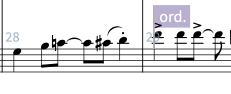
For anyone else who encounters this issue, using “ord.” works as a reliable workaround (and can be hidden in the Properties panel). In swing time, it needs to be added to the note immediately after a slur that ends with a staccato marking. For example:
The key detail, as noted above, is that the issue can carry over from one flow to the next.