Firstly, I’d like to thank steve for rekindling my love of the project logical editor recently.
So, I went ahead and made a bunch of new PLE presets, really useful to me, and I’ll share a couple here that some of you might find useful, and possibly instructive when creating your own.
The first one deletes tracks that are “disabled”, like after a render in place or unused hidden tracks etc.
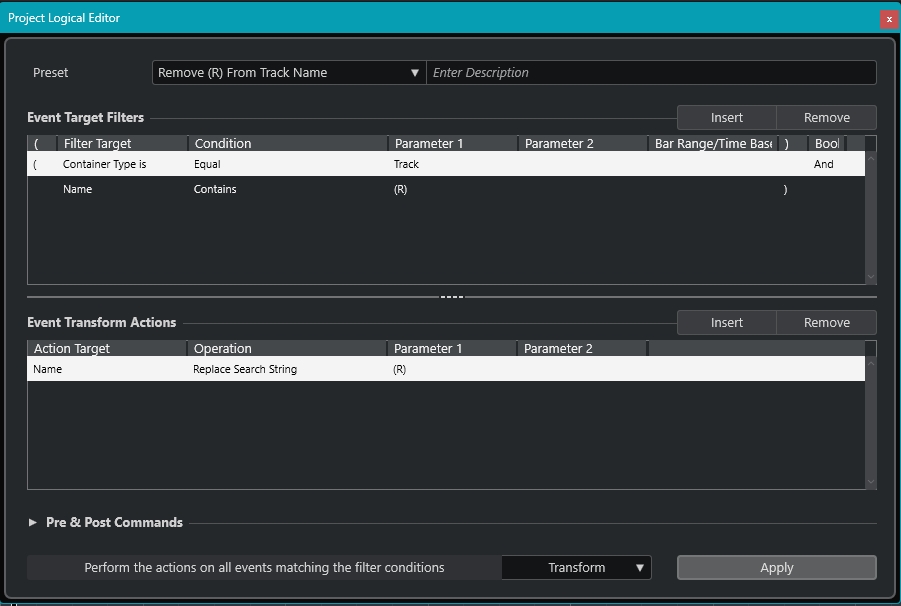
The second is a real time saver for me - it deletes all the “(R)” or “(D)” from the track names of Rendered tracks.
My question to the brain trust is, is there an way to use a wildcard so that when, say, Spectralayers puts those long bracketed numbers on unmixed tracks names, a PLE preset could have, rather than “(R)”, or “(D)” - “(wildcard)” that will remove anything in brackets?
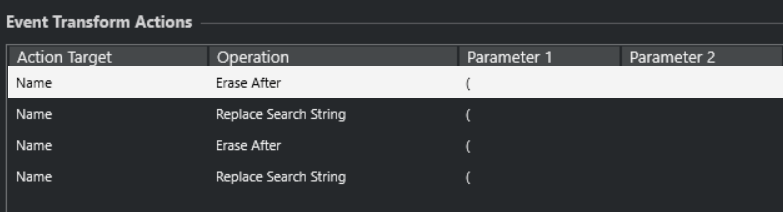
This will replace two bracket sections (the PLE will start searching from the end of the string). If more are needed you can insert the “Erase After” and “Replace Search String” more times, just to be sure that all of them are deleted. Depends on the track name you get.
Furthermore, using MIDI Remote, we can actually apply Regex and such operations can get really trivial, as long of course one accepts to get into scripting. For example, the thing you want as a regex, could be this: str = str.replace(/\([^)]*\)/g, ''); Then you need to loop through the tracks of the mixer, and transform the names accordingly.