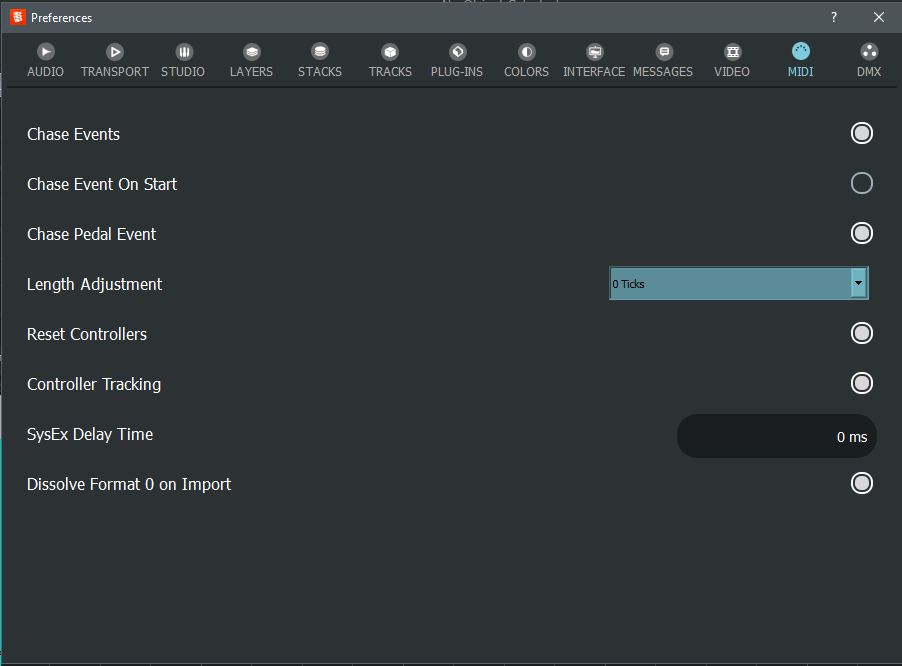
I’ve been using the MIDI preference called Controller Tracking practically since it was first introduced.
When enabled and combined with event chasing, it allows you to reduce the flow of MIDI control messages sent to a port to the bare minimum, which is particularly useful when the target device is hardware.
Lately, I’ve been having trouble with a device for which a Controller Tracking equivalent would be very useful, but only for Program Changes— in short, a sort of Program Change Tracking preference.
I’ve been wondering for a while: is the lack of such a feature due to some technical or protocol reasons, or has there simply been no need to create it?
The problem is that when you change Bank Select, a program change may target a different program (of a different bank).
Just ignore it, those 2 bytes will not harm he communication even when applied multiple times.
First of all, thank you for your explanation, which has made the problem that led to your choice much clearer to me…
I had considered the hypothetical Program Change Tracking solution, but in reality, what’s really giving me problems is the Program Change generated when execution is stopped. but I assume this generation is part of the chasing logic (which is useful to me and I don’t want to disable).
Unfortunately, sending this additional Program Change upon stopping causes the device to reload the patch and lose any changes made during the performance with various control changes.
It’s somewhat annoying during rehearsals, but obviously doesn’t impact the live performance.
I don’t know if you can think of anything that could solve the problem without too much impact.
What do you mean by that? The only MIDI messages generated on Stop are all notes off, and reset controllers. Then with chase activated (and chase on start disabled), chase events at the stop position are generated (incl. program changes).
Looked it up: “Track Controllers” actually does also track MIDI Program Changes. So there should be no program change sent when that is enabled, or chase is disabled. Otherwise, it will be chased (means the last value is sent) on locate, which always follows stop. So maybe try set preferences chase and/or track controllers?
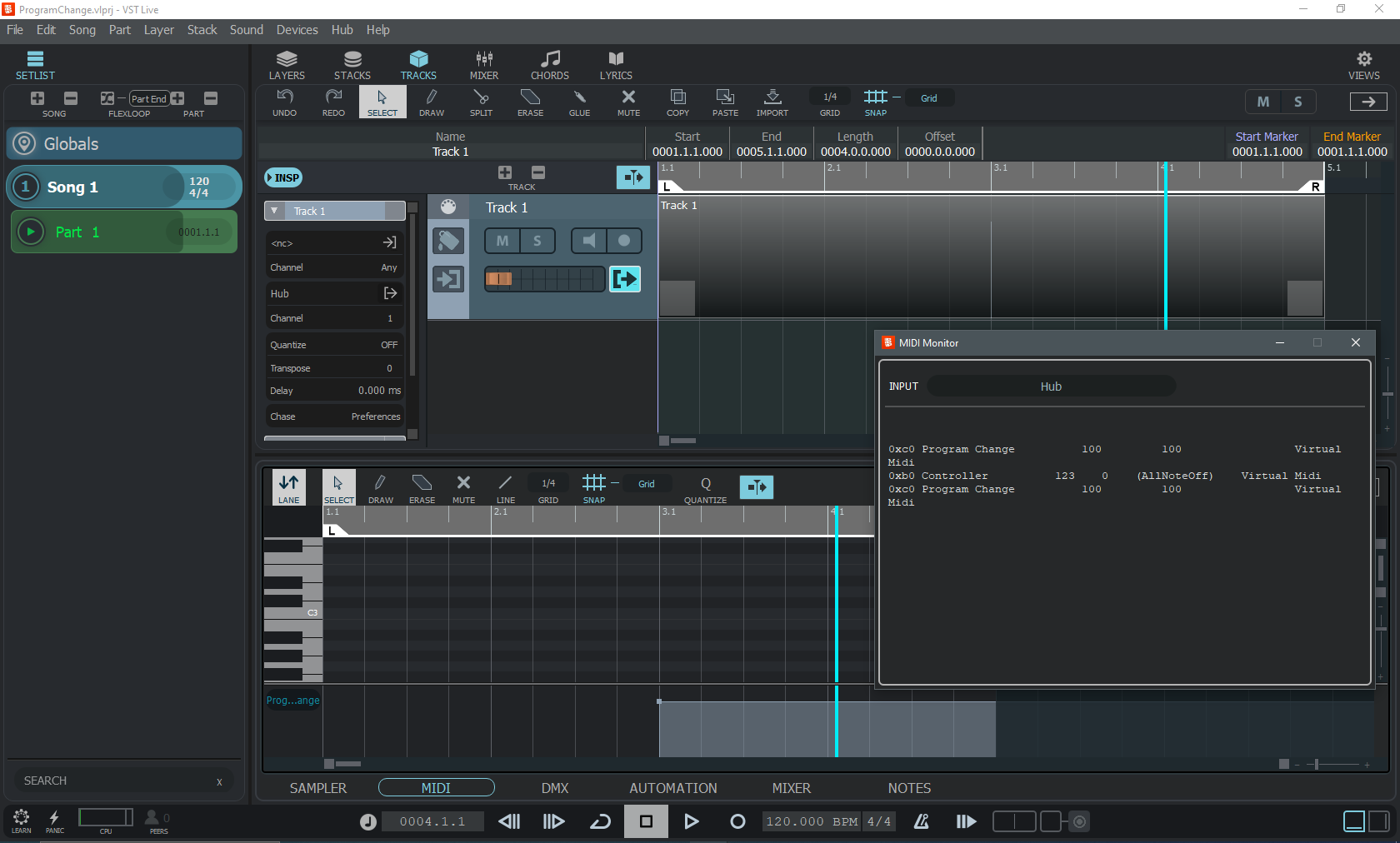
If I understand what you’ve said correctly, I’d say that what you’ve described is exactly what happens in my preferences configuration scenario, which I’ll describe to you precisely:
Actually, what’s causing me problems is precisely the event chasing on stop, which, honestly, I’m not sure what it’s for…
Why chase and send MIDI events (CC and Program Change) when the playback is stopped and the hardware/software settings controlled by VL via CC and PC should already be the desired ones?
I don’t know either. As you have “Controller Tracking” on, it will not send the same program change twice.
VL has no reason to send anything pgm chg by itself, except reset controllers/all notes off.
There are 2 possible sources for pgm chg, one is MIDI tracks (try mute) and the other are Layers. If you think that with “Track Controllers”, there should be no change, check if any Layers are set to pgm chg.
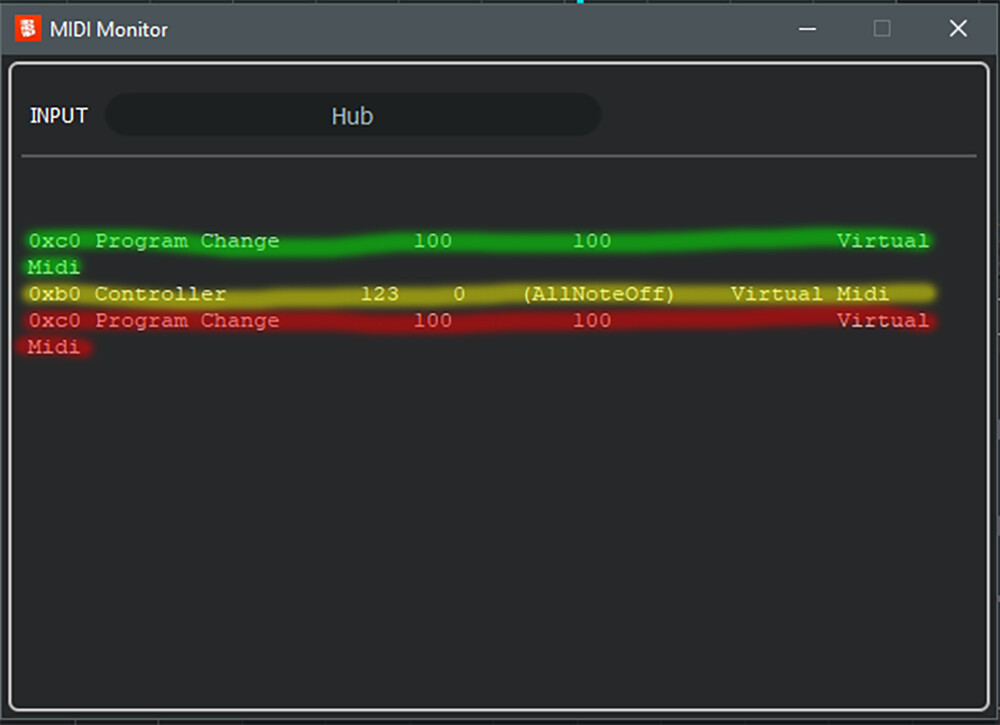
GREEN: this is the Program Change event generated upon reaching measure 0003.1.1 and this is, obviously, expected.
YELLOW: this is the Control ChangeAllNoteOff event generated upon stopping, and this is, once again, expected.
RED: this is another event generated upon stopping, corresponding to the chase of the only event present in the track, namely the Program Change.
And it is this last event (the red) that is the subject of my problem with a piece of hardware (but also with some VSTs) and my doubts about whether you foresee it and whether it is in any way useful.
I hope I’ve clarified the issue, in case it wasn’t already clear.
I look forward to your further comments, thank you.
Thanks. The track sends to Layer via virtual MIDI “cable”. This does not perform Controller Tracking but sends directly to the Layer.
If you send Layer output to a real MIDI Output, and “Controller Tracking” is activated (as you have), the Program Change is not sent to the real device output, it is filtered. In fact, once sent, it is never sent again.
In order to veryfy this (there must be a reason for your problem?), we connected the Global Layer output to UR22C MIDI Out, applied a (real) cable from UR22 MIDI Out to its MIDI in, and monitored UR22C MIDI in. The program change is sent exactly once.
I had the opportunity to test a “direct” routing (i.e., without using Virtual Ports) and indeed found that Controller Tracking does exactly what it was expected to do when enabled, even on Program Change.
At this point, I can review some of my routing logic and certainly solve the problem I posed, regarding the transmission of MIDI events to my hardware devices, based on this information.
However, I rechecked what happens with a VST that receives Program Change messages, this time without the use of Virtual Ports, from a MIDI Track and obtained a similar result when sending messages to an external hardware device.
What appears to me is that the issue concerns the use of Virtual Ports along the path from a MIDI Track to a (typically in my case) VST used in a Global Layer.
To summarize:
When a MIDI Track’s output port is connected to a physical device or directly routed to a VST, Controller Tracking seems to do its job even if I press Stop during playback (it prevents retransmission of the last events already sent identically).
When I reach the VST or hardware via a Virtual Port, Controller Tracking no longer seems to filter messages already sent, always in the case of a song interruption.
Unfortunately, avoiding using Virtual Ports causes me difficulty with routings where I have to combine MIDI messages from different sources and then pass these messages to a couple of specific VSTs in the Global Layer.
These VSTs are also among those that reload the current preset when a Program Change is pressed, which is irrelevant in a live setting where, hopefully, there are no interruptions during a Song, but which has very annoying implications for rehearsals.
I apologize for the length of this answer. Do you have any suggestions?
But, after all, does it make sense that using Virtual Ports along the route would result in this different behavior of Controller Tracking?
That’s correct, because it is up to the final output port to track controllers.
With your case, it appeared to refer to physical MIDI outputs.
It is a tricky issue. Usually, the receiving device or plugin should check if it needs to apply program change when it doesn’t change (pun intented). Some plugins may require a “refresh”. But then you can still set “Controller Tracksing” off.
So ok, we’ll add tracking to plugins as well, sorry to have been lost on the wrong path all along.
As said, virtual ports are cables, not devices. Tracking is performed by device port output. We even connected MIDI in and out physically, with a real cable, and pgm chg was tracked (ignored) as expected.
But you are right for the plugin case and we’ll improve that.
I have no idea if what I’m seeing is related to what’s discussed in this post, but I’d like to ask if there’s any news on the topic of managing Program Changes sent to VSTs when Controller Tracking is enabled, and also let you know about a behavior I’m observing.
A few days ago, I re-enabled the Controller Tracking flag and noticed that Program Change messages were arriving intermittently (in most cases, they didn’t arrive at all) to external devices and VSTs.
The messages sent are contained in MIDI tracks, and I realized that the tracks with only one Program Change listed were the ones that weren’t working properly, while those with more than one PG message seemed to work properly.
With Controller Tracking disabled, everything returned to normal.
I tested the versions backwards and found that the issue appears to occur starting with version 2.2.57.
We found a timing problem that may explain why you are experiencing these problems. Pls try again with the next version and let us know if it works out for you.
But that is to be expected with Controller tracking enabled. If you start a track with one PGM CHG multiple times, only the first one will be sent, following ones will be omitted due to controller tracking (no change - ignore). It also explains why it works with multiple changes, because then the MIDI messages are different and there is no reason for controller tracking to ignore them.
PGC 1 - sent, repeated: not sent
PGC 1, PGC 2, both sent, when repeated: sent again, because the last one was PGC 2.
I believe there’s some confusion (primarily my fault) about the issues I reported.
At this point, the issue regarding the Program Change being sent again with the same value for the stop action, despite Controller Tracking being enabled, is not testable, given the software’s current behavior with this preference enabled.
I’d therefore prefer to close this post and create a new one regarding the current behavior of Controller Tracking, attempting to describe it more precisely and in depth.