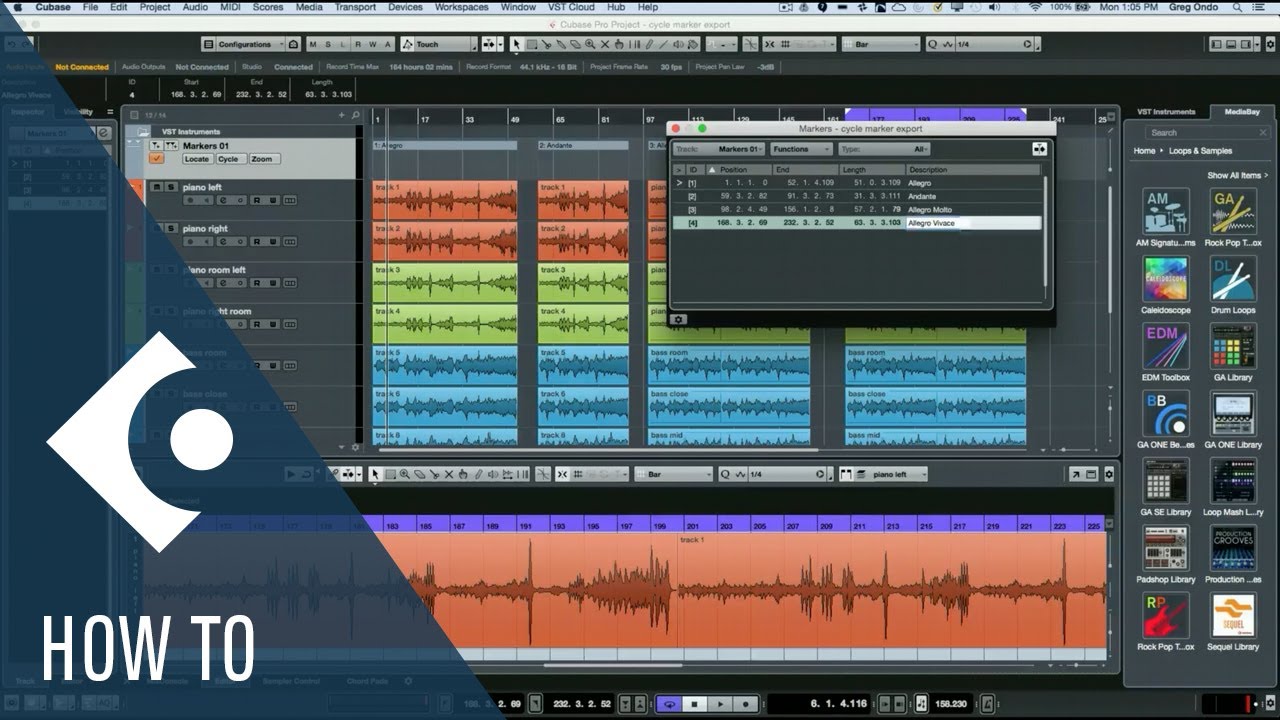
I have a project with a couple of audio tracks. Each one of these tracks contains one Song. They are of course of different lengths!
In the master out channel there is some processing going on that should be the same for all the songs.
I set up a batch export that creates one Audio File named correctly for each of the individual tracks/songs. But here’s the problem:
All of the exported mixdowns were “cut” to equal length (obviously the first one I had selected and set the Locators accordingly). I remember to have set the locators to each of the indiviual Song’s lengths while creating the batch. Still… it did not work as intended.
So my question is:
Is it possible to achieve what I described above, i.e. one Audio file per “track” (song) with DIFFERENT lengths?
I think you’d probably want to use cycle markers and export multiple files via the cycle markers. Here’s a video that shows this (in an older version of Cubase, but I think it is probably still the same basics):
One note: This assumes the separate songs in the project do not overlap. It’s not clear from your description if that is or isn’t the case in your scenario.
Thank you for the hint! I used this method alteady.
In my case the situation was different, because all tracks (the contained events) started at the same position.
I assumed this would work, because it does not seem to make sense if exporing several tracks would require them to be of the same length - wouldn’t this undermine the use cases for a batch export function?. (I assumed that this would not even require a batch in the beginning - just selecting “multiple”… which obviously does not work because of the “locator-rule”).
I just found that it works with markers in my scenario with a batch export. The key is to export single tracks (with or without master fx, just as needed) and before that to set up a marker for each one of the tracks, just the way you would do if the songs were on a single track one after the other. I am aware that the “all songs on a single track” only requires one export and not a batch. But this can be tedious to set up when we talk about a lot of songs.
So - there is a reasonable solution, because markers can overlap.
Right, that was why I mentioned the caveat at the end of my response.
Well, that depends.
I use the batch export functions for two main purposes. One is exporting different audio file formats of the same mix (e.g. WAV and multiple MP3 bandwidths, 24-bit/48 kHz and 24-bit/96 kHz – I have to do my CD-quality exports in a separate batch due to different dithering plugin settings needed for the 16-bit versus 24-bit part). The other is exporting stems for a mix. In both cases, all exports will be from the same exact source and locator range.
That said, there are also other things I’d like to be able to do that the current batch export facility doesn’t handle (at least not for my purposes). One would be exporting both the full mix and karaoke and instrumental mixes in the same batch. That doesn’t work because I have to mute the lead vocal for the karaoke mix and also the background vocals for the instrumental mix, so I have to do three batch exports to get all three sets. Another is for unmastered mixes, a case where I want pre-roll and post-roll, and thus a different locator range, to export from the mix bus instead of the stereo out.
I’m not sure what your specific reason for having the two different songs overlapping is – that would seem to me to make it hard to do the track-specific processing since you’d have to mute or solo one of the songs while working on the other, rather than just starting playback at a different position. The only times I’ve done that sort of thing in Cubase is when doing a whole bunch of cassette digitization, with each tape being on a different track, where all other tracks are disabled when adding a tape to the master project. That was just to prevent having to have a whole bunch of separate projects on the front end, though, if I ever get to doing real restoration work on those files, I’ll probably break them out to separate projects as I do each tape (just importing any given tape’s track from the master project when I begin the tape-specific work). For now, though, if I need to work with one specific song, I just enable the specific track with that song on it, then set the locator range where it needs to be for that song, and do any processing work needed then do the export.
What I might suggest, if it makes sense for your context, is that you could simply move the relevant clips/events from one of the songs to later in the timeline, then use the cycle markers as in the video. Perhaps that may be complicated if there is a bunch of automation, but it would probably be pretty simple if not, even if there are multiple tracks involved.