I posted this on the FB Dorico to Finale form and got several suggestions I should post it here so here it is.
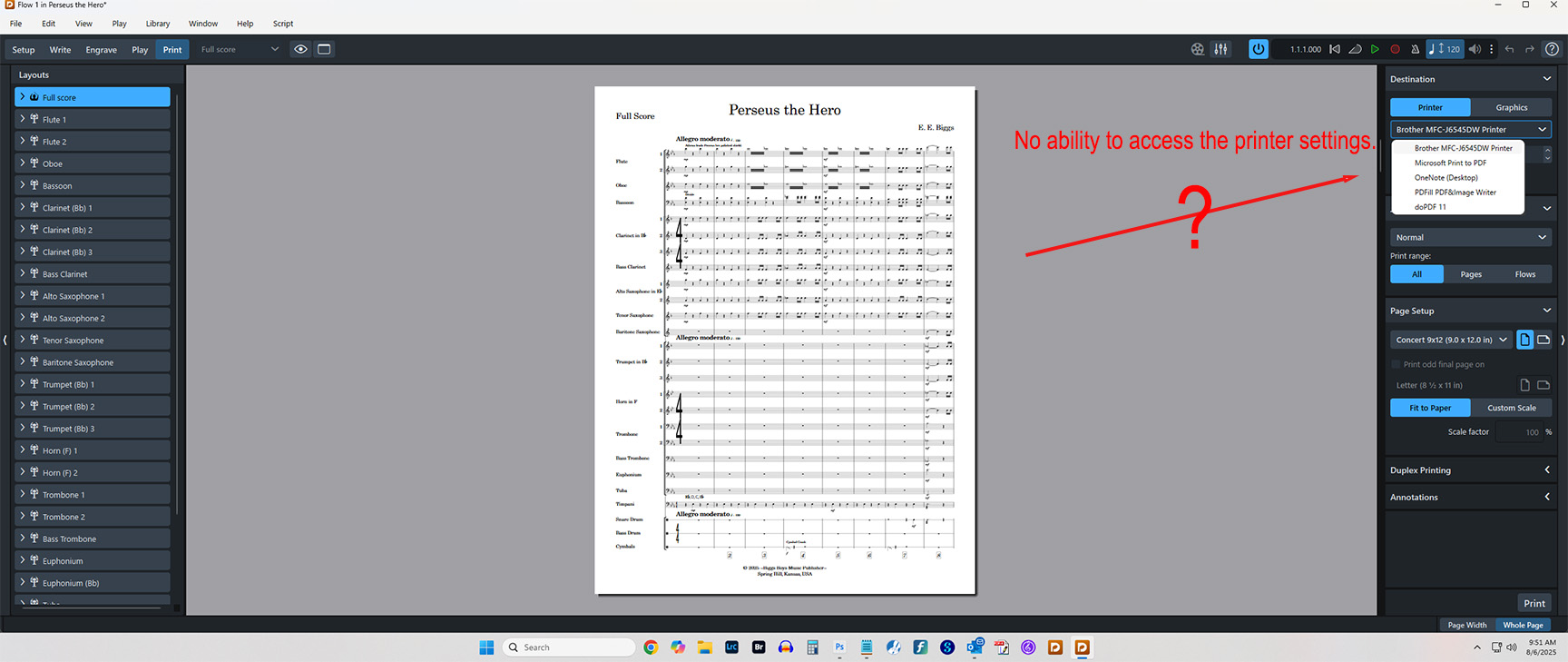
“Why doesn’t Dorico let you or have a way to access the printer like all the other big notation apps. It seems like such a simple addition to the Print module and it is essential.”
I don’t know why it doesn’t provide a shortcut, but if you need control over more settings than Dorico provides you with, you can always open the printer control panel directly from your OS. (Personally, I’ve never needed to do that.)
That is not a good solution because the printer is used for more than just printing music as I suppose most people need. Why such a simple addition or correction isn’t there just seems like an oversight which can be remedied easily and quickly.
Besides other printer functions the inability to select which tray the printer uses is the biggest issue. 9X12” concert size paper is in the MP tray which can not be selected in Dorico unless I can access the printer directly as I suspect every other printer there is.
The fact all other notation apps, as I believe all other apps that print, have this ability. The question becomes, Dorico why?
For that very reason I always save my files as .pdf first. Just relying on a proprietary format is always a risky business. I am using Dorico on a Mac, so .pdf is second nature of that OS. And saving musical projects to .pdf should always be an additional step anyway.
Basically I avoid
a) when opening a project: using the Dorico launcher. I always go via the finder/file explorer
b) when printing: using Dorico’s Print Mode. Instead I save as Graphic/.pdf.
When I was on PC, I could never print from Dorico. My default paper size is 9.5x12.5 and I could never access my Printer’s system settings through Dorico to be able to correctly print to that size through the bypass tray. I usually create PDFs of everything anyway, but it was still an extra step to always have to print from PDF that I didn’t have to do with any other program. (Acrobat obviously had no problem accessing these settings.) IIRC the devs said this was a QT issue. In any case, Dorico on Mac can access the system settings so it’s not an issue, but it was definitely annoying not to have this option on PC.
For that very reason I always save my files as .pdf first.
Well it doesn’t say much for a $500+ dollar app which can’t complete a project unless you buy another expensive app to complete it. All the other apps seem to know how to include that functionality.
eebiggs, your best approach would be to put this down as an official feature request (FR). The developers read every post and can decide on feasibility and urgency.
It was suggested I repost this to the feature request tag.
I posted this on the FB Dorico to Finale form and got several suggestions I should post it here so here it is.
“Why doesn’t Dorico let you or have a way to access the printer like all the other big notation apps. It seems like such a simple addition to the Print module and it is essential.”
You and a few others here are why I don’t use the forum very often and only this time because it was a suggestion to me to do so. I am sorry if I don’t know all the ins and outs of this forum like I am sure you are. It is likely to stay that way!


 completely off topic: our daughter used to say “when I am big and have a daughter: she will have a cat…”