Now, here is someone with their glass half full 

Hey, at least some proof of life of an expression map update is not bad.
LFG, Steinberg.
I couldn’t agree more 
Swapping out a bunch of expression maps to upgrade and if Steinberg is indeed updating it (Which would be amazing) I have a few requests fresh on my mind:
Allow the EM editor t o stay up and persist while working instead of hiding. There is a hacky workaround to right click, hit move, then use DeskPins to pin that window open. It’s useful to do so when working on multiple EM sets.
When selecting an expression map in a track, automatically sync the EM editor to that EM. I have about a hundred EMs and it’s very difficult to manage them all without this. The same request goes for selecting tracks and wanting the EM assigned to that track to pop up in the EM editor.
Also, ability to update EMs. Some of us use external tools, or BabylonWaves EMs and importing new versions is a huge amount of work listed below. If we could simply right click and say (Re-import) to update and maintain the EM assignment that would be incredibly useful and save me hours for any future fixes or updates to libraries and Babylon waves. Even better if it can keep manual tweaks I’ve made such as assigning shorts to CH2 instead of manually one by one having to adjust those after.
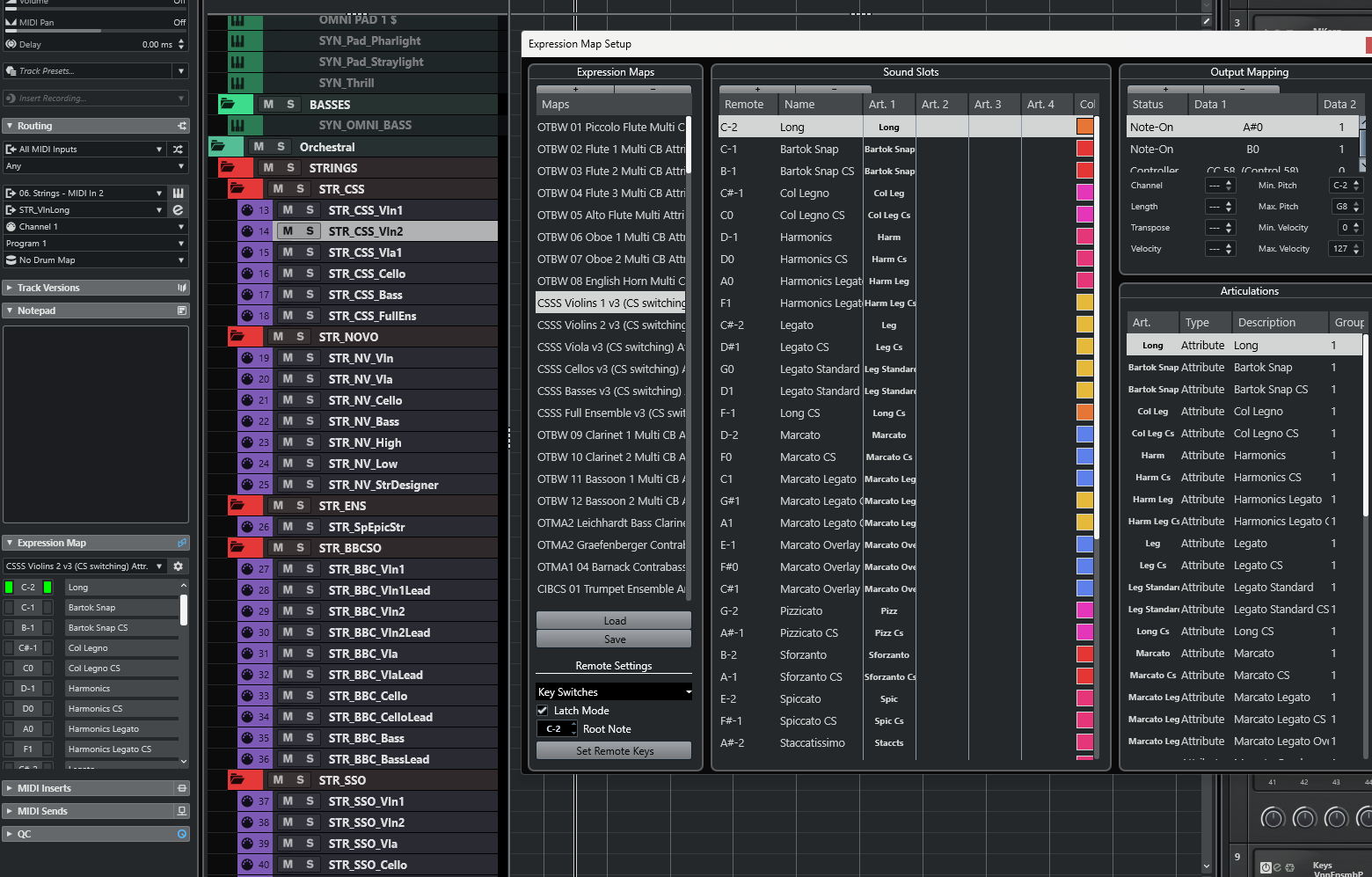
CURRENT MANUAL WORKFOW FOR SWAPPING EMs (Why I’m requesting an update/reload).
Open old template in one window in C13 save a copy with a new version name
Open new version in C14 open that in a new window on the right side of the screen. (Only way to have both activated to actually see and edit the EMs is to have unique cubase versions)
Now you’ll have both the new and old template open.
In the new one remove all expression maps. EMs just live in each project locally once imported.
In the old session copy the name of the first EM, for the first midi track
In the new session paste the name of the first EM, make any alterations to match, then assign.
Continue for all EMs.
Also, the big list here I already shared here:
Saving expression maps in templates works fine now. Not sure when or if they changed it recently, but it works.
Yes, can confirm it works now when I load my latest template. But the bugs where it did not and expression map assignments got lost when a track was reenabled shows there needs to be more stability around expression maps. Hopefully Steinberg refocus more on composer features, like expression maps - and why not improve drum maps too (i.e. would love to see multiple variants of factory sample library expression maps + drum maps from third party vendors)
So, C15 just released with (finally.!) some attention here…
Of course, still plenty of ideas in this thread that haven’t made it yet, but maybe it means there’s (realistically) chance of further updates to come…
We went through all the main expression map threads and feature requests over the years and implemented a huge number of the things that were requested, and in particular a lot of workflow improvements. We tried to prioritise the things that have the most positive impact to the most people, so apologies if your own requests haven’t been done in this version.
Updated to Cubase 15 Pro - Just finishing up a piece that I am composing in Dorico Pro 6 and waited until Cubase 15 to be release before importing into Cubase to do expression maps. Was really hoping to have some kind of update regarding expression maps and sure enough Steinberg came through! Thank you so much Team! 
cheers
JDTune
I finally got my wish with the updated expression map, however, I am not sure if this was intentional, seems like the “midi modifier” section such as the attack delay is not saved with the map? Has to be modified per track or project?
It does get saved with the map - I’m not sure what you mean. Are you saying every time you save and close and reopen the project all of your attack compensation settings are gone?
Solved, the modified file was saved under a different name although I wanted to overwrite, all is fine
YES!!! This is excellent news. Just updated and so nice to see the new features and bulk selection attribute editing. That alone is essential for quickly mapping all these EMs. Looking forward to digging in further.
After digging in the main thing I think it needs is a filter and multi select edit. Here’s why:
I’ve got dozens of expression maps from Babylon Waves Art Conductor all hooked up. I also have plans to adjust the attack comp per expression using the handy chart here: Virtual Instrument Track Delays - Google Sheets
Currently, there’s no way to do this. At a minimum I want to be able to select all strings, then select all their legatos and assign an attack comp, then all shorts and assign an attack comp. Then rinse and repeat for WW, Brass, and Perc.
On an average these values would work ok for a good set of libraries, but currently there’s no good way to apply it to the EMs used in a template. However, if I could select multiple expression maps and simply filter by “long” articulations, then “short” articulations or even by names or multi selections with multiple EMs then I could batch assign the values extremely quickly.
Even better, most companies have pretty similar MS delays here so if we can select by company (which is simple in BW Art Conductor) we could assign them.
| Instrument Family | Articulation | Value |
|---|---|---|
| ALL | Short (Stacc/Spicc/Pizz) | -40 ms |
| ALL | Long (Sus/Legato) | -90 ms |
| Percussion | All Hits | -20 ms |
| Override | CSS / Lyrical Legato | -150 ms |

So the main requests for me after messing with C15 are:
Bulk selection of expression maps
Bulk Importing/Exporting of multiple expression maps (for backing up while making tweaks
Filtering all EMs from the multi selection by name or short/long or color.
Batch editing multi selections, for multiple EMs at one time to apply things like attack comp or channel.
With those options we could all tweak away and quickly get our attack comps set even more granular than simply splitting out by short/long which many do due to the time committment of every articulation being perfect.