Greetings All,
From the reading I’ve done on this forum, it seems that it is possible to add custom clefs to Dorico using a doricolib file, but I have no idea how this is accomplished, or how such a file is created. In Finale, I often created tablature with this symbol as the “clef” for the tablature staff:
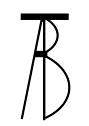
I would greatly appreciate any help regarding how to add this graphic as a clef in Dorico.
I, too, am interested in the answer.
Is this what you’re looking for?
I downloaded the image from the previous post (which is a PNG file with a transparent background), executed Library > Music Symbols, searched for 6-string tab clef in the Edit Music Symbol dialog, deleted the existing glyph, selected the Graphic tab in the upper right corner, clicked on Choose, selected the image I previously downloaded in the Open Image dialog, clicked on Open, and clicked on Add Graphic. Then I adjusted the scale (keeping X-Scale and Y-Scale the same) and the Y-Offset until the graphic had the desired size and vertical position on the tab staff.
8 Likes
Thank you! That worked like a charm! I appreciate your help!
Exactly. I just now figured it out. I created a symbol using two ♭ symbols to create the B and similar lines. I created a very big TAB symbol so that pixels are more smooth when on the page.
You beat me to it. Thanks


