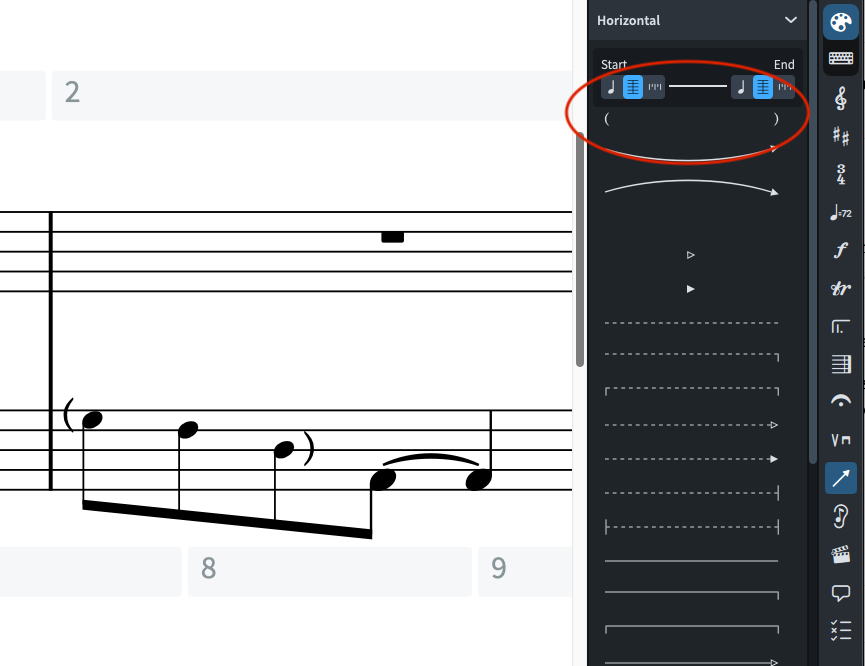
I would like to enclose a string of notes in parenthesis - left parenthesis “(” to the left of the first notehead and right parenthesis “)” several bars later, to the right of the final notehead.
Based on this thread in the forum I have used Edit Line Annotations to create the left and right parenthesis in the “text” category.
But how do I actually make these symbols appear on my score? I cannot find any source anywhere that explains how to use these custom line annotations once they have been created.
If you created the horizontal line already, it should appear in the Lines panel. From there, you can select the notes in your score first and then select the line to apply. I imagine you’ll want the line attached to the noteheads at the start and end. You may also need a little manual adjustment in engrave mode to get the position you want.
Thanks for your help - I did figure out how to create a line with parenthesis on either end, but, how did you get your line to be invisible? Even with zeroing out all the values in the Line Body Editor I couldn’t get the line to disappear.
In the meantime I was able to create a workaround by just inputting ( ) as staff text and moving them where I want them in engrave mode. But it would be nice to have the option of doing this with an invisible ‘line’ as well.
Thank you both!! That finally worked. I think part of what I did not understand was that I had to
Create a new “line body” in the line body editor (not edit one of the existing)
Name it Blank or Invisible or such, then set that that line to 0; 0
THEN explicitly select that line I just made in the Body Style box. I had thought the Body Style box would auto populate with the line I had just designed, it didn’t.
All that done and it works as it should. The only problem is that the ( and ), which I have set as start cap and end cap, deploy between the two selected notes, rather than to the left (of the first note) and right (of the final note). I imagine there isn’t a way to change this - because lines are supposed to connect two notes? The parenthesis are easy enough to then move to the proper position in Engrave mode.
I really like this solution. But there is something I’m not understanding about how to create Notehead Sets. I can create a new Notehead Set just fine with the left parenthesis “(”.
But when I try to create a second Notehead Set with the right parenthesis “)” it works but the left parenthesis set I created before it gets changed from “(” to “)”, even though I clicked ‘new’ notehead set for the right parenthesis and gave it a different name. It’s like the two sets are linked somehow even though as far as I can tell they should be different.
The noteheads themselves are linked. When you create a new set, you need to create also a new notehead (using the + in the Notehead panel), and remove the one that was automatically added to the set (selecting it and using the icon with the arrow going outside the little box, in the Notehead Set panel).
You are welcome @Gary_Prince, though the idea of using notehead sets was suggested here above by @jesele, who probably deserves the Solution checkmark.
(I was explaining an aspect of creating notehead sets).