After Over a Year of Troubleshooting, Nuendo Seems to be What's Crashing Our PC

Power save? No, we disabled eco settings everywhere we came across them and set both Windows and Nuendo to optimize for performance; which is why we use an ASUS Thor 1200W Platinum PSU, to supply ample power.

Why would the GPU power setting come into play and, if it matters, where should I look to check the specific setting you’re referring to?

It just recently started happening. The popup I just started getting looks to be the same, but the file mine mentions is

This module is blocked from loading into the local Security Authority. \Device\HarddiskVolume3\ProgramFiles\Bonjour\mdnsNSP.dll”

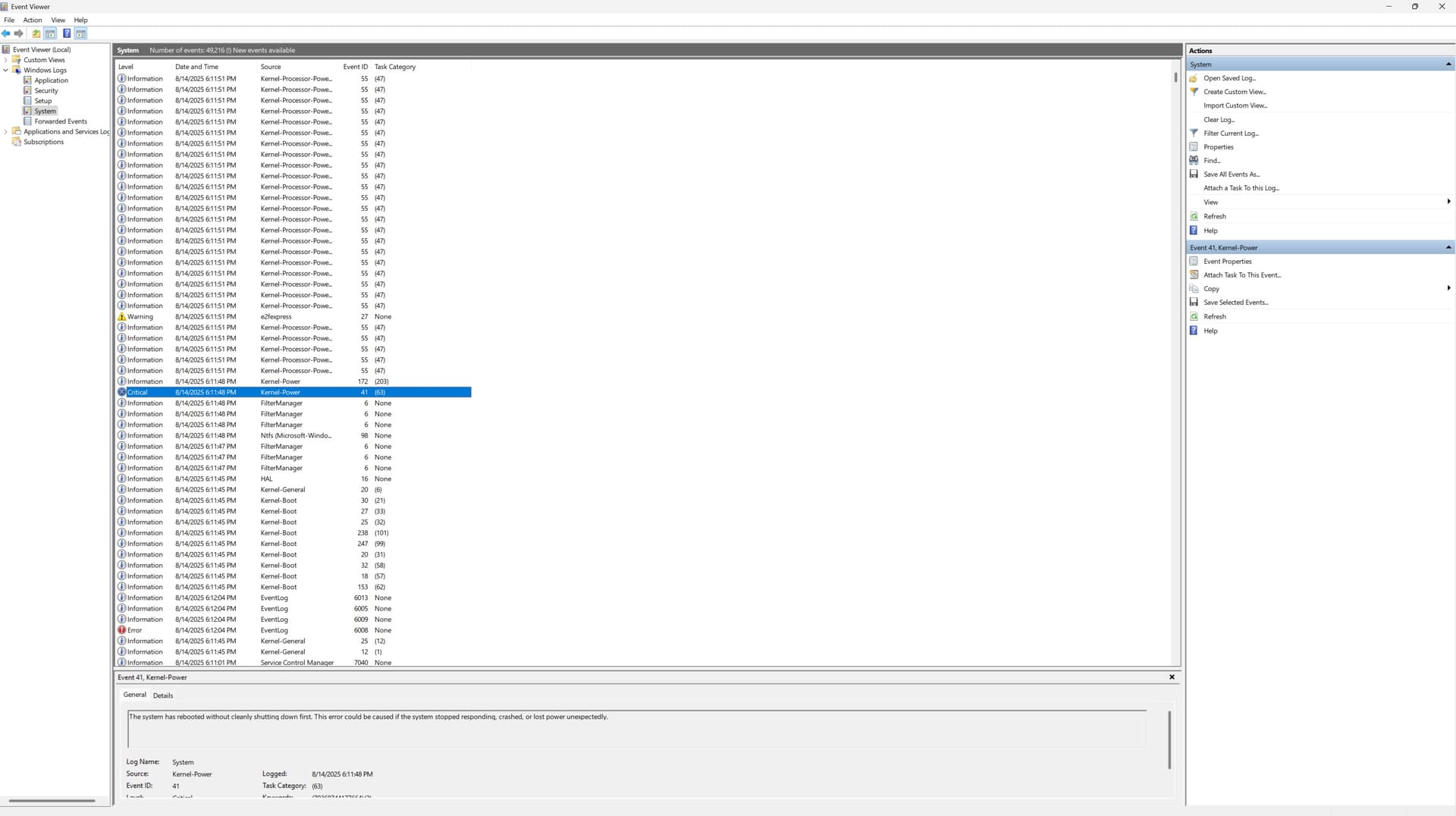
Notable event logs:

Several TPM-WMI Errors throughout the day, which say: “The Secure Boot update failed to update a Secure Boot variable with error Secure Boot is not enabled by the machine.”

WHEA-logger Errors: “A fatal hardware error has occured. Reported by component: Processor Core. Error Source: Machine Check Exception

Critical Kernel-Power: “The system has rebooted without cleanly shutting down first. This error could be caused if the system stopped responding, crashed, or lost power unexpectedly

I attached a PNG screenshot. Not sure whether you’ll be able to read it, but if your familiar enough with Event Viewer you can probably figure out the information; especially since I just typed the most potentially relevant info.

I dont think so. I setup the displays after the last fresh install of Windows 11 Pro, and haven’t thought about anything related to the GPU since.

I think this is your culprit - unfortunately, this points to a physical hardware problem, and one being reported by the CPU (or at least within the capabilities of the HAL to interpret the source).

I found this article from MSFT:

The causes cited range from power to thermal, and of course general hardware failure. This could be mixed bag of issues, like poor heat management causing socket connection issues to “brown-outs” from a bad (or fluctuating) supply.

Hard to make a recommendation other than taking it to a reputable repair facility to verify.

But I think as long as you see these kinds of errors, you’re looking at hardware, which can manifest itself in any number of ways.

As an aside, I noticed your Event Log seems to be sorted other than by event date, as near the bottom where you’ve got that Event Log error, the date-time stamp has 06:12:04pm entries in-between your 06:11:45 entries. I’d make sure to sort the log chronologically so that you can better correlate entries.

Its Windows 11. We switched from Windows10 Pro to Win11 Pro, in the process of all this, hoping it might help; not that it likely matters, but just in case.

Other than disabling hyper-threading, the settings are as you described. We’ve kept hyper-threading enabled ever since Nuendo first introduced it because my work requires a LOT of CPU power.

Its still running the AMD R9 5950X because every time we discuss the replacement PC we’re torn between moving up to at least a 32-Core/64-Thread TRx-Pro or just updating to the latest version of our current CPU (9950X) because a TRxPro would give us a lot more cores/threads… but slower base clock. The 9950X, on the other hand, is exactly what we already have, but with a little more speed. The other thing that makes a Threadripper more appealing to us is that the mobos are a wet dream. The ability to swap the CPU out for a 96-core when the budget allows, 2TB DDR5, 4× M2 slots, 7 PCIe lanes, dual NICs, plenty of TB4 and and USB3.0… Itd be nice to build a PC that doesn’t need to be upgraded for the next decade or so lol.

Anyway, the point is that we need a LOT of performance power. This is the main PC for a hybrid Dolby Atmos mastering room. We need to be able to run 100+ mono/stereo channels with an average of around 2.5 plugins per channel, about 150 or so sends (which seem to each eat up a surprising amount of CPU resources), (4) 7.1.2+ reverb busses, 3 to 4 delay busses ranging from 7.1.2 to as high as 24-channel ambisonic delays, 200 outputs, 146 inputs, and still host SpectraLayers Pro in ARA, WaveLab Pro in ARA, Melodyne in ARA, UAD2 software, Dante Virtual Soundcard (for system audio and/or OBS), OBS, Dante Contriller, Neve Recall, SSL digital console remote software, DADMan, RedNet Control… Im sure Im leaving some essential software out- All without losing the ability to add VSTi like Iconica, Halion7, ReasonRack, etc.

Our Atmos rig is very special. Despite iur small size, Ive had some of the biggest name engineers (Derek Ali, for example) dumbfounded by our rig. I don’t wanna burn any of those bridges, so Ill stop there, but the point is that this is an incredible Atmos room and this PC is the motor that drives it all. Im not sure I can get by without hyper-threading enabled.

I’ve been fortunate enough for the issue to become more rare and even go away when Im on a deadline to deliver, and I have Reaper (also ProTools Ultimate and other DAWs, but ProTools is awful, so I always go with Reaper) available when the issue becomes too problematic… but I need Nuendo to become as reliable as the other DAWs because using any other DAW is like getting shot in the foot before running a marathon.

1 Like

I can understand your reluctance to disable hyper-threading. That said, Nuendo on Windows does have known quirks with very high logical-core counts under extreme sessions like yours (100+ channels, ~150 sends, multi-channel reverbs/delays, and other apps running). On a 5950X—16 physical cores / 32 threads with SMT (hyper-threading) on—the DAW can spread work unevenly, which can at times cause dropouts or even crashes. Atmos projects make this more sensitive because real-time rendering and plug-in hosting need very predictable thread scheduling.

The extra software layers in your setup (DADMan, RedNet Control, Neve Recall) can also add handshake points where the renderer chain misbehaves.

The jump from Windows 10 to 11 may not have helped either. Some Ryzen 5000 systems (including 5950X) have seen intermittent BSODs like Kernel-Power 41. It’s worth updating the motherboard BIOS to the latest AGESA for 5950X/Win11 stability, and testing different NVIDIA/AMD GPU drivers since a few Win11 crashes have traced back to GPU–Dante interactions.

With an average of ~2.5 plug-ins per channel, ARA hosts (SpectraLayers, WaveLab, Melodyne), UAD-2, and networked audio (Dante/RedNet), you’re in a zone where conflicts can come from an incompatible VST, ASIO overload, or simply the sheer number of sends (they really do hit the CPU).

In my experience, Reaper and Pro Tools tend to cope better with very high core counts out of the box. Nuendo’s Atmos toolset is excellent, but it does have limits. If you’d rather avoid disabling hyper-threading, I’d start with BIOS/AGESA and GPU driver updates, prune or restructure heavy send networks, temporarily disable third-party plug-ins/ARA to spot a culprit, and test higher buffer sizes for renders. If those don’t stabilize it, limiting cores (via affinity) or, as a last resort, turning off SMT for the heaviest mixes can make Nuendo behave more predictably.

Also have that on a W11 machine.
But it doesn’t affect anything.
I have been told that it is a Quicktime compoment (installed by some application/plugin) that isn’t compatible with Win11.
As said, everything is working perfectly here.

Fredo

1 Like

Bonjour is for Dante autoconfig. It searches for components in the network.

Yeah, that’s correct.
Forget to mention this one.
But there are more applications that need Bonjour.

Fredo

FWIW, there were two different reports in the thread for the same dll - one in the Audinate folder, and the other from Bonjour. The OP’s was related to Bonjour directly, which (as you said) may or may not be safe to remove based on his requirements. ‘Twer I the other user reporting the Dante instance, I’d just remove it completely since he stated he doesn’t use it.

I’m not a big fan of vendors that continue to load bloated components for no reason. For my Apollo x8 drivers UAD force a Dante (ConMon) installation by way of a shell script (which is lame in itself) and the x8’s don’t even support Dante, though the Console still has an entire network section where you can go in and configure it even though it’s not supported.

However, for this thread in general, I don’t see how any of these other details even matter as the OP already posted event logs showing fatal processor core errors reported by the machine checks, which (to me) pretty much solves the mystery.

2 Likes

Based on the messages reported by the OP I would wholeheartedly agree.

2 Likes

My reference-audio comes from AppleMusic+ hosted on a Mac, which is multicast to the MTRX (Monitor Source B) and the 512×512ch. Dante PCIe interface card (DAW inputs for when I want to analyze or print reference audio for whatever reason) over DVS.

All of the PCIe cards, instances of DVS, and Dante-enabled devices appear in Dante Controller; except that instance of DVS that runs on a Mac. It only appears in Dante Controller (which is on the PC that gives the pop-up about Bonjour) every once in awhile. Weeks and often even months go by between its appearances in DC. Communication between that instance of Dante Virtual Soundcard and the devices its routed to & from always send & recieve audio. Its only Dante Controller that has trouble finding it :man_shrugging:.

I don’t think there’s any correlation between the Bonjour pop-up and DC rarely seeing DVS on the Mac, but Bonjour being an Apple thing, you mentioning its relevance to DC, the fact that DVS’ by default is named after the computer running it in DC (unlike the PCIe cards), and the Mac’s instance of DVS not appearing in DC seems like a bit much to just ignore completely.

Doesn’t seem to have anything to do with the problem Im concerned about, but might be worth looking into at a later time, just to be sure they’re not related.

That’s what I spent the afternoon looking into, before checking back here.

From what I was told this afternoon, after sending the full event log text file to my IT guy, the event logs indicate an issue with the first thread of the first core. (“Core 0, Thread 1”)

I was told that there are still a a bunch of other possible causes, but it at least gives me a place to start testing. I was also given an organized process of elimination to follow that will hopefully lead me to the cause. I started step 1 before I left the studio.

I ran Nuendo14 > Loaded a problematic project > Right-clicked Nuendo14 in the “Details” section of Task Manager > Clicked the option that says “Affinity” > Disabled the box that corresponds to the first 2 cores (the 16 cores were grouped into 8 pairs in the menu that popped up). Then, I worked on the project for about an hour and left it running when I left.

If its still running tomorrow when I walk in, Im to work on the project and, if it doesn’t reboot by the end of the workday, it means I’m on the right track… but it still doesn’t narrow the issue down to faulty core because there are apparently other possibilities related to the CPU.

Some of the things I remember are:

□ Swapping CPUs with another X570 PC

□ Running Memory Diagnostics again and giving him the results this time, instead of relying on my own limited knowledge alone.

□ Checking to see if there’s been another BIOS update since I last updated, in case there was a fix that resolves my issue.

□ Running Nuendo in Safe Mode and enabling 1 plugin at a time, with all cores enabled. I dont get what one has to do with the other, but apparently there’s some known issue with GPU-powered plugins. I looked into them before to see if there were any that might be useful to my work and all I saw were some unimpressive VSTi, but he specified Waves and iZotope. The only iZotope plugin I ever use is the immersive reverb Equinox, but we have a few a few others and, like any other studio, we have Waves entire catalog. So, if that’s a possible cause, it needs to be confirmed and/or eliminated.

□ The one I REALLY dont want to have to do is rule out the ASIO and Dante card. So, Im hoping to put that off as a last resort, unless there’s a way to save and recover F4 routing. The downside of a 1,024ch. interface is the days it takes to configure all the inputs and outputs.

Im probably forgetting some of the stuff on the list, but anyway, having a checklist to rundown feels more promising than trying random stuff.
1 Like

Thanks, everything you just said fits with what I was told today.

Disabling hyper-threading in Nuendo disabled ASIO-GUARD, which made audio playback sound awful. So, I turned it back on and moved ASIO-Guard from medium to high. Unfortunately, the issue remained.

I noticed awhile ago that Nuendo internal processing defaulted to 32bit-float after the last time I reinstalled Nuendo. I dont think it’ll make any difference, as far as the rebooting issue, but I switched to 64; just to make sure.

This is like the 5th time today the GPU has been mentioned, but I don’t understand the relevance. I was told earlier to open Nuendo in Safe Mode and enable one 3rd party plugin at a time and see if it’ll crash; with an emphasis on checking GPU-powered plugins. I didn’t think I had any, but apparently there’s have been similar issues reported with Waves and iZotope plugins related to the GPU. I get the issue with only MixHub and NLS in the project, but I don’t know which ones are linked to issues nor whether or not they have to be applied to an insert to cause issues.

GPU-sag was the only thing I thought could be GPU-related. So, I took a shitty mic nobody would ever miss (Røde NT1A) and stuffed paper under it until it was able to support the the GPU without applying pressure upward. Adding support to the GPU didn’t help (obviously).

Just finished reading the rest of what you typed, and its remarkably close to what the IT guy went over with me today.

I used the Task Manager “affinity” thing to temporarily disable “Core 0” for Nuendo, after a few things I was told to type into prompts confirmed what that the ID mentioned in the logs referred to “Core 0, Thread 1”. Then, I spent a little under an hour editing, without it rebooting. I left it on overnight and, tomorrow, I’ll check to see if the project is still on the displays when I walk in, or if it rebooted after I left. If its still running, Ill get going on the project and see if it reboots on me. I was given a list of tests to run if it reboots and another list to go through if it doesn’t.