Any coders here by any chance?

Why not? You’re exactly the right person, because you come to this with a completely fresh perspective; us dinosaurs have just learned to live with stuff, muttering away in the dark and hacking our own solutions.

If enought people need this, then it’s a win-win … go for it! :mega:

The binary strings inside the <bin name="audioComponent"> … </bin> element inside every /…/<obj class="MInstrumentTrack" …>/<member name="DeviceAttributes">/<member name="Synth Slot">/<member name="Plugin"> are simple hex dumps, 2 digits 0…9A…F per byte, chopped 64 characters (32 bytes) per line except the last, possibly shorter one. The format clearly depends on a particular VSTi instrument.


I. The SINE Player, that @Sebastian_Alvarez mentioned, at the line 163974

                     <string name="Original Plugin Name" value="SINE Player" wide="true"/>

has almost all of its data in a UTF-8 JSON string, save for a few binary leading and trailing lines:

SINE Player JSON data
{
  "fileFormatVersion": "1.0",
  "samplerVersion": "1.2.2",
  "instanceName": "SINE Player",
  "dynamicXFadeCC": "11",
  "velCCXFade": "1",
  "disableExpressionCC": "false",
  "masterTune": "440",
  "masterTempo": "120",
  "syncToHost": "true",
  "keyswitchOptions": {
    "ksAreaStartHighInstrument": "24",
    "ksAreaStartLowInstrument": "96",
    "ksAltRelease": "23",
    "ksAutoSustainMute": "21"
  },
  "selectedEntry": {
    "instrumentIndex": "0",
    "articulationIndex": "0"
  },
  "renderer": {
    "prefetchPageCount": "256",
    "latencyBufferCount": "1",
    "readerCachePageCount": "1024",
    "readerCachePageSize": "4096",
    "sampleCachePageCount": "32768",
    "controllerMappingRules": [{
        "inController": "1",
        "outController": "1",
        "useCustomCurve": "true",
        "curve": ["0", "1", "2", "3", "4", ...[SNIP]..., "104", "105", "106", "107", "108", "109", "110", "111", "112", "113", "114", "115", "116", "117", "118", "119", "120", "121", "122", "123", "124", "125", "126", "127"]
      },
      ...[SNIP]...
    ]
  },
  "preloader": {
    "preloadTime": "0.25",
    "lockPreloadedPages": "true"
  },
  "instruments": [
    {
      "instanceId": "54881345-eb61-4d43-b360-e87054ba3c17",
      "id": "1996",
      "title": "Violins I tutti",
      "midiChannel": "1",
      "omniMode": "false",
      "performanceType": "default",
      "performanceScript": "",
      "keyRangeLow": "55",
      "keyRangeHigh": "100",
      "transposition": "0",
      "volume": "0",
      "mute": "false",
      "mutedbysolo": "false",
      "solo": "false",
      "switchMode": "MONO",
      "switchType": "KEYSWITCH",
      "polyMapPerformanceMode": "SWITCH",
      "polyMapTrackingType": "CC",
      "variationCC": "3",
      "color": "50",
      "ksshift": "0",
      "syncToHost": "false",
      "lockToBeat": "false",
      "autoTempo": "false",
      "multiplier": "1",
      "arrangerActiveState": "true",
      "arrangerLeadVoiceState": "false",
      "arrangerBassVoiceState": "false",
      "arrangerVoiceSettingsModified": "false",
      "arrangerLeadVoiceRangeSettings": "2",
      "arrangerBassVoiceRangeSettings": "0",
      "arrangerRetriggerActive": "true",
      "micPositions": [ ...[SNIP]... ],
      "articulations": [ ...[SNIP]...]
    }
  ]
}

instruments[0].title = "Violins I tutti" is an easy guess. :slight_smile:


II. Here’s another VSTi species, line 55992:

                      <string name="Plugin Name" value="Opus" wide="true"/>

whose dumped state is just over 100000 lines of binary data (about 320K) long, but near the end contains the following JSON snippet at lines 159394‒159476 (three dots in strings are bytes encoding one character in UTF8; this is an artifact of my doing a byte-level dump):

Opus JSON data
{
  "bounds": {
    "width": 1146,
    "height": 770
  },
  "inspector": false,
  "inspectorTab": 0,
  "instruments": true,
  "keyboard": false,
  "workspace": {
    "Browser": {
      "browserTab": "library",
      "tagBrowser": {
        "tags": [{
            "class": 1,
            "lastSelected": 0
          }, {
            "class": 2,
            "lastSelected": 0
          }, {
            "class": 5,
            "lastSelected": 0
          }, {
            "class": 6,
            "lastSelected": 0
          }, {
            "class": 3,
            "lastSelected": 0
          }, {
            "class": 4,
            "lastSelected": 0
          }
        ],
        "instrument": {
          "class": "InstrumentInfo",
          "title": "09-Celeste",
          "fileName": "09-Celeste.ewi",
          "entity": 10659,
          "path": "GM Bank/009-16 CROMPERC",
          "installationState": 0,
          "description": "GM BANK ... This is the world...s first 14 GB General MIDI bank. Most (but not all) of these programs can also be found in other folders in this library. The GM bank is mostly for convenience and to adhere to a standard.",
          "instrument": "",
          "keyRange": "",
          "loadSize": "",
          "keyMin": 36,
          "keyMax": 96,
          "size": 0,
          "productId": "com.eastwest.11",
          "productEntity": 0,
          "productTitle": "EW Goliath",
          "rating": 0,
          "comment": ""
        },
        "playPreview": true,
        "previewGain": 0.16295507550239564
      },
      "diskBrowser": {
        "product": "com.eastwest.8010",
        "instrument": {
          "class": "InstrumentInfo",
          "title": "18V KS Master",
          "fileName": "18V KS Master.oib",
          "entity": 18853,
          "path": "18 Violins/05 Keyswitch",
          "installationState": 2,
          "description": "Keyswitch (KS) Master instruments can switch between many individual instruments or articulations by playing their respective blue-colored keys (...keyswitches...) on the virtual keyboard. When an instrument or articulation is actively selected, its corresponding keyswitch will be highlighted in yellow. This is one of the fastest ways to cycle between articulations in real time, and it makes it easy for you to drop notes into the piano roll and switch articulations after the performance.",
          "instrument": "",
          "keyRange": "",
          "loadSize": "",
          "keyMin": 0,
          "keyMax": 0,
          "size": 0,
          "productId": "com.eastwest.8010",
          "productEntity": 0,
          "productTitle": "EW Hollywood Strings Opus Edition",
          "rating": 0,
          "comment": ""
        },
        "folder": [{
            "path": "/Users/Shared/Eastwest/EW Hollywood Strings Diamond/Hollywood Strings Opus Instruments",
            "selectedItem": 0
          }, {
            "path": "/Users/Shared/Eastwest/EW Hollywood Strings Diamond/Hollywood Strings Opus Instruments/18 Violins",
            "selectedItem": 4
          }, {
            "path": "/Users/Shared/Eastwest/EW Hollywood Strings Diamond/Hollywood Strings Opus Instruments/18 Violins/05 Keyswitch",
            "selectedItem": -1
          }
        ],
        "selectedPath": "/Users/Shared/Eastwest/EW Hollywood Strings Diamond/Hollywood Strings Opus Instruments/18 Violins/05 Keyswitch",
        "playPreview": true,
        "previewGain": 0.16295507550239564
      }
    },
    "Mixer": null,
    "Performance": null,
    "Player": null,
    "selectedPage": "Player"
  },
  "instrumentsCollapsed": false,
  "project": {
    "location": "/Users/sebastian/Documents"
  }
}

Is this enough to determine the patch loaded into the sampler? There is a mismatch between instrument and diskBrowser.instrument. I may have missed more JSON-formatted pieces in these 100000+ lines, of course.

Both VSTi’s are apparently built with JUCE, as its name occurs at the end of the binary dump, so their binary dump format is probably documented.


III. But Kontakt 7’s binary dump data, line 2628,

                     <string name="Plugin Name" value="Kontakt 7" wide="true"/>

look totally opaque to me; nothing like readable strings there, unless I missed them. Of course, the data may contain opaque binary library and instrument IDs only, as Kontakt has its own ecosystem.


It looks like some library and instrument names can be recovered with a little effort, but not all can be.

1 Like

How is this for a feature request? It’s pretty specific I think.

2 Likes

The biggest surprise is that I don’t think this is a terrbile complicated feature to add- the content is literally in the file. Especially since it’s been asked for so many times.

But I’m starting to think that Steinberg monitors this forum and then makes a point to never add anything we’ve ever asked for here.

That seems perfect to me.

I don’t know about that. To me it seems more like a matter of priorities and resources.

… so go to @noise 's topic and vote for it (I have):
image

Just did. Only 3 votes :sob:

1 Like

Thank you for the detailed information. I found some time to write a small Java app that extracts basic data from the XML file including the instrument names present in the encoded JSON data of the SINE player. Here’s how it looks after processing the above XML file (not pretty but somewhat usable):
grafik

Here’s another example where inserts are present:
grafik

3 Likes

I just got the brilliant score for Godzilla Minus One in the form of a Japanese CD, with pretty much every instance of text in Japanese. I’m sad to say that this paragraph you wrote is barely one step above that Japanese text when it comes to my understanding, so I really appreciate you taking the time to go through all of that with the knowledge to know what it means.

That would be correct:

But how come if I do a search for even just tutti, I get no results? I mean in the XML file that I exported.

The Opus one seems a lot more complicated, so this is a screenshot of what’s loaded:

So yeah, it has the info in all that code that you pasted.

Weird, but well, at least we can get the track names and the VSTi. It’s a matter of keeping up with copying the instrument name to the track name the first time and then after changing the instrument inside the engine, if we do that. And the thing is that many engines are not designed well. For example, SINE player only shows the name they gave to the sub-instrument, not the name of the library they belong to.

In the case of “Violins I Tutti”, I know they are the Wallfisch ones because those are the only ones with that name. But look at this:

Screenshot 2024-06-18 at 20.59.17

Each of those is from a different library. If you expand them, and you spent a lot of time with these, you might be able to tell them apart. But I don’t have the best memory, so I can’t always tell them apart.

That’s cool, do you want to put it up somewhere so we can try it out?

These instrument names are not stored in plain text but encoded in the hexadecimal byte sequences found in the bin elements, like

<bin name="audioComponent">
55A8170000000000010000006873696E01000000000000005FCF34B1ACE34654
...
</bin>

After converting them to ASCII, some of them lead to readable text. But that depends on the VSTi. So each VSTi would need it’s own data extractor.

Sure. You can download it here. You need a recent Java Runtime Environment (JRE) to execute it. If it’s already installed on your computer, a double click on the JAR file should start it. You can also run it manually on the command-line with

java -jar cbxml-extract.jar

I’ve changed the interface a bit. The app is a quick hack, not properly tested and might not work with all Cubase XML files.

So how do you convert it from hex to ASCII? Is that a function in Visual Studio, Xcode, and software like that?

Thanks Martin, I downloaded it, and also downloaded the latest Java runtime version, but it’s not working. But I think I may have accidentally screwed things up because when I did a right click and choose Open With, I accidentally set the .jar extension to open with Firefox.

So after installing the JRE I did another open with and this time I navigated to C:\Program Files\Java and associated it to java.exe. When I double click your file, it flashes the command prompt window for a split second and disappears.

So I ran it the CLI way you told me, and here’s the output:

C:\Users\sebaz\Cubase project to text project>java -jar cbxml-extract.jar
Exception in thread "main" java.lang.UnsupportedClassVersionError: MainFrame has been compiled by a more recent version of the Java Runtime (class file version 61.0), this version of the Java Runtime only recognizes class file versions up to 52.0
        at java.lang.ClassLoader.defineClass1(Native Method)
        at java.lang.ClassLoader.defineClass(Unknown Source)
        at java.security.SecureClassLoader.defineClass(Unknown Source)
        at java.net.URLClassLoader.defineClass(Unknown Source)
        at java.net.URLClassLoader.access$100(Unknown Source)
        at java.net.URLClassLoader$1.run(Unknown Source)
        at java.net.URLClassLoader$1.run(Unknown Source)
        at java.security.AccessController.doPrivileged(Native Method)
        at java.net.URLClassLoader.findClass(Unknown Source)
        at java.lang.ClassLoader.loadClass(Unknown Source)
        at sun.misc.Launcher$AppClassLoader.loadClass(Unknown Source)
        at java.lang.ClassLoader.loadClass(Unknown Source)
        at sun.launcher.LauncherHelper.checkAndLoadMain(Unknown Source)

It seems like a versioning problem, which is weird because I went to Java.com and downloaded the latest runtime for Windows 64 bit, and even opened the Java control panel and checked for updates.

What did you use to build it?

I’ve written a function for this in the Java program. If you just want to convert a hex sequence on the fly, there are several websites providing online utilities for that, e.g. this one.

Sorry, I should have mentioned, that at least Java 17 is required. Oracle stopped distributing JREs publicly some years ago. So the one from java.com is pretty old. You can get recent JREs here for example.
I hope this helps.

That is not correct, you can still get the latest JDK from Oracle as abfree download.

Yes, that’s right, you can get the latest JDK but not just the JRE. As a user you normally don’t want to install all the development stuff. At least I don’t.

True, a JRE is These days mostly included in products that require Java. Installing a JDK doesn’t take really much space, but you get the latest Release and the JRE is included.

1 Like

I’m really confused. So Oracle, the company that created Java around 1996 if I remember correctly, stopped offering the runtime environment by itself years ago, however, they still have it up on the java.com website, which they own I presume.

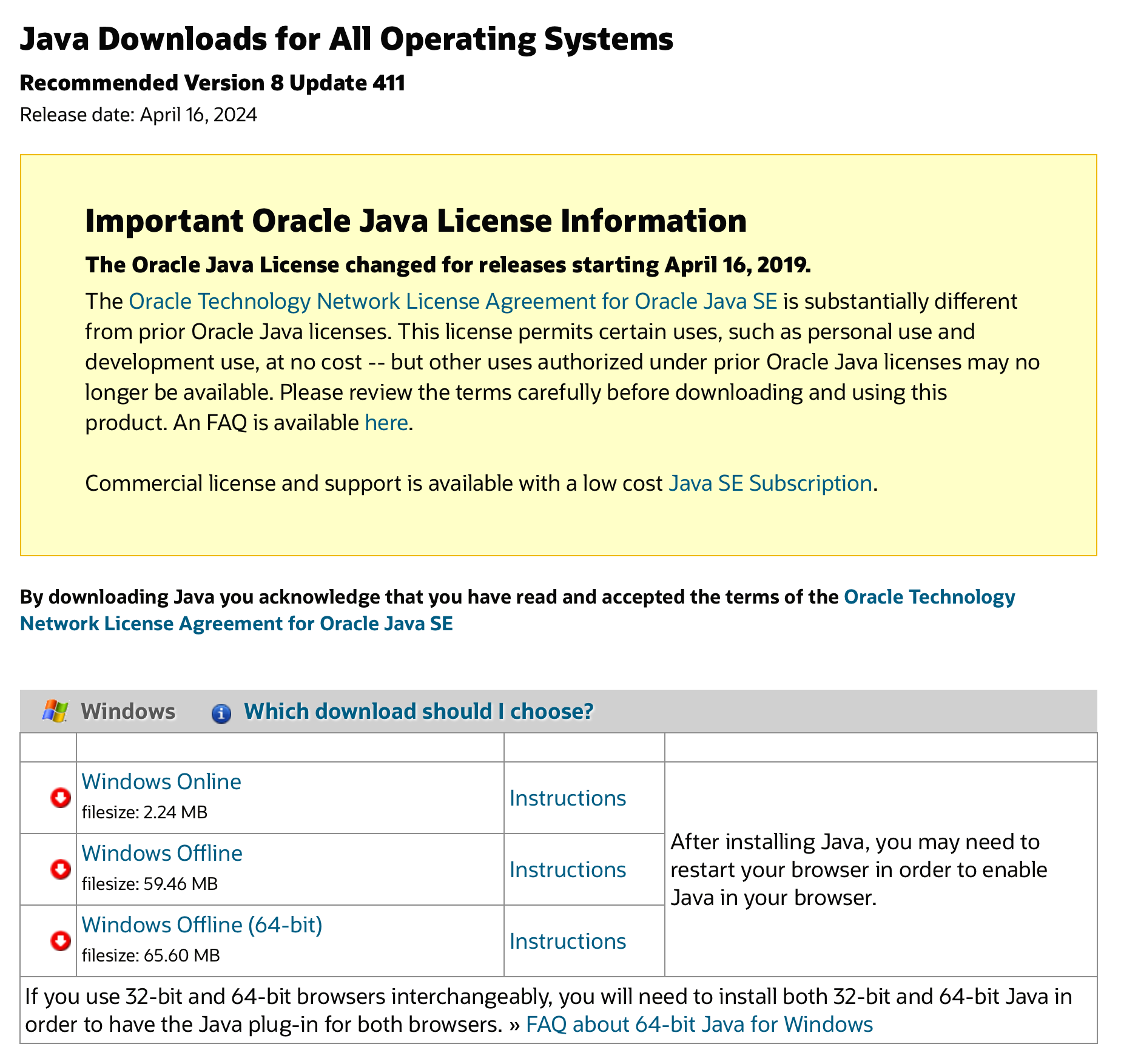
Are you positive about that? Because I was just at that website again and it seems current to me:

I mean, if Oracle is posting an old version of their runtime environment that would open them to class action lawsuits because people would download to their machines outdated and with a lot of safety holes.

But as you can see, the version on Java.com is from April of this year.

Oracle still provides updates for Java 8 including security fixes. That’s why the latest release is from 2024. Java 8 is also the latest version that officially supports Java applets and the Web Start technology. It’s still present in later platform versions but they have been deprecated and will be removed at some point.
So the newer Java versions are considered to be used on servers and for standalone applications but not as a client technology used within web pages, for example. That’s probably the reason why Oracle expects developers to bundle recent JREs with their applications and doesn’t offer them on their website any longer. The JRE of Java 8, on the other hand, might still be used in other contexts and is therefore still distributed separately.
Nonetheless, if an application doesn’t bundle the required more recent JRE for some reason, you need to install it separately. In this case, you can use the JDK, but I prefer a plain, more compact JRE without the additional development stuff I’ll never use on that computer. That’s why the JRE builds e.g. provided by the Adoptium group come in handy.

1 Like