Hi,
Is there any way to create artificial harmonics without going into the lower panel? For occasional use the panel is fine, but for artificial-harmonic-laden pieces it would be amazing to have keyboard shortcuts, for instance one to add/remove the harmonic and one to go through the partials…
1 Like
No, at the moment there’s no way to do this other than via the Properties panel. This is certainly something we want to change.
4 Likes
yes please.
that and change the default harmonic from octave to 4th.
2 Likes
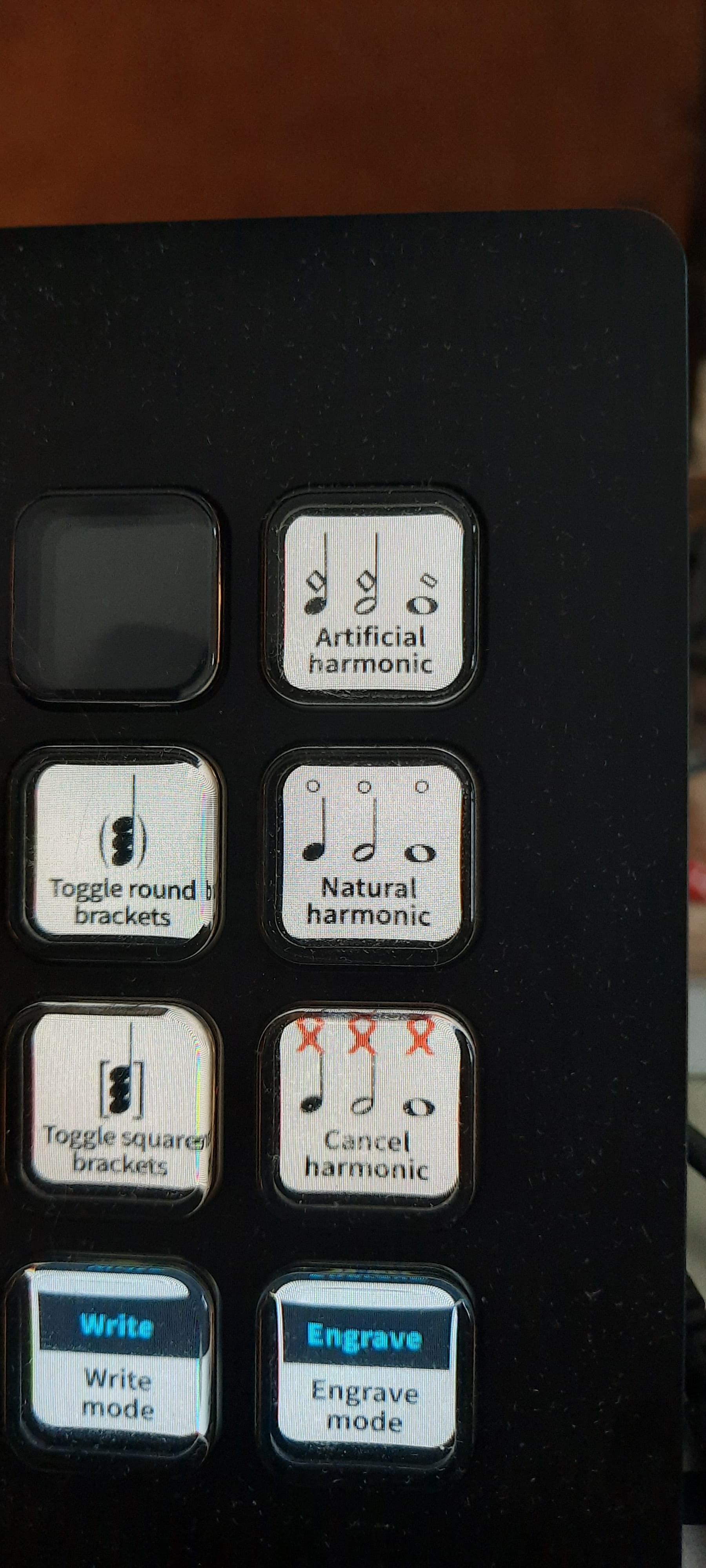
If you have a StreamDeck, there is a function in there for creating harmonics.
Unfortunately, because of the way someone at Dorico programmed it, it defaults to the octave harmonic, which is of no use at all to anyone writing for orchestral strings.
So you can add harmonics very rapidly to a whole selection of music, but you still end up having to go into the bottom panel to change the partial.
However, that said, if you select ALL your harmonics, you can set them all in one fell swoop to the same partial. meaning you don’t have to do them all one-by-one.

1 Like
For those interested, I just recorded my action to make it so it’s now a mini Lua script. Pop this into the script folder with a text file that ends in .lua and you’ll be able to use this.
local app=DoApp.DoApp()
app:doCommand([[UI.InvokePropertyChangeValue?Type=kNoteHarmonicType&Value=string: “kArtificial”]])
app:doCommand([[UI.InvokePropertyChangeValue?Type=kNoteHarmonic&Value=int: 4]])
This will work if you’re in Dorico 5. If you’re in 4 or earlier, you’ll need to split the commands into 2 separate scripts (the app had issues running multiple commands before).
Scripts appear in the jump bar command list, which makes it pretty quick. If you have Keyboard Maestro (I highly recommend, only $36), you can also make key commands through it to run the scripts.
2 Likes
I was able to turn this into a single button with my StreamDeck
1 Like
Ah, I saw that your post from 5 months ago didn’t include the touch 4, so you were still having to enter the Properties Panel to apply that.
Great if you didn’t need the script to pull that off, but if you do (or anyone else who finds this thread) the script will get you directly to the Touch 4 harmonic in a single function!
No, no, I actually used your script WITH my Stream Deck.
now I can just apply touch-4 harmonics with the touch (no pun intended) of a button.
1 Like
SLICK glad it was helpful.
Scripting actually works now in D5, so there’s a lot of annoying processes that are now possible in a single click - which should really open doors for you with the stream deck!
2 Likes
Hi Daniel!
Any update on this?
I am writing a piece with a lot of harmonics
I suppose you know the harmonics limitations already in this video jus few months ago
I think it is a great wishlist to address in future release!
There is no update on this as yet, no.
Hey. Thanks. Put the script in the lua folder. Sorry, I do not know how to use it? Dorico beginner help needed.
Thanks in advance.
Win: c:\Users\<username>\AppData\Roaming\Steinberg\Dorico 5\Script Plug-ins
Mac: ~/Library/Application Support/Steinberg/Dorico 5/Script Plug-ins
Save your script file there as text file with a .lua extension, and they will appear in the Script menu in Dorico.
1 Like
Thanks.
I did. But how do I use it?
I am a newbie.
Jump bar did not find it
Do you see it in the Script menu? To use this particular script, select the note you want to add a harmonic to, then select the script from the Script menu.
When you add a script to the scripts folder, it should show up in the Scripts menu right away, but you’ll need to restart Dorico in order for the jump bar to see it.
1 Like
Thanks. Excellent advice.  Now it works via the script menu.
You are great!
All the best from Sweden!
/Curt
Hi everyone, I created the macro for artificial harmonics in the script menu. Is there a way to map it to a shortcut or midi mote? Thanks in advance!
You can do this if you’re comfortable editing the JSON file that contains key commands.
This file is called keycommands_en.json (where en is the abbreviation for whatever language you have Dorico set to), and it’s located in c:\Users\<username>\AppData\Roaming\Steinberg\Dorico 5 on Windows and ~/Library/Application Support/Steinberg/Dorico 5 on Mac.
Because the current state of this file can differ depending on what key commands you already have set up, I suggest using Dorico to add a key command for a similar command – in this case, something in the Note Editing section – and then altering the command in the file to call your script instead.
For example, let’s say you want to use Ctrl+H for this harmonic script. Go into Edit > Preferences > Key Commands and add Ctrl+H as a shortcut for “Propagate Note Spellings” (or something else in Note Editing that you don’t use). Then close Dorico.
Open up the JSON file in a text editor – note: not a word processor, like MS Word, but something like Notepad on Windows – and search for the command you just added.
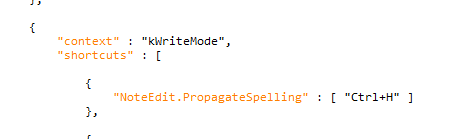
Replace NoteEdit.PropagateSpelling with Script.RunScript?ScriptPath=C:/path/to/myscript.lua. (Use the actual path to your lua file, and use forward slashes even on Windows.)

Save and close the file. The shortcut should work for you the next time you start Dorico.
1 Like
Thanks! i will give it a try!
I use a .lua script that I think is the same as described earlier in they thread and is easily accessible from the Script menu whenever I need it. I merely select a single note, engage the script, and it creates a perfect artificial harmonic (a fourth above the note) as desired. I could probably tweak it to create different artificial harmonics, but for strings, the fourth partial is the most common I would use and it’s easy enough to tweak it in the Properties Panel if needed. The problem with using the Properties Panel to create a harmonic de novo is that it defaults to an octave, which is weird since that’s not anything I could have done on the violin back in the day when I actually played it.
The script is attached. I run it from my Dorico folder on my computer. Easy.
artificial harmonics.lua (208 Bytes)
1 Like