Automate creation of CC automation events?

In my quest to find faster ways to tackle boring and repetitive tasks, I’m trying to find a way to automate adding automation points to CC1 whenever I download a MIDI file that I want to turn into something much better.

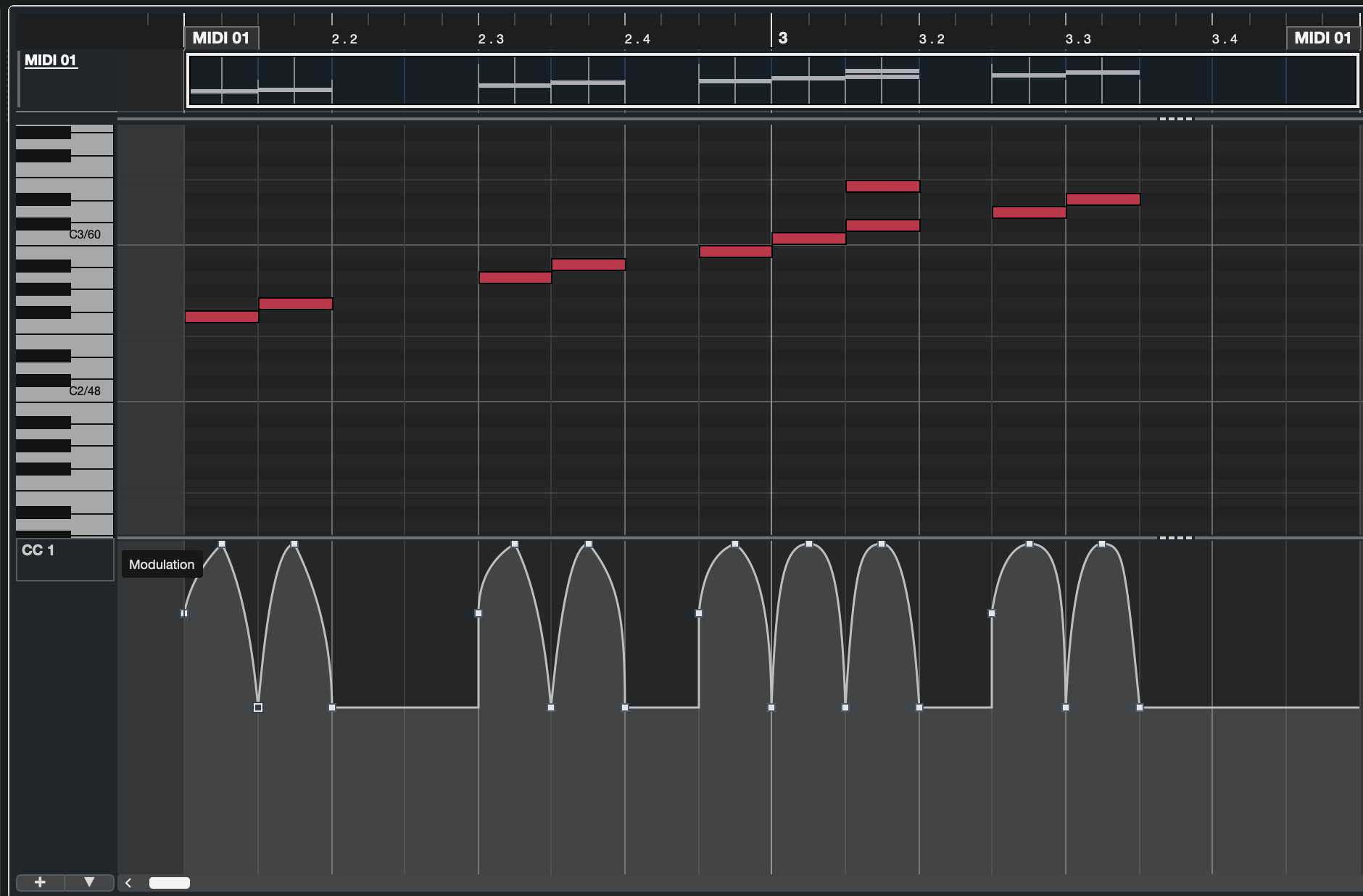
This is what I want to achieve:
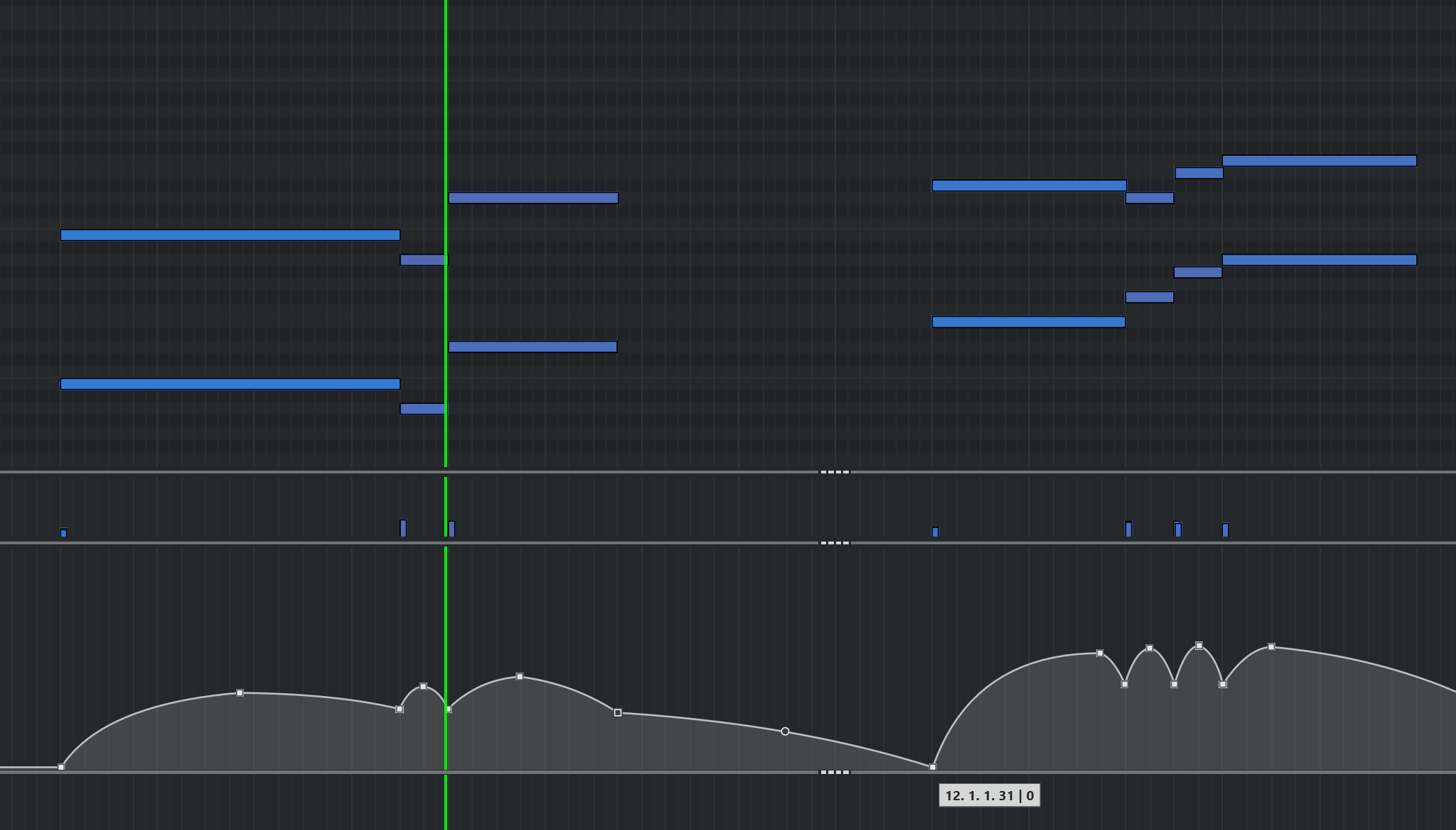
It doesn’t have to be exactly like this, but basically is creating something like this, where every note that is a quarter note or longer, would have 3 points, one at the very start, one in the middle, and one at the very end, which would also be the starting point for the next note, in cases where notes are one right after the other, or simply have a 3rd point, and then the next note after the space without notes, would also start with a point.

The start and end points could be at a value of 60 and the ones in the middle of the note could be at a value of 90 to say something. Any value that would make it easy to click and drag all the high or center points and do whatever you want with them, using one of the many great actions that Cubase provides for CC automation editing.

Meaning, this would be something that would take care of the annoying part of alt+clicking several times to create all those points, then dragging the little circle in between them to make the line curved and all that. Sure, to some extent you can save some time by creating a few of these, then copying and pasting them, but then you have to move a lot of these points so they match the beginning and end of the notes.

With the method I’m thinking about, it would at least save a lot of time by taking care of the stuff that really adds nothing creative to the music, and then just modify all those points, selecting several at once and moving them backward or forward in time to put the emphasis at the beginning or end of the note, or use the scale tool that can make these “mountains” start low and get gradually higher. Basically, I want to stop wasting time on things that don’t need brains, and use that time for the things that need some creativity. Not only for MIDIs somebody else did, eventually I would like to have this for my own music.

I spent all afternoon reading the manual for the logical editor and found nothing that tells me that creating these automation points is even possible, even with all the vast amount of things that the logical editor allows. Further testing on my own didn’t yield much.

Can this be done, at least some version of it?

Hi,

Sorry, this is not possible. With Logical Editor, you can detect a MIDI Note On message only. Do you could create the “start” nodes only.

Bummer. How about other programs? I don’t mean necessarily other DAWs, mostly because for what I’ve gathered online over the years, Cubase is the one with the most advanced MIDI features.

But I mean small Github projects, or even software that was made for Windows 20 years ago. After all, MIDI is a format that has been around for decades, and it’s not out of the question that someone could’ve thought of this before.

Of course this would require to pre-process the file before bringing it into Cubase, or export it from Cubase as MIDI, process it in that program and then bring it back.

Hi,

I can imagine writing a simple Python script to do (partly) so. I don’t know what exactly the values of the MIDI CCs are. So the simplest way would be to create the MIDI CC events later, and then set the values manually.

What none of the software could do was make the curves of the MIDI CCs. This feature is not based on pure MIDI, this is Cubase feature.

Hi,

This is what I got from the simple Python script:

So it creates a MIDI CC1 message for every single MIDI Note On message, MIDI Note Off Message (or MIDI Note On with Velocity 0), and at the mid-point of every single MIDI Note. The values of the MIDI CC1 are as follows:

  • Note On Velocity
  • Note Off Velocity
  • 127 (for the mid-point)

The task, you would need to do manually is to set the curves and adjust the CC1 values, if you want them different.

By quick curves adjustments, I got this:

1 Like

This is quite impressive. Even if it doesn’t create the curves, because as you said, it’s a Cubase feature, not a MIDI one. But it’s conceivable that such a script could create a curve by adding not just the three points, but adding several throughout the duration of the note, as it normally looks if you “draw” the curve with the mouse or a drawing tablet.

Could you please upload that script? And how did you execute it? I know nothing about code, but recently I went back and forth with Copilot for a whole day to create a small Python app that had a few input fields and triggered a Blender render. But it was a hard process, because it would give me code that didn’t work most of the time, while at the same time showering me with praise for every single correction I made, which was unbearable.

Well, I got Copilot to create a script based on a long prompt I wrote and then modified. The first attempt was a disaster, but surprisingly, the second one gave me what you showed here in the first screenshot.

I’m fine tuning it, but I will post it here for whoever wants to give it a try. Needless to say, this will need the latest Python installed in your system. I could turn this into a self contained app, but that experience with the Blender one showed me that it’s not as easy as creating an .exe and that’s it, because you can do that, but if it’s not digitally signed, then even the crappiest antivirus will flag it and not let it launch.

But it’s super easy to just create a .py file that will open as long as you have Python and a couple more things installed.

But I’ll fine tune it and add a few more things, then upload it here. This is what is looks like so far:

1 Like

OK I got it working. Hopefully it will work for everybody else. I’m sorry to say this is probably just for Windows, because it may be Python code, but I think it uses Windows stuff. I may try it on my Mac one of these days, but if it doesn’t work, I won’t fix it because I wouldn’t know how. I did this with MS Copilot, starting with a long and detailed prompt, testing the resulting code and giving it feedback over 7 hours or so.

That said, this code is not encrypted or anything, anyone here who wants to port it to macOS you’re welcome to do so.

So here’s how to make this work:

  1. Download and install the latest version of Python from https://www.python.org/

  2. Open a Terminal window (also called Command Prompt in Windows 10 and earlier)

  3. Copy and paste this into that window:

pip install mido python-rtmidi

  1. Download my file to anywhere you want and run it.

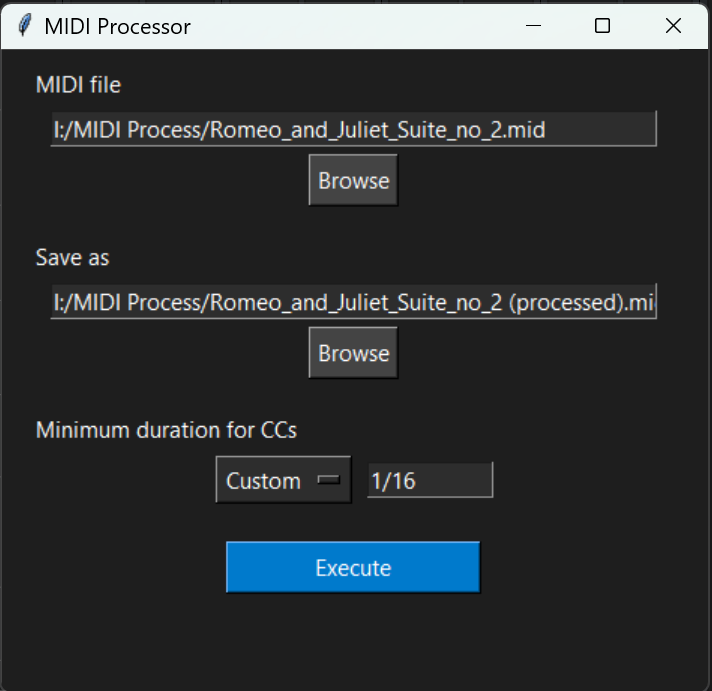
This is what you should see:

It’s pretty self explanatory as you can see. Browse for the file you downloaded from Musescore or some other place, then browse to choose a save location, which by default should be the same as the MIDI file, but you can change it.

The program will set the file name to the same as the source file but adding “(processed)” right before the .mid extension. This program will never overwrite the original MIDI file.

“Minimum duration etc” will let you choose a duration between 1/2 and 1/32, or type in a custom one if you choose “Custom” from the drop-down menu.

When leaving the automation mode at constant, the result will be something like what Martin showed above, basically a step with a point at the beginning, middle and end of note, where you have to manually do the curves.

If you choose the Smooth option, you get a much larger file obviously, because it creates the same type of mountain-like curve that I showed in my first post, so it’s something like this:

Of course this might make things slower in Cubase. In fact, with the initial amount of points, I had to change that parameter to do half as much, because even in my machine it felt a bit sluggish, but not terribly so. To adjust the number of points, please check this text file, zipped so I can upload it here:

How to adjust the amount of points.zip (1.1 KB)

For those who know even less about code than me, just so you know, you can open the MIDEasier.py file in Notepad and make any changes you want, as long as you don’t let it add the .txt extension and keep it as a .py.

Click on the Execute button and the processing is pretty much instant. It shows a message to let you know that it’s done.

Another thing to keep in mind is that the resulting file only keeps the Program Change data from the original file, and deletes everything else that is not notes and their velocities, positions and durations. I made it that way because when I download a MIDI from Musescore usually it has a lot of extra data that was probably created for some other purpose, and the only CC lane that has anything remotely useful is the CC2 one, but it never comes with a smooth automation. I even have a macro to delete all CCs but CC2, copy it to CC1 and CC11 and then delete it, but I always end up changing most of it, because it’s useless.

So the idea with this is to save a lot of time that is not used creatively but in repetitive and mundane tasks like setting CC1 and CC11 automation. Obviously many people prefer recording automation with faders and that’s great, many times I do it that way, but when I do, I end up having to correct a lot of it manually and it’s more time wasted.

This script does a lot of the work for you so you can focus on then editing the CC1 automation any way you want using all the great capabilities that Cubase has for editing MIDI automation.

So here’s the file. Feel welcome to try it out and change it as you wish, if you know Python and you want to change anything or add anything, it’s totally cool.

Keep in mind that if you launch this from a Terminal or Command Prompt window, you have to launch it this way:

python MIDEasier.py

MIDEasier.zip (3.3 KB)

Just to give you an idea, I’m going to also upload a MIDI file downloaded from Musescore, and the resulting file.

Romeo_and_Juliet_Suite_no_2.mid (168.6 KB)

Romeo_and_Juliet_Suite_no_2 (processed)v20.mid (637.7 KB)

2 Likes

Hi,

Great job! Does your app process all MIDI Tracks of the given *.mid file, or just the first track, or how do you select the track, please?

I’m also wondering, what is the UI based on, please?

Btw, this:

installs the Python mido library, which is necesary to be able to Import/Export a MIDI File. Then it instals the python-rtmidi, which is a Python “wrapper” for a C++ library called RtMidi. The purpose of RtMidi is to provide a single, unified way for developers to write MIDI software that works on multiple operating systems. It acts as an abstraction layer.

So it’s safe to install both. :wink:

Thanks, Martin! It processes any tracks it has, and the resulting file has the same exact tracks, except for the MIDI controller data that was in the original file, because the first process after opening the MIDI file is to strip all the CC data, and then build the automation for CC1. I didn’t make it to build the automation for CC11 as well because there’s always some extra work to do, so it’s better to finish working on CC1 and then Cubase makes it really easy to select all the automation on CC1 and paste it on the same place in CC11 (for those who are not familiar, Alt+V pastes the automation points in the same exact place that was copied from, while Ctrl+V will paste the first point at whatever position the playhead is at).

I don’t know, since I don’t know any programming (although I intend to learn a bit of Python soon), but I believe (and I could be completely wrong), that is based on something called “tkinter”.

See, this was done by typing up of all the features and conditions this app should have, then pasting all that into Copilot, choosing the GPT-5 model, because when I did the Blender app, it was the plain model it opens with, and it was a nightmare. This one was an easier process, but it still gave me a lot of messy code, even after giving me good code and me asking for a simple cosmetic change. In fact, the version I ended up with was the 11th one, where it had everything 98% there, but I wanted to make the input fields for source file and save as a bit wider to accommodate more text and the next code it gave me was flawed because the app window was gigantic for no reason.

Indeed. When it gave me the first code and I launched it, it didn’t do anything, so it told me to run that to install those two things.

1 Like

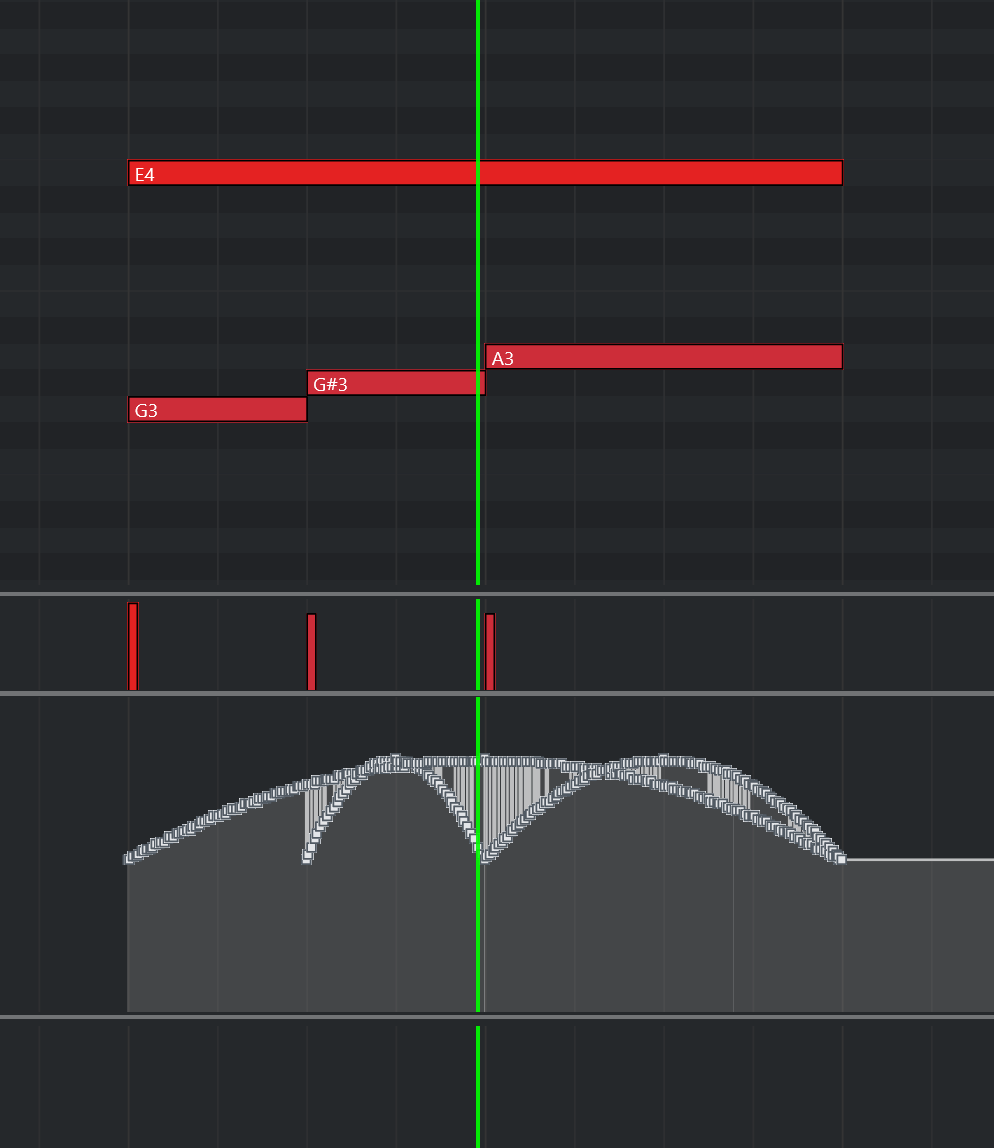
Another thing to keep in mind. With certain notes you might get this mess:

Obviously it wants to create the curves for both the E4 and the other notes below, so it ends up in this mess. While I could spend probably a lot more time asking Copilot to find a way to fix it, it only happens in these situations, so it’s not a lot. In those cases, I just delete the whole mess and just create a few points to do the curve and that’s it.

Hi,

You could make the Note On/Off counter. Note On = +1, Note Off = -1. If value is > 2, that means the situation on your screenshot happens. Then you can handle it other (your preferred) way.

Sorry Martin, I don’t follow.

Hi,

Sorry, English is not my 1st language…

My understanding was that you don’t want to make the MIDI CC curves if the notes are overlapping, to avoid the CC mess.

Therefore, you can introduce the MIDI Notes On/Off counter to ensure that there is only a single note playing back or multiple notes. If there are multiple notes playing back, you can handle the MIDI CCs differently.

You can even make the condition more complex. So if there are notes with the very same Start and End position, you can process them like monophonic notes (like the melody in the octaves, you had on your 1st screenshot). If they don’t match (like your last screenshot), handle them differently.

Martin, your English is perfect. It’s not a matter of language, but rather that your knowledge of MIDI and Cubase far surpasses mine, so I’m having trouble understanding the concepts you mention, but it’s not a big deal, because these occurrences barely happen at all, so it’s easier to just delete that section and just do it manually with three points.

The thing is, what you mention would probably mean asking Copilot to incorporate that into the code, then it would do that but break something else, and for the most part, this does what I need. I’d be happier if it was possible to create just the start, middle and end points and then do the curve to avoid having thousand of points per track, but at least it saves me a lot of time.

I’m surprised about one thing, though. Cubase has excellent features to edit MIDI. It surprises that it doesn’t have a “smooth” function that would grab the MIDI track if I were to use the “Constant” option, meaning the same as you showed earlier, and just make the “mountains” from them, or at least allowed you do them manually but for the selected note range. That’s not a feature that exists and I’m missing, right?

Hi,

No, this is not possible. There is only the Step mode, or the Ramp mode (which is set to linear, by default). There is no way, how to set the “curve” shape as a value.

Yeah, I didn’t think so. It would be great if Cubase would support some kind of scripting that can add features like many other programs have. Of course the Logical Editor is sort of a scripting feature, but it’s constrained to the options it gives you.

I understand that it probably doesn’t have that because many scripts would break things and many users would complain to Steinberg, but at the same time, it would bring lots of great features. One example is Blender, which obviously it’s not a DAW, but people are creating add-ons for it all the time which bring new features to it.