
Try .33 but it is there in .30 just for the VST plugins that expose a menu list for a given parameter. There was not for VSTLive parameters or on/off items, that should be added by devs too

We are speaking different languages, i meant this list of parameter VALUES.
See this is 2.2.33:
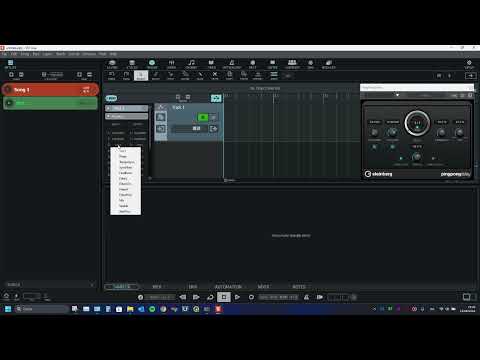
Now that list is gone in 2.2.5X (anyway, there wasn’t the same list for inserts on/off, volume pan etc for direct VSTLive parameters, there was only for VST plugins parameters that presents a list.
yes, I understood everything perfectly, well, now the same thing with AmpliTube 5, Guitar Rig 7, I’m not interested in vst from Steinberg as in your example at all
and even if this is so, one does not interfere with the other, but a pop-up window near the cursor is much more convenient when drawing (we are talking exclusively about convenience) it is implemented conveniently in Cubase! this ends the further discussion. There will be as many opinions as there are people
I can do the same in Antares autotune and other 3rd party plugins in 2.2.30/33, it depend on the plug-in availability of a discrete list of parameters.
Now, when there is not a list but a custom scale , this was never implemented. The scale in standard automation track goes from 0 to 1 , plugins should be able to give scale information like, 0-100% or 20-2000msec or whatever… this should also be implemented, at the moment you see only 0-1 or discrete list labels (in 2.2.30 and I hope at least the lists labels will return in next version)
Agree about the convenience of the hovering tooltip when drawing! 
Exactly. The list of available parameters is exposed and controlled by the plugin only.
Thanks again for the provided version VST_Live_2.2.33, here everything works and at least it is clear and convenient to draw, but in the new version they didn’t even return this…, otherwise you will probably never wait for the promised implementation of a pop-up hint near the cursor🤣

Please bring back at least this functionality so that it works.
Well, ackkkktually, at the moment I revert to 2.2.33 to edit automations and back to latest pre-release for all the other tasks 

Well, you can’t say it better, you have to have several versions, it’s easy to break what you’ve done, but to return it so that it works as before, it seems like in one quote, and it’ll do) it really reflects the approach to the matter
I’m sure there is a reason for the list entries disappearence two possible reasons:
- devs started back from a previous version to fix some other issues (they reworked all the routing in last versions to improve performance and crackling issues. And forgot they had implemented the list entries for automation
- There is a new “2.5” or 3 version (paid update) in development and this function will be integrated later or inglobated in new functions/sustems in development at the moment.
both ways, I cannot say any more louder how much I appreciate their work and attitude in listening and helping us users.


You are a big optimist) but the results say otherwise import export does not work from the beginning of version 2 and when it will be fixed is a big question, in fact there is not a single version in which everything works as stated, one continuous beta test. You yourself keep 2 versions in order to draw automation in one, and with the other new one and then if you are lucky and there are no bugs, to perform)
And personally, I admit, I am already tired of all this, I do not ask for something that cannot be done and I do not even want to delve into why something does not work out for the developers, I only know one thing everything should work as stated from start to finish, and will I buy another version next, I think it is unlikely until everything is fixed and the approach does not change, I was not hired to be a beta tester
Well …… akkkktually () I performed 1 or 2 gigs a week this summer, entirely based around VST live for a band of 6 elements, everyone passing in stacks inside VST live, more or less 50 VST plugins always active, 6 iem sends, master plugins, dmx lights, videos, lyrics, everything!!! So I cannot be more happier than this expecially with last versions cpu usage and song switch time optimizations.
this is a young software and obviously need to reach a feature complete and stable state. But I am happy to help with development and improvements.
Thanks @Spork , much appreciated. While we are on it, would there be a way to implement it not only for fixed list but also for custom scales like 0-100% or for example 0,05-2000msec for compressor, seconds for reverb length decay etc etc and so on … and regarding also not only from VST plugins but also internal VSTLive item like ON-OFF for inserts enable-disable, dB for volumes L-C-R for pan etc etc …. Often times the standard 0-1 scale is of difficult interpretation
@Spork if there is no easy way to implement at least on-off for like inserts etc, can you please add a couple of buttons “set 0” “set 1” next to value field ? Just to have a easy clickable way to insert 0 and 1 in automations (could be useful also set 0 and set 255 for dmx and midi cc’s) because it is not easy to click on graph to these extremes values, and I al always need to activate input in value field and digit it. A button should be quicker!
In version 2.2.61, automation drawing in the lower field was broken, the pencil now only perceives extreme positions in the lower field, in 2.2.60 everything works as it should
@Spork , @musicullum checked this:
Autom points:
- placing a point with draw tool works as expected
- moving a placed point with SELECT tool works as expected BUT you can drag above 1 and below 0 the point (nonsense)
- moving a placed point with draw tools (snap on grid) make the point move by value 1.000 each mouse movement, jumping well above 1 obviously (should move by decimals).
MIDI CC/velocity:
- placing a point with draw tool works as expected
- moving a placed point with SELECT tool works as expected range 0-127 by 1
- moving a placed point with draw tools (snap on grid) not possible (should be possible like redrawing by hands velocities by dragging free hands the draw tool)
DMX points:
- placing a point with draw tool works as expected
- moving a placed point with SELECT tool works as expected range 0-255 by 1
- moving a placed point with draw tools (snap on grid) works as expected range 0-255 by 1
So, a couple quick corrections, i believe it is because we need to differentiate between Autom. points (0-1 movements by 0.01 or so), MIDI CC points (0-127 by 1), DMX points (0-255 by 1).
EDIT: Actuall ythis is very important and basic edit functions, and new users will soon find it because as a new user, first thing i would do is adding tracks and play with them to learn basics. So stubling in such difficulties in basic edit functions for a new user is a pretty big let down, i would correct it as soon as possible in public releases. My 2 cents
Cheers, Ciro.
It still draws an extra command, and what is drawn cannot be selected and deleted with an eraser, only with the cursor by pressing delete on the keyboard