Behringer xtouch one

BERHINGER XTOUCH ONE

Dear All - I have just bought the above unit and can’t get it to work with VSTL. I could assign a small number of buttons from VSTL to Xtouch (using VSTL’s Actions & Shortcuts option), but some button and fader assignments are quite tricky. Anybody with experience in this area to assist!!!??

1 Like

Yes and no. Behringer Xtouch (and all the others on that level) are very ticky to provide complex controls (E.g.: there are function-btns they change to output value regarding the quantity of pushing the btn, etc.) So tricky, I couldn’t even properly change specific things under LogicPro. For Cubase, I’m using script from github for defaults …

Where did you stuck?
The motorfaders are pitch-band values but a note-on is sent when touching the fader (so u need to set manually instead of LEARN to bypass that, etc)

Thank you so much Felician for your usual prompt response. I remember coming across a past post where you made some mention of the Xtouch One. My current problem lies with activating the fader to control each individual channel’s volume (controller 07??). I have so far been able to program some functionality, such as use of the function keys (F1..F6), start/stop, moving to next/previous channel, etc. In a nutshell, I am trying to learn and understand the “Actions & Shortcuts” menu.

I have also managed to use the default Mackie settings for Cubase.

I guess it’s probably because Xtouch sends a NoteOn when touching the Motorfader-knob (to send “touch active”), but LEARN receives that NoteOn first, while you’re probably expecting fader movement (pitch band) will be larned. Instead try this:

  1. touch the motorfader knob and keep your finger on it
  2. click LEARN in VL with other hand
  3. move the fader for LEARN
    This will send the corresponding pitchband data straight ahead and will bypass “touch NoteOn”. Did this help?

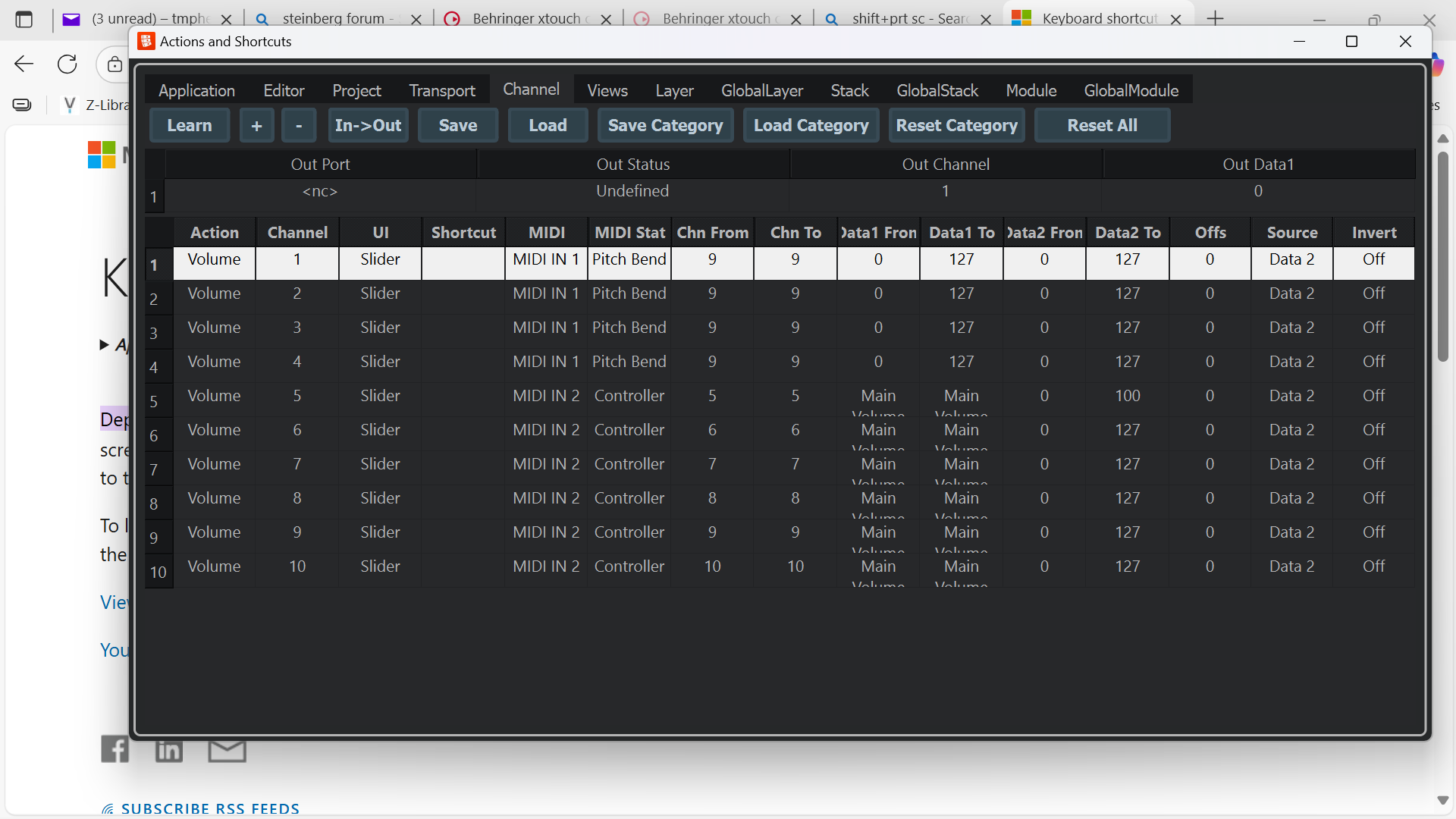
Thank you once more Felician. The guidance you provided partly works in that when I try to program the channels’ volume faders individually, their volumes all move at the same time, not individually. In the attached screenshot, I programmed the first 4 channels. I tried changing the Chan from and To values, but their values keep on going back to no 9.

Let me add also that I am using the default Mackie setting on Xtouch. I have been playing around this with the “Master” button on and off..

hi! try opening the MIDI monitor to see how the motorfaders are differented (e.g. MIDI channel or something… )

With only channels 1 and 2 activated:

0x90 Note On 104 127 (104: G# 6) MME Midi

0xe0 Pitch Bend 0 0 0 MME Midi

0x80 Note Off 104 0 (104: G# 6) MME Midi

0x90 Note On 104 127 (104: G# 6) MME Midi

0xe0 Pitch Bend 0 0 0 MME Midi

0xe0 Pitch Bend 24 0 24 MME Midi

0xe0 Pitch Bend 76 0 76 MME Midi

0xe0 Pitch Bend 116 1 116 MME Midi

0xe0 Pitch Bend 88 2 88 MME Midi

0xe0 Pitch Bend 116 3 116 MME Midi

0xe0 Pitch Bend 12 5 12 MME Midi

0xe0 Pitch Bend 52 6 52 MME Midi

0xe0 Pitch Bend 112 7 112 MME Midi

0xe0 Pitch Bend 60 9 60 MME Midi

0xe0 Pitch Bend 8 11 8 MME Midi

0xe0 Pitch Bend 100 12 100 MME Midi

0xe0 Pitch Bend 64 14 64 MME Midi

0xe0 Pitch Bend 44 16 44 MME Midi

0xe0 Pitch Bend 28 18 28 MME Midi

0xe0 Pitch Bend 44 20 44 MME Midi

0xe0 Pitch Bend 40 22 40 MME Midi

0xe0 Pitch Bend 72 24 72 MME Midi

0xe0 Pitch Bend 124 26 124 MME Midi

0xe0 Pitch Bend 44 29 44 MME Midi

0xe0 Pitch Bend 96 31 96 MME Midi

0xe0 Pitch Bend 0 34 0 MME Midi

0xe0 Pitch Bend 48 36 48 MME Midi

0xe0 Pitch Bend 96 38 96 MME Midi

0xe0 Pitch Bend 20 41 20 MME Midi

0xe0 Pitch Bend 52 43 52 MME Midi

0xe0 Pitch Bend 84 45 84 MME Midi

0xe0 Pitch Bend 4 48 4 MME Midi

0xe0 Pitch Bend 20 50 20 MME Midi

0xe0 Pitch Bend 36 52 36 MME Midi

0xe0 Pitch Bend 36 54 36 MME Midi

0xe0 Pitch Bend 52 56 52 MME Midi

0xe0 Pitch Bend 48 58 48 MME Midi

0xe0 Pitch Bend 48 60 48 MME Midi

0xe0 Pitch Bend 48 62 48 MME Midi

0xe0 Pitch Bend 28 64 28 MME Midi

0xe0 Pitch Bend 8 66 8 MME Midi

0xe0 Pitch Bend 8 68 8 MME Midi

0xe0 Pitch Bend 100 69 100 MME Midi

0xe0 Pitch Bend 124 70 124 MME Midi

0xe0 Pitch Bend 64 71 64 MME Midi

0x80 Note Off 104 0 (104: G# 6) MME Midi

0x90 Note On 104 127 (104: G# 6) MME Midi

0xe0 Pitch Bend 64 71 64 MME Midi

0x80 Note Off 104 0 (104: G# 6) MME Midi
leaving to perform, good luck with :slight_smile: (NoteOn’s are the motorfader-touch indicators)

Thanks Felician. We will further look at the problem upon you being free. Goodluck with the show!!!

MIDI-Ch1 pitchband is for MotorFader#1
MIDI-Ch2 pitchband is for MotorFader#2

(probably when flipping page, it goes like ch9==fader1…)

Thank you so much Felician. However, I am not making any progress. Remember: I am using JUST ONLY XTOUCH ONE - single fader!!! If you are using same unit (or as you may advise), kindly “sell” me the template file you are already using - tmpheteng@yahoo.com

But it changes the output ch as pushing channel left/right next to the motorfader

Hi Felician. I have been able to program the unit to move one channel to the next. The problem lies more with being able to program fader volumes for individual channels. The current problem now is that as I try to program individual channels, unfortunately previously programmed channels’ volumes move up along with that of the newly programmed channel/s (they move with equal and not relative volume levels) - so I cannot separate channel volume programming. Is there a manual you can refer me to for additional learning???

Hi dev team. My frustrations with VSTL are never ending. While I ended up finding a work-around on volume and plugin changes that were not being saved, I have now come across an uphill battle with trying to configure the XTouch One to work with VSTL. Though @fkalmus did provide some great assistance (and thanks to him) with mapping the Fader, unfortunately all efforts I have put into this matter for the past two weeks, or so, have not yet yielded positive rewards. In a nutshell, the problem lies with the Actions & Shortcuts menu/functionality. Thee mappings that I make on individual buttons (on XTouch into VSTL) simply get lost as I work on other buttons. Also, saving what has already been configured or mapped does not recall those changes upon reloading the saved configuration or mapping physical file. As a result, and until otherwise, I find myself having to revert to my old Studio One (now version 7) to revisit their Show Page functionality meant to work like VSTL for live performancs. So far things are getting well with ST1, as I can now RELIABLY program the XTouch to work with DAW. Also, there are default Mackie-based protocol templates that were designed to work with all these major DAWS, thus simplifying one’ mapping efforts - I wish VSTL could embrace use of templates as well. PLEASE, REVIST VSTL’S ACTIONS & SHORTCUTS and debug it. VSTL IS A GREAT PRODUCT!!!

1 Like

You probably assigned them elsewhere later?

No problems with x-touch here, but one can easily get lost.

We like to help but need some way to reproduce the issue.

1 Like

Thank you @Musicullum for prompt response, given your very tight schedule. If it were possible, I would request a downloadable mapping/template for this mapping between XTouch One and Actions & Shortcuts (A&S) screen. Some of the challenges/ recommendations I have: I find some of the buttons on the A&S misplaced (in my view) - e.g. Next Channel and Previous Channel buttons are placed elsewhere, and not in the Channels category, where I think the mapping would be more logical and, perhaps, more effective. Mapping channels is one area that I cannot get right - even after several attempts to start afresh by resetting all buttons. The mapping here either gets lost or simply malfunctions. Other challenges include saving of working buttons: saved buttons do not work upon being reloaded. While my frustrations are certainly also to do with lack of skills in this area of mapping, I can certainly verify that A&S screen itself is contributing by its inconsistency and instability.

Is there an instructions manual that one could get? I am also prepared to buy a mapping template file for XTouch, if there is anybody that has it.