Using Cubase 14
when I change the BPM at bottom of screen, the tempo does not change. The metronome speeds up or slows down and the bars stretch. This must be a preference somewhere but where? Cubase 12, when I lowered the BPM the project slowed down. Any help?
If you only use audio events, that are not in musical mode, then the playback tempo for them won’t change.
I have no audio tracks. So why doesn’t speed change? I do not see the tab for Musical Mode.

Still can’t change the bpm of the melody. Only the tempo of the metronome changes and the midi notes are stretched or condensed over the ruler as I change the BPM. Time display set to Bars+Beats.
Tempo track shows one line when activated. This line moves up and down as I change BPM but the melody speed doesn’t change. The metronome changes and the midi notes are stretched or condensed over the ruler. When de-activated, there are two tempo lines. One is fixed, not responding to erase or draw tools. The other moves with the draw tool or when I change the BPM. As all other times, the metronome responds but the tempo of the melody does not change and the notes are stretched out over the ruler. I’m sure this is a quick fix of a setting but what?
you’re a genius
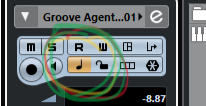
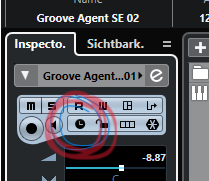
It was the time base switch located on inspector panel.
I figured it had to be a one click fix.
Thanks