Chord Pads MIDI Note Overlaps [Solved]

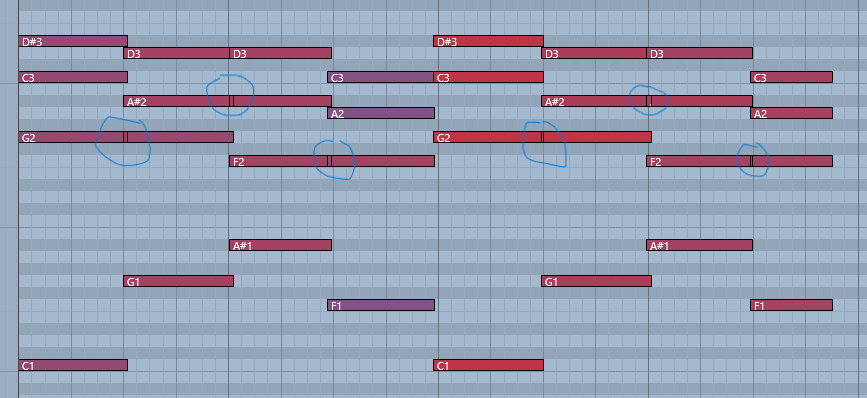
A question I’ve been meaning to ask forever - probably covered elsewhere, but I’m not sure how to phrase the question for a forum search. Anyways … a picture paints a thousand words they say, so how do I avoid these irritating MIDI ticks when recording overlapping chords either manually or with the chord pads?

I normally swear under my breath and delete them manually, before splitting the notes. Time consuming, so I’m sure there’s an explanation and a remedy?

Have you tried using MIDI→Functions→Delete Overlaps?

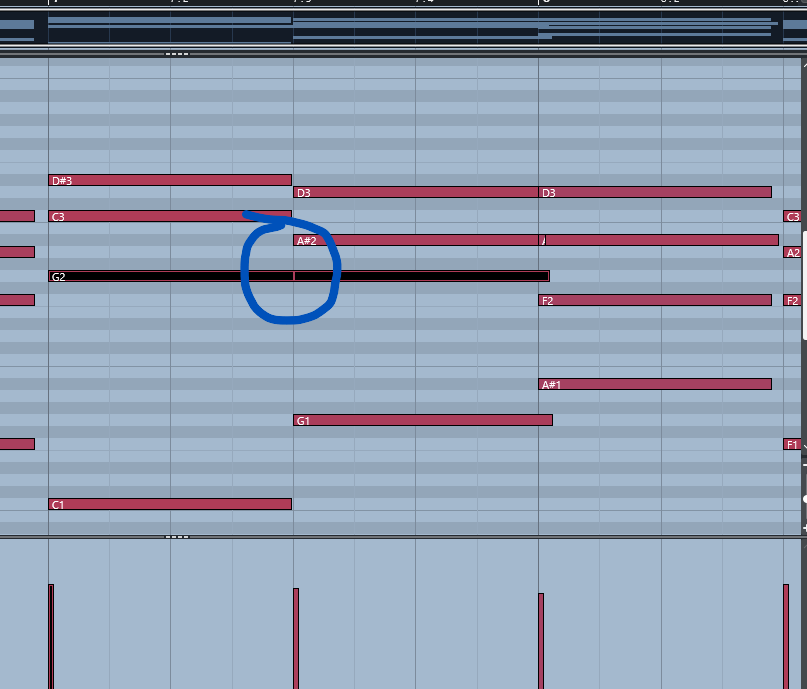
Tried that. but this the result:

Also tried Logical Editor ‘Delete Short Notes’ without any luck.

1 Like

I would be interested in a step by step guidance how you can create these short note events. I don’t have them so far. Maybe then we can figure out a way of how to avoid them being created.

1 Like

I agree with Johnny–try to figure out how to avoid the situation–but a decent workaround is to either use the list editor and command+select all the short notes at once and delete them, or use the glue tool to select each pair of the overlapping notes and merge them together.

You could create a PLE that deletes any notes shorter than a certain length.

However, it would be good to find out what’s causing it. Most likely it’s an issue with the controller you’re playing the notes in with.

Can you set up a MIDI monitor and see what’s happening while you’re playing?

Thanks for the replies folks - I’ll see if I can replicate this and report back when get into the studio later. I’m currently using a Novation Launchkey, but the same happened on my Nektar Panorama and my Komplete Kontrol S61 before that, so I can’t see that the hardware is the problem.

It happens when I overlap two chords where there is a common note (G2 in the example I’ve provided). Instead of creating two full notes, it extends one of the notes and creates this little ghost note. It actually happened on the next chord where the A#2 overlaps (you can see a slightly larger ‘ghost note’ on that one).

Thisis something that has happened to me on every iteration of Cubase and every keyboard, so it must be me :laughing:

Pleased I finally got round to asking and didn’t end up with a ‘RTFM’ reply!

1 Like

This is 8 chords captured purposefully lazily using the chord pads, and you can see six of these pesky ghost notes generated.

I ran MIDI Monitor at the same time and these are the results:

Note On C1 75 1 0.000 1 0:00:00.000
Note On G2 75 1 0.000 1 0:00:00.000
Note On C3 75 1 0.000 1 0:00:00.000
Note On D#3 75 1 0.000 1 0:00:00.000
Note On G1 85 1 0.000 1 0:00:00.000
Note On G2 85 1 0.000 1 0:00:00.000 OverlappingPitc
Note On A#2 85 1 0.000 1 0:00:00.000
Note On D3 85 1 0.000 1 0:00:00.000
Note Off C1 64 1 1 0:00:00.000
Note Off G2 64 1 1 0:00:00.000
Note Off C3 64 1 1 0:00:00.000
Note Off D#3 64 1 1 0:00:00.000
Note On A#1 85 1 0.000 1 0:00:00.000
Note On F2 85 1 0.000 1 0:00:00.000
Note On A#2 85 1 0.000 1 0:00:00.000 OverlappingPitc
Note On D3 85 1 0.000 1 0:00:00.000 OverlappingPitc
Note Off G1 64 1 1 0:00:00.000
Note Off G2 64 1 1 0:00:00.000
Note Off A#2 64 1 1 0:00:00.000
Note Off D3 64 1 1 0:00:00.000
Note On F1 64 1 0.000 1 0:00:00.000
Note On F2 64 1 0.000 1 0:00:00.000 OverlappingPitc
Note On A2 64 1 0.000 1 0:00:00.000
Note On C3 64 1 0.000 1 0:00:00.000
Note Off A#1 64 1 1 0:00:00.000
Note Off F2 64 1 1 0:00:00.000
Note Off A#2 64 1 1 0:00:00.000
Note Off D3 64 1 1 0:00:00.000
Note On C1 103 1 0.000 1 0:00:00.000
Note On G2 103 1 0.000 1 0:00:00.000
Note On C3 103 1 0.000 1 0:00:00.000 OverlappingPitc
Note On D#3 103 1 0.000 1 0:00:00.000
Note Off F1 64 1 1 0:00:00.000
Note Off F2 64 1 1 0:00:00.000
Note Off A2 64 1 1 0:00:00.000
Note Off C3 64 1 1 0:00:00.000
Note On G1 91 1 0.000 1 0:00:00.000
Note On G2 91 1 0.000 1 0:00:00.000 OverlappingPitc
Note On A#2 91 1 0.000 1 0:00:00.000
Note On D3 91 1 0.000 1 0:00:00.000
Note Off C1 64 1 1 0:00:00.000
Note Off G2 64 1 1 0:00:00.000
Note Off C3 64 1 1 0:00:00.000
Note Off D#3 64 1 1 0:00:00.000
Note On A#1 84 1 0.000 1 0:00:00.000
Note On F2 84 1 0.000 1 0:00:00.000
Note On A#2 84 1 0.000 1 0:00:00.000 OverlappingPitc
Note On D3 84 1 0.000 1 0:00:00.000 OverlappingPitc
Note Off G1 64 1 1 0:00:00.000
Note Off G2 64 1 1 0:00:00.000
Note Off A#2 64 1 1 0:00:00.000
Note Off D3 64 1 1 0:00:00.000
Note On F1 86 1 0.000 1 0:00:00.000
Note On F2 86 1 0.000 1 0:00:00.000 OverlappingPitc
Note On A2 86 1 0.000 1 0:00:00.000
Note On C3 86 1 0.000 1 0:00:00.000
Note Off A#1 64 1 1 0:00:00.000
Note Off F2 64 1 1 0:00:00.000
Note Off A#2 64 1 1 0:00:00.000
Note Off D3 64 1 1 0:00:00.000
Note Off F1 64 1 1 0:00:00.000
Note Off F2 64 1 1 0:00:00.000
Note Off A2 64 1 1 0:00:00.000
Note Off C3 64 1 1 0:00:00.000

Seems to be ‘Overlapping Pitch’ where this occurs - is that any help to the MIDI gurus out there?

I understand for you it is crystal clear what you are doing but for someone like me it is important to know the exact steps that you take. I am trying to reproduce the issue, without success so far.

No problem - it is always difficult to explain without a fully featured video! But this time it is pretty straightforward: 124 Bpm Project. Any old VST (in this case MassiveX) chord pads open, Input routing set to Chord Pads, no MIDI remote settings or external devices in play, and simply record half bars of C1, D1, E1 and F1 using the default Chord Pad setting, Cmin Gmin A# F, but hold the chords and allow them to overlap slightly (my badly described ‘lazily’ playing). I hope that makes more sense!

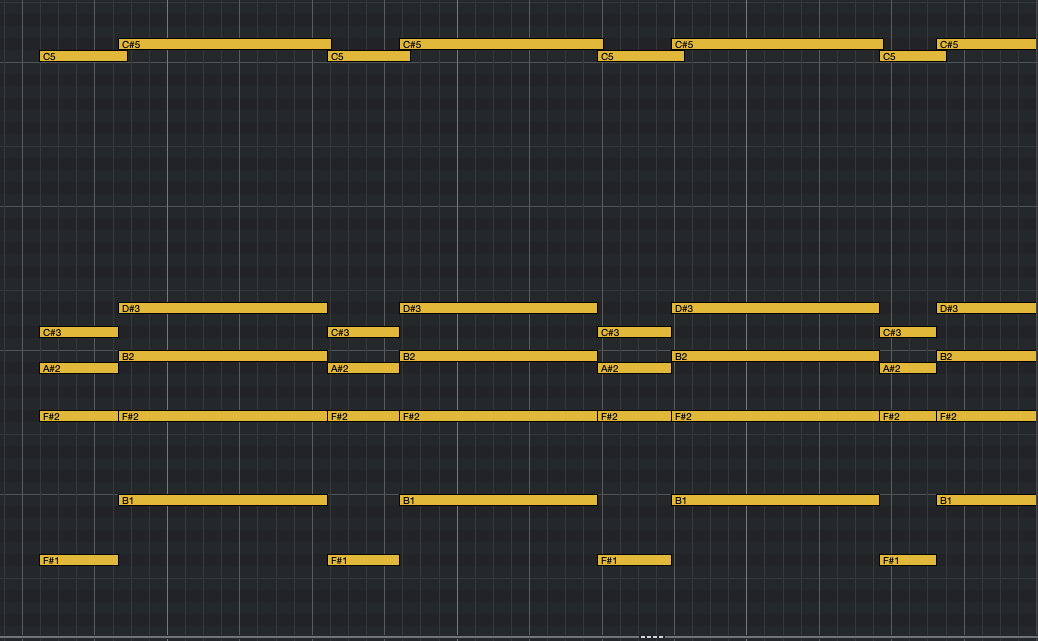
I recreated the issue using the default Chord Pad settings and slurring between G♭ and B♭min⁷.

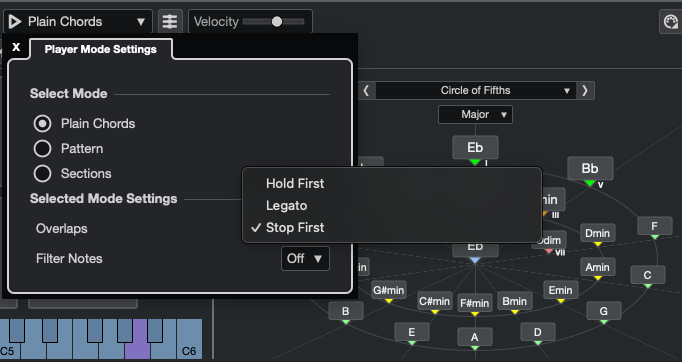
The Hold First option in Player Mode Settings is the cause.

You can avoid those unwanted extra notes by using either Legato (the common note(s) are automatically glued together)

or Stop First (no notes are glued together).

3 Likes

Wow - Thank you for that! I’ll give that a spin later and check out the different options. I often go the legato route by manually joining notes, as this happens to me mostly when I’m generating a pad, so having this ability from the get go is a big bonus.

As a guitarist my keyboard technique is sadly lacking, and can take a LOT of editing to get a keyboard sequence put together :flushed_face:

Thinking about it overnight I realised that using the chord pads is an ‘unnatural’ way of slurring (good word!) between chords that wouldn’t happen to someone playing a keyboard normally, and figured that was the cause. But now we have a solution!

[Edit] Shame there isn’t a preference to set this as a default
1 Like