In past versions of Cubase within the score editor I have been able to adjust the size of chord symbols on lead sheets, something has changed and I am unable to this anymore. I’m running 14.0.032 . I just need the chords to be larger.
With Cubase version 14, it’s currently not (yet) possible to manually change the size of the chord symbols; the size is set automatically and depends on the Space Size (Layout Settings).
What you can do is change the Default Text Font (Score Settings). Choosing a suitable font might make the chords easier to recognize.
Thank you for your help. Some of the lead sheet functions were much better before they “improved” the score editor.
2 Likes
I have not tried it yet, but I believe this ability is now probably there in Cubase 15, with the new font size dialogs.
Thank you, I am planning on upgrading next week and I will let you know if it has changed.
1 Like
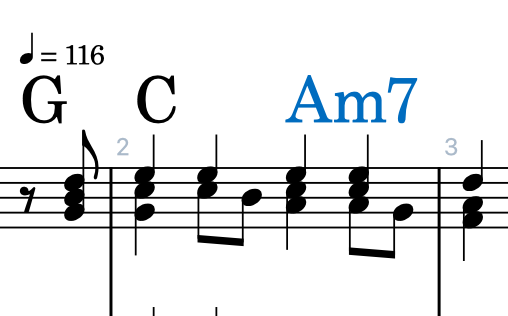
C15 —- I can change the Chord fonts to Jazz Text. but I can’t seem to find how to make the chord root larger, independent of the chord modifiers. That was possible in C11 —-
Dorico has a huge number of settings for the display of chord symbols that haven’t made their way yet into Cubase. If these settings were added into Cubase in a future version, it would allow making the chord root larger, as you can make any modifiers superscript or subscript by default in Dorico and also set the percentage size of superscript or subscript vs full height.
These settings in Dorico are in the same section of the program where the display conventions are decided upon like dim vs the little circle, or maj7 vs a triangle. So this post/thread might be applicable:
This makes it harder to read for Lead sheet / Real Book charts. What is preferred is the iReal Pro chord display where the Chord root is about twice the size as the modifiers. And that kind of font, too. Since this is more or less the standard, then perhaps make a “Jazz” option?
iRP Chord example.pdf (11.2 KB)
that defaults to this?
Dorico already has the following presets in the chord symbols settings:
Boston
Brandt-Roemer
Indiana
New York
Nashville
Jazz Standards
Ross
Japanese
Menu>Score>Font Styles>Chord Symbols Fonts, gives ,e a list of all the fonts on my Mac.. There are no Jazz Standards, Boston, Nashville, Brant - Roemer, etc. There. I do have Steinberg Jazz Chord Symbols Regular. However, Changing the font style and size here, is not reflected on the chart.
When I go to Menu>File>Settings>Event Display>Chords and Pitches, I see Steinberg Chords Jazz under Chord Fonts. Closing the window does not change the chart’s Chord Font.
Changing Parent from default to Chord Symbols font, doesn’t change anything, either.
So right now, I am at Steinberg Chord Symbols Jazz 20 point (!) and the chord symbols should be huge, but they are still on JazzText about 14 point….
And – I wish the windows would stay open when making changes - it’s annoying to try out a font, click OK the window closes, and I decide a try another font…
Closing the score window and re- opening doesn’t do anything, either