I enter Cdim for a C diminished chord and Dorico displays Cm(b5). How do I get Dorico to spell Cdim as entered? Thanks.
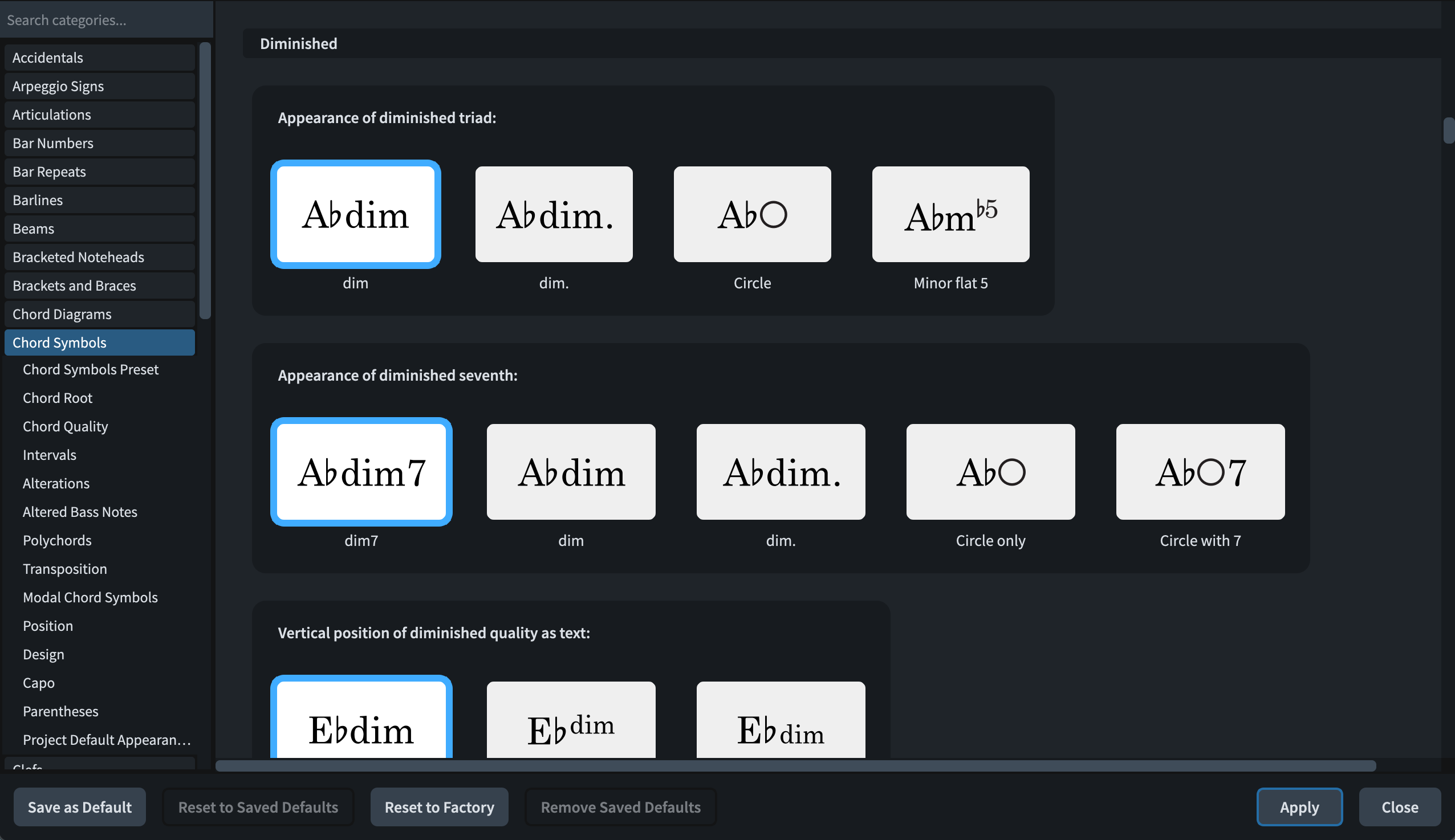
Go to Library menu at the top of the screen and then → Engraving Options → Chord Symbols → Chord Quality (see screenshot). Scroll down to “Diminished”, press dim instead of “mb5”, click Apply and then click Close.
Hint: after clicking “Apply” you can also click “Save As Default” from the bottom in order to make this the default for your new projects.
2 Likes
@hannuala Thank you, thank you, thank you! I just could not locate this!
Could I ask a follow-up question? After changing a chord spelling as you describe: suppose prior to that I had changed a setting in Barlines (for example). If I click “save as default” does the bar line modification also get saved, or would it just be the chord spelling preference?
That would be just the chord spelling preference, I think, but I may be wrong.
In my own workflow and thinking I’d rather split these tasks anyway: I click “Save As Default” after I’ve have changed some things in one setting (like Barlines you just mentioned) - and then select another option and make those changes there and so on. This way it is easier for me to keep track of the big picture of the changes I am making.
No, if you click Save as Default in Engraving Options, all of the current settings in Engraving Options are saved as defaults for future projects.
1 Like