Honestly, I’ve noticed this since the 12th Cubase. I’m so tired of it that I can’t find any swear words… Especially when I urgently need to submit a master, and then have to re-listen to long podcasts to make sure no popping noises pop up during export  . And most importantly, they appear in different places every time. Manufacturers, are you aware of this? I really want you to pay attention to this! Thank you!
Hi,
can you reimport a rendered file and upload a screenshot showing both the rendered file with the problem and the original, please?
Are you talking about noises when no proper crossfade is applied between two audio events?
Or is it clipping?
Have you tried to check Audio/Statistics to get an idea about the overall peaks?
Hello! I recorded a video and attached it here!
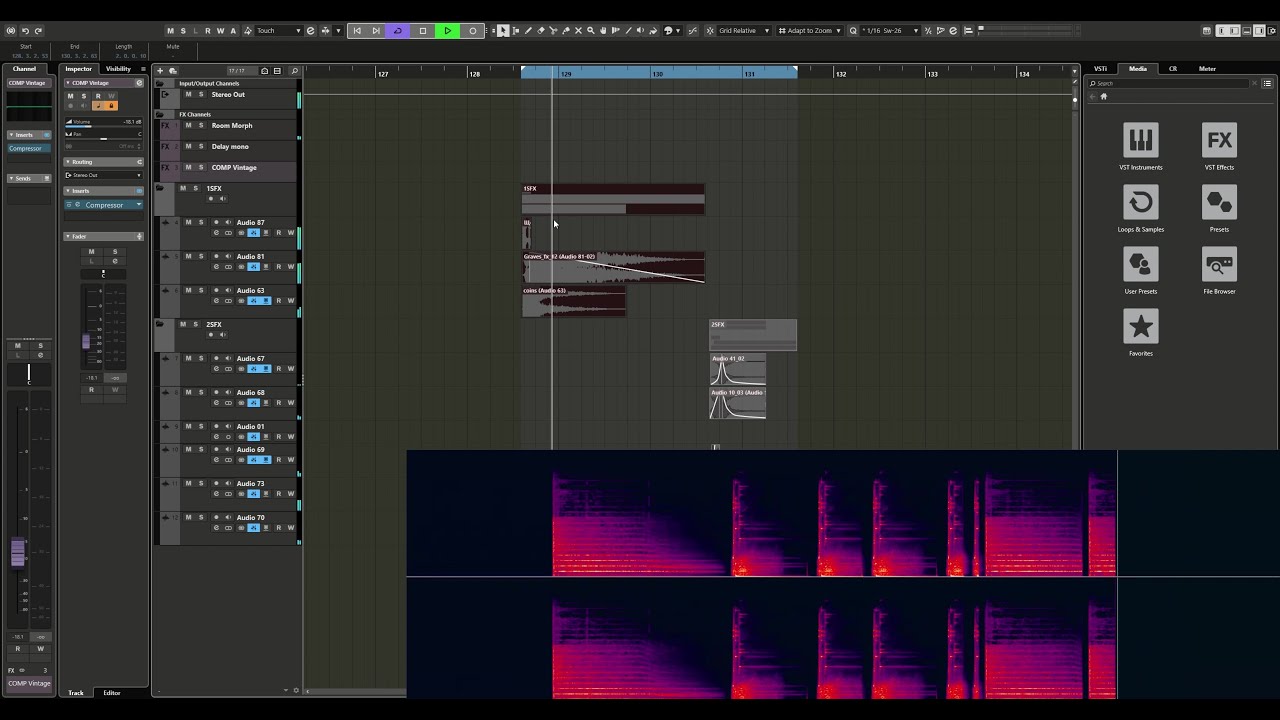
Also including these factors (I didn’t talk about them in the video, since the video turned out to be long)
-
- LOOP
Also, if I wrote a LOOP of music that I want to output to a WAV file for later use in new Cubase projects, if I export a WAV file with a beat’s worth of headroom to later overlay them in a new Cubase project, I get that same popping/clicking noise right at the joints.
Again, in Cubase 5, which I’ve been using for 11 years, I’ve NEVER had such problems!
- LOOP
-
- FADE in - FADE out
I’ve also noticed that when applying a fade to a sample, clicks can occur. Sometimes I have to bounce to avoid clicks, as they can also occur during playback and when exporting the mix while the fade is active.
- FADE in - FADE out
I really want you to seriously consider all of these things I talked about in my video and here in the description.
Because in some cases, I sometimes have to freeze tracks several times, then return to Cubase 5,
so I can work flexibly and quickly show the client the result,
where there are no software artifacts and where I don’t have to clean up extraneous pops,
clicks, and jumps in the editor after each mix export. Or worse, when I sometimes have to export the mix several times just to get it to the point where it’s more or less intact.
I’ve literally observed things like this starting with Cubase 7.
In the versions released before that, everything always worked perfectly! But now it turns out I feel like I’m shooting a movie on film, and then I have to occasionally correct a shot because the film has messed it up :))
Thank you for your understanding! I hope you won’t make these mistakes in future versions.
Have you tried adjusting the Auto Fade Settings?
If Auto Fade In and Out are enabled and the time is set short, crackling noises may occur at the edges of the parts.
The problem isn’t always the sound fading.
The problem is that a clicking sound appears at random moments.
I’ve tried it on different video cards and different computers, but the problem persists.
Could you show me how to do this or send me a link to a video?
No, this doesn’t help the situation at all.
Sorry, you’ve probably already considered everything, but here’s a list of possible causes and measures that might be helpful in some respects.
Popping and crackling during audio recording in a DAW can stem from a wide range of factors, both internal to your computer system and from external influences.
1. Internal / System-Related Causes:
-
Buffer Settings: A buffer size set too low overloads the CPU or audio interface, causing dropouts and clicks.
-
Driver Issues: Incompatible, outdated, or faulty audio drivers (especially common on Windows; generic drivers like ASIO4ALL can cause problems if misconfigured).
-
Performance Bottlenecks: Background processes, insufficient RAM, or slow hard drive read/write speeds (particularly with many tracks/plugins).
-
Sample Rate Conflicts: Mismatched sample rates between the DAW, the audio interface driver, and the system settings (clock source settings).
-
Plugin Problems: Buggy or incompatible plugins (especially real-time virtual instruments or effects).
-
Data Transfer Issues: Problems with the USB/FireWire/Thunderbolt connection to the audio interface (faulty cables, overloaded USB hub).
2. External Electrical Interference:
-
Switching Power Supplies: Cheap or faulty power supplies for lamps, phone chargers, monitors, etc., can inject noise spikes into the power line.
-
Dimmers: Phase-cut dimmers (for LED bulbs/lights) generate high-frequency interference.
-
Motors & Compressors: Refrigerators, air conditioners, or fans switching on/off can cause voltage spikes.
-
RF Interference: Nearby mobile phones (GSM/UMTS signals), Wi-Fi routers, or microwaves can induce noise into poorly shielded cables or interfaces.
-
Ground Loops: Different ground potentials between the PC, audio interface, mixer, and other gear cause hum and sometimes periodic clicks.
3. Mechanical/Electronic Issues:
-
Faulty/Dirty Cables & Connectors: Intermittent connections from loose or corroded plugs cause short dropouts and clicks.
-
Static Discharges: Especially in dry environments (e.g., winter), static discharge on connected equipment can create popping impulses.
Practical Troubleshooting Steps:
-
Isolation Test: Unplug all non-essential devices from the power outlet. Test recording with a minimal setup (only interface, PC, monitor).
-
Battery Power: Test with a laptop running on battery. If the clicks disappear, the issue is likely related to mains power interference or grounding.
-
Increase Buffer Size: Significantly increase the buffer size in your DAW (e.g., to 512 or 1024 samples). If clicks vanish, the system was overloaded.
-
Driver Check: On Windows, always use the manufacturer’s dedicated ASIO driver for your interface instead of Windows Audio or ASIO4ALL.
-
Cable Check: Replace all audio and USB cables, ensure all connections are secure.
-
Consistent Sample Rate: Set the same sample rate everywhere (DAW, audio interface driver/control panel).
-
Use Separate Power Circuits: Plug your audio equipment (interface, monitors) into a different power strip or circuit than your PC, refrigerator, etc.
Hope this helps a little.
Hello! I recorded a video and attached it here!
Also including these factors (I didn’t talk about them in the video, since the video turned out to be long)
-
- LOOP
Also, if I wrote a LOOP of music that I want to output to a WAV file for later use in new Cubase projects, if I export a WAV file with a beat’s worth of headroom to later overlay them in a new Cubase project, I get that same popping/clicking noise right at the joints.
Again, in Cubase 5, which I’ve been using for 11 years, I’ve NEVER had such problems!
- LOOP
-
- FADE in - FADE out
I’ve also noticed that when applying a fade to a sample, clicks can occur. Sometimes I have to bounce to avoid clicks, as they can also occur during playback and when exporting the mix while the fade is active.
- FADE in - FADE out
I really want you to seriously consider all of these things I talked about in my video and here in the description.
Because in some cases, I sometimes have to freeze tracks several times, then return to Cubase 5,
so I can work flexibly and quickly show the client the result,
where there are no software artifacts and where I don’t have to clean up extraneous pops,
clicks, and jumps in the editor after each mix export. Or worse, when I sometimes have to export the mix several times just to get it to the point where it’s more or less intact.
I’ve literally observed things like this starting with Cubase 7.
In the versions released before that, everything always worked perfectly! But now it turns out I feel like I’m shooting a movie on film, and then I have to occasionally correct a shot because the film has messed it up :))
Thank you for your understanding! I hope you won’t make these mistakes in future versions.
Everything you wrote doesn’t work. I already wrote that I tried everything on different computers (PC, MAC, different sound devices, etc.) The problem is the same.