Tonight, I really need to vent my frustrations and regrets after all these years using Cubase. I work professionally in music and film production, and like many in this business, we usually mix in Pro Tools. But for music production, I’ve mostly relied on Cubase and Ableton.
Here’s where the frustration begins… I have a project in progress, and VCV Rack seemed like the perfect solution to make it work. I bought the Pro VST version and was really impressed with the concept.
But after a few hours trying to sync Cubase’s clock, nothing worked properly. There was always an offset, and the sync was shaky. I removed every setting that could make Cubase chase anything (notes, CC, aftertouch, etc.). That helped a bit, but the timing was still ahead.
Cubase sends the “1” to the sequencer and then actually starts afterward—sometimes almost an eighth note late. So Cubase is either late or completely out of sync.
Go figure.
I put that aside, opened Ableton, and—like always—the sync was perfect after a few quick tweaks. I took the same setup and tried applying it in Cubase… nope. Still not working, always lagging. This is something I’ve always felt with Cubase: even something as simple as a MIDI clock can’t deliver reliable timing. Add that to other bugs I won’t even get into…
I’m done. I think it’s time to invest my upgrade money in another product.
I’ve given Steinberg enough over the years, and I’m finally ready to change trains. Anyway!
What do you mean by. “Cubase sends the 1”? If you’re using midi clock, there is no beat synchronization, only tempo. You’d need MTC for beat synchronization.
What does you non-working config in Project Sync Setup look like?
What “quick tweaks?”
If that were true, everyone would be facing the same issues with VSTs and external MIDI devices. You can’t get some particular 3rd-party plugin sync’d with Cubase. Given that sync’ing MIDI is core functionality, it’s reasonable to believe that it will work when your configuration is correct.
You’re not going to accidentally get it working if you’ve already given-up and concluded that it’s a Cubase bug–not a configuration issue with Cubase, the plugin, or your system.
I sometimes get frustrated when something I just bought doesn’t work–but then I take a step back, analyze the problem, and find a solution–or at least an understanding of the root cause. You’re jumping right to “it’s not me–it’s Cubase,” without even understanding why you have this issue. How’s it going to be any different when you run into problems with another set of tools?
Regardless of what DAWs professionals choose to use for recording and production, they have to be willing to troubleshoot when facing integration issues.
Thank you all. To be honest and straightforward, the main reason you want a DAW is to make music—not to navigate through a thousand settings and pages. For those who remember FINALE, the notation software, that’s exactly what killed the app, and Cubase suffers from the same problem. Something as simple as sending a clock to another app in the same environment in 2025 should be straightforward.
If you’re familiar with VCV Rack (VST), you just take the clock or a clock divider and send it to whatever arpeggiator, sequencer, etc.
Here is the setup:
Modules are… MIDI-CV-CLK out (24 ppqn) → Impromptu Clocked in (24 ppqn, send reset on stop and start) → CLK1 out → sequencer or whatever.
This setup works in Ableton but not in Cubase.
When you press play in Ableton, everything starts on the 1.
In Cubase, the sequencer starts, but Cubase is always late. I get the impression there’s a preroll buffer that creates the gap… very strange.
If the sync issue came from VCV, it wouldn’t sync properly in Ableton—but on the contrary, Ableton is rock solid and precise.
I wonder where the issue lies here. Not sure what OS you are using.
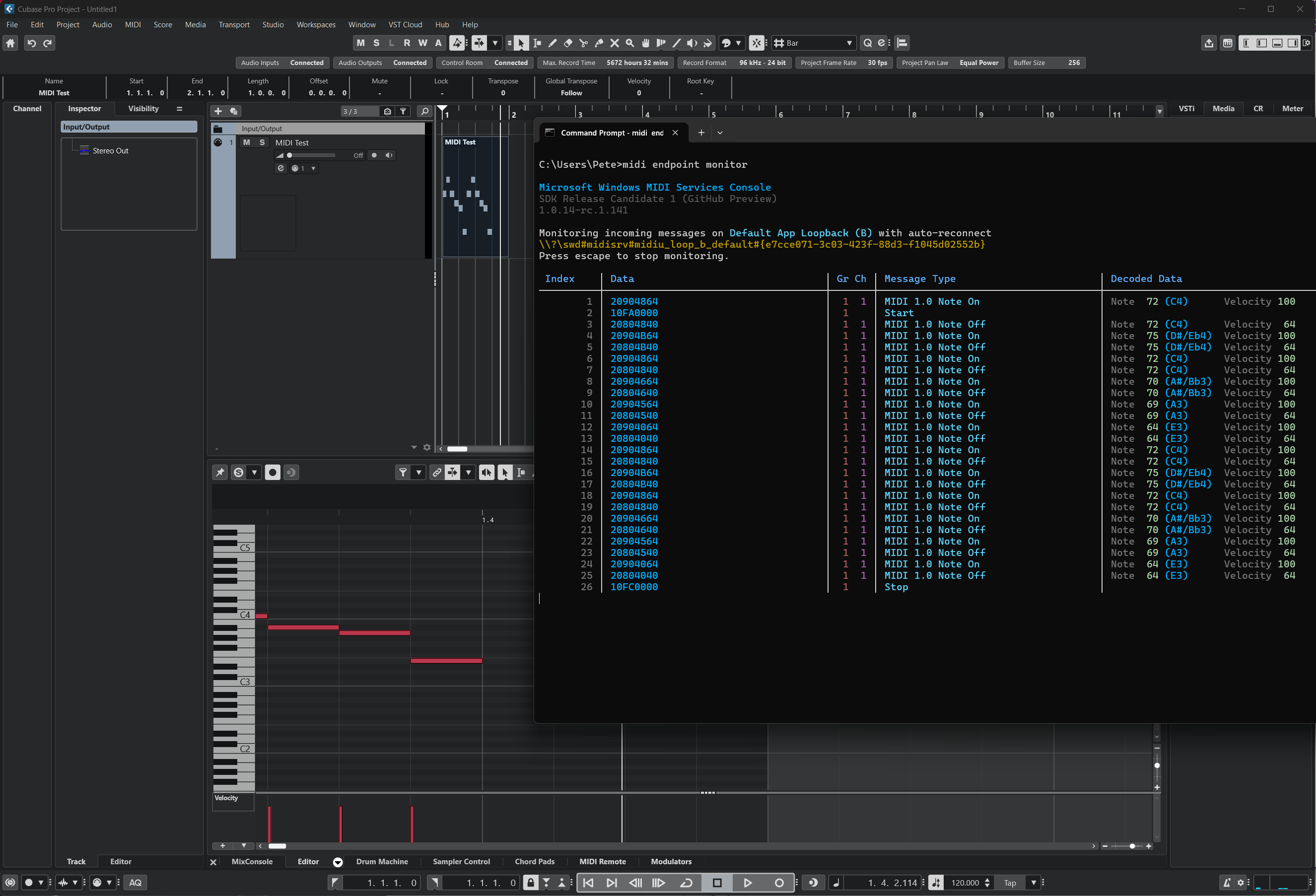
I just tried this on Windows 11 with a simple MIDI track, and I get the MIDI Start 400 microseconds (0.4 milliseconds) after the first note-on message. Effectively simultaneous.
I wouldn’t assume that the issue is with Cubase. The VCV rack is known for having issues in a variety of scenarios. Even when used inside the same program, two different users will get different results. It’s been an issue for years.
Hi everyone, after running some tests with Cubase and its MIDI clock, I noticed a significant issue: Cubase is dropping some of the first MIDI clock pulses at the start of playback.
Here’s what I did. Cubase’s MIDI clock is supposed to send 24 PPQN, which is normal. But when syncing with VCV Rack Pro (VST), the sequencer was giving me random offsets. To fix that, I created my own “fake” 24 PPQN clock using MIDI notes on a regular MIDI track. With that setup, everything was perfectly tight — every time I hit play, the sequencer locked instantly on the first beat.
Then I compared both signals on a scope. That’s when the issue became obvious: Cubase’s internal MIDI clock sometimes skips one, two, or even three pulses right at the beginning of the sequence. That’s enough to throw the whole sync off from the very start.
This is not a VCV Rack issue — it’s clearly coming from Cubase.
Bottom line: Ableton and Reaper don’t have this problem. Using the exact same test setup, their internal MIDI clocks were perfectly consistent every time, while Cubase was the only one skipping pulses at the start. I don’t know if it’s a buffer problem or a bug, but this should be a straightforward setup.
If anyone has suggestions or a workaround, I’m all ears.
Cheers.