DOP processes multiplied and never end

v14.0.32

image

image1273×815 89.8 KB

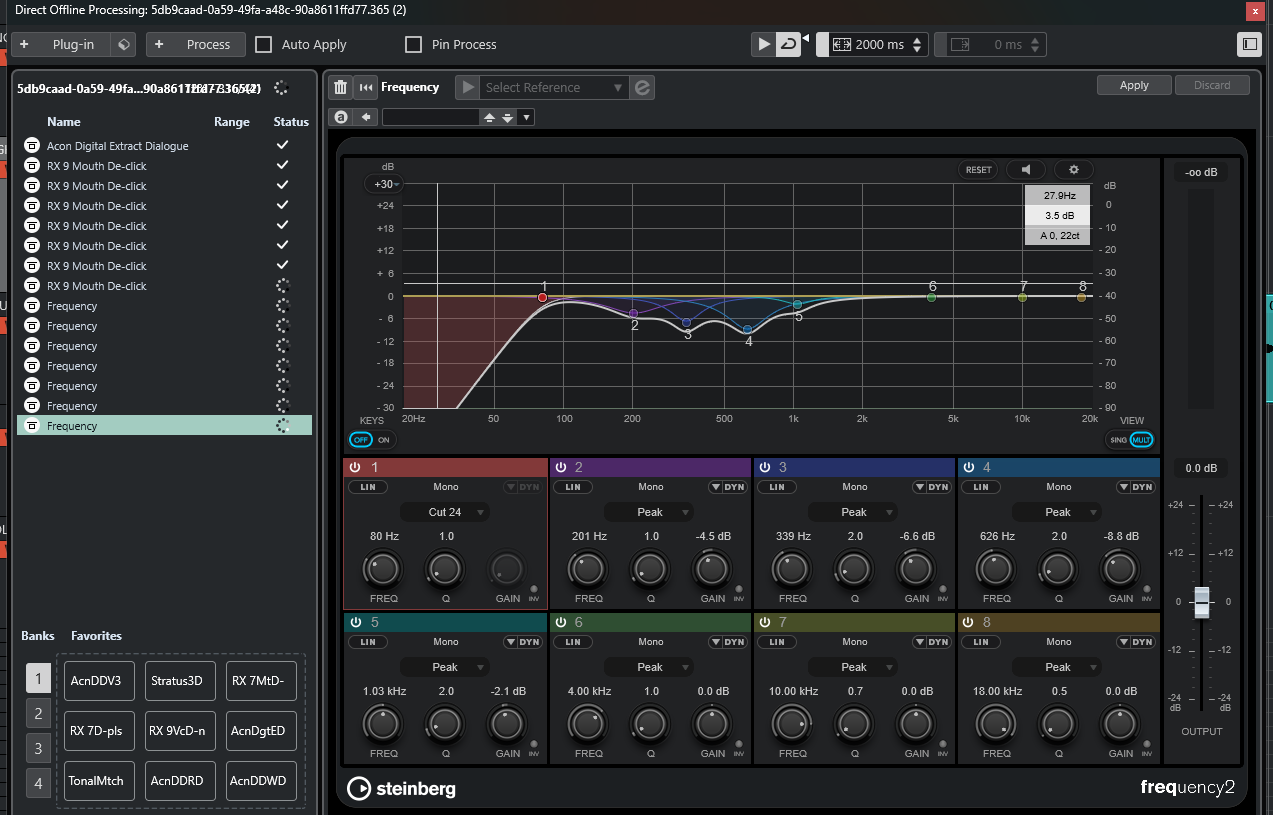
You can see above that I have multiple process of each plugin. However, what I did was 1) apply each plugin once, and then 2) adjusted the parameter for the one applied first.

The first “pass” of processing remains and Nuendo then does 5 new passes for however many plugins are affected in the plugin chain. If the new parameter I chose is in a plugin that was applied last then I get 5 new entries per event. If it was first in a series of three plugins I now get 15 new entries, 5 per plugin.

In addition to that, here are two events selected:

See the three instances of processing?

Now with just the one event selected:

The “spinning” / processing never stops for those 10 (!) duplicates.

Now watch this - I select an event again:

and delete the three visible instances that were completed, and after that I see this:

So this means that if I select events and process them it’ll look like I got the three applied processes done. But then when selecting the one it looks like Nuendo is still processing. If I then at some point delete the top three the remaining ones finish processing, but only if I do it while the others are visible (?)…

Is this an annoying visual bug or is this a potential disaster waiting to happen? Because if I can’t see this going on then it might finish rendering after I’ve made sure it sounds ok and thus it sounds different on export.

Trying “undo” sometimes doesn’t help either. It may lead to the wrong processing, again.

Please look into this immediately.

We shouldn’t be seeing this in a x.x.32 release.

2 Likes

Yeah, this is a documented one.
Hope it gets fixed soon.

Fredo

2 Likes

Thanks for confirming.

This bug is horrible. I treated thousands of events across a 1hr timeline using DOP. With delivery tomorrow it’s making me feel extremely uncomfortable.

3 Likes

Thank you for reporting and confirming this. I tend to limit my use of DOP for anything complex. Since the very beginning of its release years ago, it was initially so buggy that I could never gain 100% confidence in it. Over the years it has been improved, obviously, but your example is another reason why I’ll just stick to “basic” DOP use. I still hope Steinberg prioritizes this and improves this ASAP.

It may needs a complete media management overhaul

1 Like

What’s weird is that whatever I was doing in N13 was fine. This seems new to me. It’s absolutely fantastic to be able to drop plugins into an offline batch in DOP and then label that by character for example, being able to just single-click and get new takes or newly cut scenes quickly processed. And it saves time on the backend when exporting.

I would hope not. There are things they could add to DOP to make it “better”, but that of course assumes it’s good to begin with and if it’s broken it ain’t good.

1 Like

That’s frustrating. This issue should be escalated, since it’s confirmed, and it’s a fundamental feature imo. In my case, I haven’t seen a change in behavior in my own day-to-day use, but as I mentioned, I purposefully keep my DOP usage to simple tasks out of paranoia from past issues. I never trusted DOP 100%.

In any case, if this is NEW behavior in N14, I really hope Steinberg is listening. I think stability and bugfixes should be a higher priority in general. Let’s go, Steinberg! We’re counting on you!

1 Like

It isn’t.
Is there since N13

Fredo

I’ve never seen it.

Even worse though if it’s been like this for this long.

1 Like

Sorry, let me add to that: I have seen one or more processes never end, but I have not seen them multiplied like this. When they kept spinning in N13 the process was simply never applied as far as I can recall whereas here it also seems the odds of getting into real trouble are far higher and it happened much more frequently.

It happened a few times in 14 but never repeatable

So something is breaking and I hope it is only that.

Didn’t face it in 12

Similar issue exists in v12 too.

Same issue here, and it’s a nightmare. It never happened (to me) in 13 or previous 14 versions. And I haven’t changed the way I do things.
To avoid it, I have to apply a plugin on a few clips, unselect all of them, reselect them, and apply another treatment.

1 Like

Bump, and noting I’m not seeing anything on this in the 14.0.40 release notes.

Four months since the last update, and seven since release, if my math is correct.

If anyone has installed and tested DOP please let us know if it’s still the same garbage…

1 Like

Did not hang around 14.0.40 long enough to test. uninstalled it almost immediately after find Atmos was completely broken!

@TimoWildenhain

I don’t know who else to tag and I don’t know what else to do here. We’re neither getting confirmation from you guys that this is a bug, even asking you directly, nor are we getting an answer if you fixed it in the most recent releases. You probably didn’t fix it because otherwise you would have said something.

I haven’t used N14 since I bought it because this bug screwed me. That makes it around 7 months of non-usage.

Can you not at least interact with users and tell them if you are aware of these things and if you are even going to bother fixing them before it’s time to pay you again?

This silence is extremely annoying. I feel like we keep telling you about problems with your software and we hear nothing back. We also keep asking for either redesigns or enhancements to functionality, or new functionality, and most of the time we hear nothing back. Just silence. And then when either the right people complain or the complaints are loud enough you make an effort for like a week and then you go missing. I know you probably hate hearing it, but Avid manages to at least interact with its users.

I’m really not liking the direction you’re in right now.

1 Like

Hello,

Thank you for your comments and apologies for the delay in getting back.

Yes, this issue is looked into and we will provide more information on the results

of the investigation. Thank you again for your patience.

Thanks,

Timo

1 Like