Dorico on Linux?

Who’s T? Is it the now MuseScore design head? :slight_smile:. I’ve been actually toying with MuseScore and already “fixed” a small bug in the icon for Ubuntu, and helped fixing a bug that made one note tremolos display wrong. So, I guess I contributed already to fixing two bugs (and I’m not a programmer!). MuseScore is happily in a position where, if you know what you’re doing and want to spend some time manually tweaking stuff (the way Finale was/is), you can certainly produce a professionally looking score. The thing is, I still remember my years with Finale before switching to Sibelius, and I remember the pain of the hours I had to spend moving stuff around with the mouse, and the imminent danger that one millimeter in the wrong direction could basically destroy the whole score. When I discovered Sibelius 7.5 at the end of 2013, I also compared it to Finale 2014. I was really impressed by seeing how much of what Finale just did wrong by default was automatically done right in Sibelius. The magnetic layout, and the ability to “reset” the layout made me save countless hours in the next years, since I didn’t have to drag so much stuff around with the mouse anymore. So using MuseScore brings me back memories of Finale… That’s something that I would like to avoid for the moment. The work being made for MuseScore 4 looks very promising anyways.

The typing stuff with Lilypond has its advantages, I would say. Typing proper stuff with the keyboard is certainly way faster than remembering shortcuts. Stuff that in other programs are “advanced” features, make no difference in Lilypond and are as easy to remember. Say the command \tempo vs. the command \snappizzicato. Both things are keywords that already exist in the vocabulary of a musician. Having to remember instead a combination of keyboard shortcuts and going to the right menus, clicking stuff in the right order, remember to do all that in the right mode, looking for a Bartok pizzicato in an 800 symbol palette until you find it, etc., is more difficult than what it looks like. I guess Dorico’s equivalent of Lilypond commands is the pop-over feature (but I suspect it’s also filled with shortcuts to some degree, I can’t use Dorico, so I don’t really know :slight_smile:).

The good thing about Lilypond’s algorithm is that it always works fairly well. If you don’t like Lilypond’s default look, you can just use a different font. The engine will still do a pretty good job. I don’t think it’s a matter of adding more code. I really have to do very little manual tweaks (the bright side being, that it “understands” it in a way that the same tweak makes sense in the part as well as in the score). On the other hand, I can usually tell when a score has been made in Finale or Sibelius as well, provided that the user didn’t change the font :wink:.

I wonder, do you think it’s mainly about the fonts?

I daresay that producing a professional yet characteristic text layout should be done by experts anyway (like with music notation).

Well, Proprietary software can be installed on every Linux distro. :slight_smile: Actually there are many paid and proprietary apps for Linux.
Actually Dorico could be compiled at least for the most widely used, for desktop, Linux distributions - they all are based on Debian, or RedHat.
The problems here are:

  1. They have to hire more people to support the Linux version
  2. Steinberg has to release ASIO driver for Linux

As far as I know Cubase is written in C++, so no problem to be compiled for Linux, which means that Dorico’s Audio Engine could work perfectly on Linux. :slight_smile:
The main, and the only problem for Steinberg to make their products available for Linux is that they have to hire few more employees to support for Linux.
By the time distros like Ubuntu, Mint etc, becoming more and more user friendly, so… At Steinberg should think about to make their products Linux compatible. :slight_smile:
Once Cubase and Dorico become available for Linux, I would gladly move to Debian as desktop! :slight_smile:

You can use any font you like with modern versions of LaTeX. The days when everything was typeset in Knuth’s Computer Modern fonts are long gone (though some academic journals still use them). There are alternatives for math that are just as comprehensive as the CM fonts. FWIW my “goto” LaTeX font family is Erewhon, which is a descendant of Adobe Utopia.

I agree that you can usually tell when an “amateur” has tried to design their own document format! But there are comprehensive packages like “memoir” (with a 600-page user guide that is actually written for users, not for programmers) which are can create good looking books without any low-level tweaking by the user - just pick the options you want and go.

That has been available since 2014. The November font and several MTF music fonts are also available.

Of course some Lilypond gurus don’t like it, but the main reasons seem to be “it’s different” and “real fonts are only created with the TeX Metafont package, so it isn’t a real font” :slight_smile:

Oh don’t worry, I’m well aware. I simply haven’t myself seen the two combined. I also haven’t been looking :laughing:

I know, hence my question.
(Mine is Libertinus, a descendant of Linux Libertine with extensive support for math. It also has a nice sans-serif companion for headings. But this is getting way OT…)

So, I dunno who all that’s actually interested in getting Dorico running on Linux is following this thread, but I have a small development on that front. Turns out Dorico will indeed run on Linux. Does it run well? In a word… no. But it runs! Or rather… I can’t get it to anymore, but it did run, like, three or four times. With no sound. But it ran!

So… here’s the rundown.

Every forum or Wine webpage where Steinberg products are mentioned, the difficult part seems to be getting the eLicenser to run. Well, after a lot of trial and error (maybe would’ve been less if I knew anything about installing things with Wine), the eLicenser runs just fine (well… well sort of, maybe). Dongles are not supported, so soft licenses only, but they appear to work. I’ve been testing it out with a Dorico SE license. I suppose once I get things working better, I’ll give it a go with a pro license using a 30-day trial.

So yeah, I can run the eLicenser

I get a splash screen

I get the Hub

And I can try to load a project

…which always hangs at 90%. I’ve got some more fiddling to do, but anyone have any inklings as to why it would hang there? Loading a new empty project seems to hang as well, so I suspect the eLicenser isn’t running as well as I think it is, but that’s really just a stab in the dark.

In any case, like I said, I have gotten it past here several times earlier on, but it’s stopped working, and I haven’t been able to progress past since. But when I did get it fully running, I was able to open Coldplay’s Clocks as well as a new blank document. In the new blank document, I set the playback template to Noteperformer, which also seemed to install fine, but with no audio, I can’t say for sure. I could add instruments, enter notes, and use popovers, and all the keyboard shortcuts seemed to work (except for those that the OS had double booked), etc. etc. etc…

Here’s what I can say about performance. It’s nothing to write home about. Then again, I’m on a VM with just two cores of an i5 and 6 gigs of ram, so who knows. Also hard to say much without sound. For that I need to get WineASIO working, which will show up in Dorico as an ASIO audio device and kick the output to JACK, so that’s not on Dorico; I just don’t know what I’m doing.

If you’re curious, I’m on Ubuntu Budgie with all the Ubuntu Studio packages installed.

I’ll keep fiddling and report back with any further developments. Anyone that might know what they’re doing better than me that wants to try their hand at it to see if they get any better luck, let me know and I’ll give you my install instructions that I’ve got so far.

Cheers!

Wow, that’s an interesting development! However, I wouldn’t pay +500€ for a piece of software that I have to run using Wine. I suppose it makes more sense for someone who already has it installed on Windows/Mac and wants to fiddle with that in Linux to get it working in another machine/partition (sorry, not a Wine fan here :wink: ).

Do you have jack2 installed?

I don’t know if wine will see it as an ASIO sound device or not, but worth a try.

@martin, I guess it depends on how much you want to use Dorico and how much you don’t want to use Windows or Mac. I agree a native Linux version would be nice (and [in my best Gimli voice] if anyone was to ask for my opinion, which I note they’re not,[/Gimli] I’d say Steinberg should do it), but it’s just not realistic to expect it to happen, even in or after a year like 2020 :laughing: For all foreseeable futures, it’s pretty much Wine or nothing. But at the very least, you are right, given the performance I’ve gotten from it under Wine, it really would only be useful at the moment for someone who already has it on Windows or Mac and would maybe just wants the occasional ability to open or maybe print a document while on Linux.

@Brian, I do have jack2 installed, as well as a whole host of other jack gui and controller applications and the like that come with the Ubuntu Studio packages. But beyond knowing that I have it installed, I don’t really know what I’m doing with jack, so that’s something of an impediment, lol… I also have wineasio installed, which supposedly should show up in Dorico as a device and connect itself to jack, but at the moment, Dorico isn’t aware of any audio devices:

and I’m not sure if or how I’d need to configure wineasio to allow jack and dorico to talk to each other.

But…

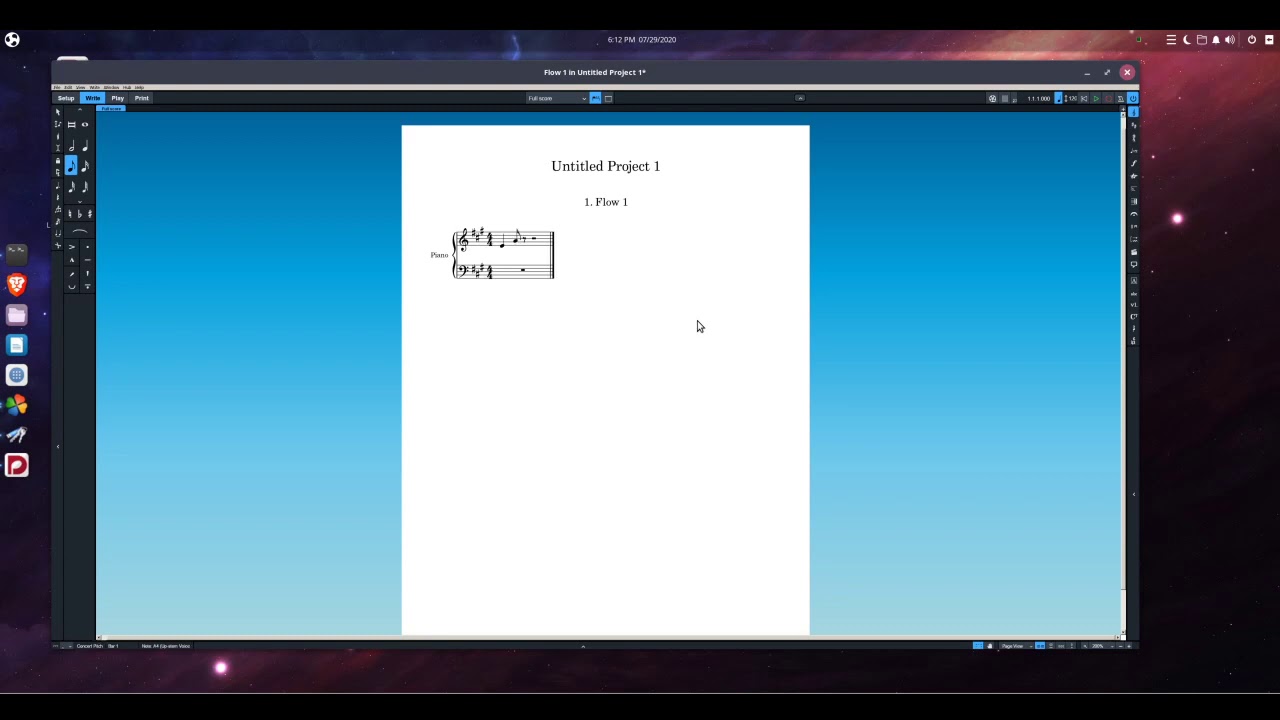
@Everybody Else, on the slightly brighter side, it turns out Dorico was not hanging at 90%, it was just loading documents reeeeeeeaaaaaaaaallllllyyyy slow. So it does in fact still run. Now, unfortunately, that slowness carries over into the actual program itself, so unlike the first several times I got it running, I can’t actually do anything once it opens (well, I did manage to switch from Play mode to Write mode, but that’s literally it). But it’s definitely super cool to see a Dorico window running somewhere it definitely doesn’t want to:

Full-res here: Imgur: The magic of the Internet

You’ll notice that the drawing of noteheads is off. Too low and too far right. Could be a virtual machine thing, could be a WINE thing, who knows, but I imagine it’s fixable. Nonetheless, a pretty neat starting point :slight_smile:

And for anyone interested, here it is running on a new document. Like I said, I have had it running it faster, but as it is, this will likely not be pleasant to watch unless you can watch it at much faster than normal speed. Enjoy!

To return to the original post…

Why not? Windows works as well as anything else, the range of application software available is unparalleled, and one can use more or less any hardware.

I used to think Linux might be the way ahead for musicians but really, why bother? Even on some fairly modest hardware, with Windows I can run anything I want alongside anything else. I can run programs from 25 years ago; I can run other operating systems in virtual machines. Half of my computers are headless (no monitor, keyboard or mouse) and controlled alongside everything else via RDP (Remote Desktop Protocol). Everything usually works as it should.

Windows isn’t perfect but unless one’s needs are extremely specific, I really can’t see a good reason to use anything else in 2020. I’m not opposed to Linux (or anything else) but can’t imagine any circumstances in which I’d need to be able to run Dorico on it.

True, but it sort of misses the point. My personal opinion (based on people-watching):

  • You choose a Mac because it is a Mac.
  • You choose Windows because you want to get something done.
  • You choose Linux because you like the challenge of getting something to work at all.

:slight_smile:

This is exactly right and you’ve managed to avoid saying anything to provoke the Mac users.

I can understand someone wanting to drive a Mazda MX-5 or tinker with a classic car but it seems the MX-5 driver thinks he is some way superior to my estate car driving self. My businessman neighbour’s chauffeur-driven Maybach would not compute at all.

I struggle with the idea that you choose Windows because you want to get something done.

In the two years I ran Dorico on a Windows machine (an HP Zbook Studio) I had more computer grief than in ten years of Mac use. That machine theoretically has automatic graphics switching, but it must now - thanks to the combination of available Windows 10 updates and drivers - be switched manually at the BIOS level. Realistically that means running the discrete GPU 24/7, which drains the battery in <90 minutes). It took me days to get to the bottom of the graphics issue, and the eventual fix gives me a workable computer but one that lacks functionality I originally paid for. Then there’s a fingerprint reader that is entirely unsupported. Maybe I just got unlucky, but the fact that the largest computer manufacturer in the world can’t seem to support its own computers for more than a year mightily irritates me.

I don’t remember this being anywhere near so much of a problem 10-20 years ago.

In an environment where hardware and software deployment is somebody else’s problem, I entirely recognise the value in Windows, of course, but I can’t be doing with “oh sorry I’m not going to make that deadline after all” when I only really have one computer at my disposal, and it’s my problem.

That’s not to say I’ve not had problems with Macs, occasionally: I had a logic board (motherboard) fail some years ago, on a machine that was two or three years out of warranty. Apple admitted a design flaw had caused the failure, and replaced the logic board (and everything soldered to it) for free.

You could have run any compatible operating system you wanted on that laptop (including Linux). It’s unreasonable to think that because your laptop doesn’t work well and HP’s support hasn’t been good, there’s something wrong with Windows.

Laptops can often be tricky blighters and I don’t think of them as typical PCs (though the architecture is of course the same). I’ve assembled a lot of desktop computers over the years and have everything from the very quick to the very capacious (a 64TB file server). The latter and a machine that’s used for rendering/encoding and the like are on all day every day. Everything I have just works. I don’t think I’ve ever missed a deadline because of a misbehaving desktop (a couple of printers have deserved to be smashed) and of course if a part fails or is slowing the system, one can simply replace that part.

With respect, the idea that one can’t expect to meet deadlines because one uses a PC and Windows is ridiculous. Does Rob Tuley not have to meet deadlines? Are the majority of computers used in business not PCs running Windows?

You need to try a well-specified desktop. I suspect you’ll find little to complain about (nearly all PCs are fast nowadays). The whole point is that you can get exactly the specification you want (it always amazes me that so many Mac users put up with keyboards and mice that I could never recommend). By all means enjoy using your Mac but do be informed about PCs and Windows.

Anyway, I probably shouldn’t say anything more on this subject. Good hardware is good hardware; operating systems are more or less alike in terms of function for the user.

I think this will be a super-profitable discussion. :nerd:

I’d say many people don’t choose Windows: they just think that’s what a computer is. It’s the default OS.

I’m hoping that “Because it’s a Mac” means ‘because it’s well-designed hardware** and software** that work together with Unix underpinnings’ etc, etc; rather than ‘because it’s a badge’. I’ve been a Mac user long enough that I’ve been criticized both for being both an unthinking ‘sheeple’ who follows the crowd, and for being a deliberately different and incompatible minority just for the sake of it. :smiley:

** Apart from the ones/bits that aren’t.

But Holy Wars about personal choices are never fruitful. Chacq’un a son gout, and all that. We are lucky that Dorico supports Windows and Mac, and we should be grateful for that.

“Windows just works… unless you want to use a laptop.” What a sentiment. 'Cause who in their right mind would ever want to use a laptop, amirite?

As to the notion that people use Linux BECAUSE they like the challenge of getting something to work at all, well, it’s just not really like that, to be frank. As a usually-Windows-sometimes-Linux user, I can say that the reason I personally use Linux is because it lacks bloat, both in terms of storage and memory usage (my Windows laptop uses 3 gigs of RAM at idle; my Ubuntu Budgie machine is pretty RAM intensive for Linux… 1.13 gigs), it lacks adware and unwanted data collection, it’s much more secure, installing and maintaining software on it is usually much easier, it’s much more visually customizable, and I don’t need to shell out hundreds or thousands of dollars on new hardware because an older machine has gotten… well… old. I can also say that every Linux user I know has the same or a similar list. And while, yes, it CAN be the case that depending on your software and hardware needs, it can require working through certain challenges to get everything working, the exact opposite can be just as frequently the case; everything just works. It’s practically a meme at this point that when a grandparent’s computer is giving them trouble, install Linux (Mint or Ubuntu or the like) and never get computer problem calls from them again.

All this to say that OP’s desire to not return to Windows is entirely reasonable and telling him it’s not is… uh… unproductive.