Dorico on Linux?

It seems to me a case of false awareness. You don’t want to run Dorico in an Apple or Microsoft system, due to privacy concerns. At the same time, you want to use a program from Yamaha, a company owned for about half of its assets by trust banks. All your scores will be at the mercy of big and dark powers anyway!

Paolo

Since Dorico is a Qt program, I guess that it needs to be built for KDE and LXQT desktops. This is just my assumption.

Qt programs can run on GTK-based desktops and vice versa; they just don’t always match the look and feel of your toolkit’s native apps, but that is usually easily fixable or at least pretty mitigatable. Every once in a while an app will have enough dependencies from the other toolkit or one of its associated desktop environments that it becomes a pain, but they’ll usually still run just fine if you install everything (for instance, I’m on KDE and I use Mailspring as my email client, which doesn’t seem to like KDE Wallet very much even though it’s supposed to, but it’s perfectly happy with Gnome Keyring, so I have both installed).

But that’s only an issue for native Linux apps. At the moment (and very likely this will always be the case), Dorico only runs through Wine, so it’s not an issue. All of its dependencies are included in the Windows installer or can be installed with Wine helper programs. Wine also has theme editors to make the Windows system elements (like menu bars and the like) look a little more integrated.

Have you met any issues with either USB eLc or soft-eLc on Linux with Wine?

Yeah, I mention this in my tutorial just a few posts up.

To my knowledge, USB dongles don’t work in Wine. In the Wine 6.0 announcement, they say that “An initial USB kernel driver is implemented, based on the LibUSB library, to provide access to USB devices.” Since then I don’t think any more work has been done on USB. Now… I could be mistaken, and that initial USB kernel driver might be sufficient for the USB-licenser, but I don’t know how to get it to work if so. There’s a method to get serial-over-USB devices hooked up in Wine, and I would have assumed it would be the same operation for normal USB devices as well, but I tried and it didn’t seem to work, so I think we have to wait if we want dongle support.

As far as the soft licenser goes, this does definitely work, though its workings don’t inspire enough confidence in me to put my actual paid-for Dorico license on it (grab a Dorico SE license or a Dorico Pro Trial license). It requires the Microsoft .NET 4.8 framework to be installed, which doesn’t always go well in Wine (seems to work fine at the moment, but you never know), and you have to use the eLicenser Installation Helper to get a soft licenser to show up in eLCC after first installing it. And every once in a while, I’ll start up the eLCC, and it will tell me that my soft e-licenser has been modified in an unrecoverable way and running maintenance tasks doesn’t seem to fix it (like I say in my tutorial, I’m pretty sure this is only a problem if you have maintenance tasks set to run from startup. If you turn that off, it seems to give the program time to resolve itself, but yeah, doesn’t inspire confidence).

And then the other thing is that you usually have to have the eLCC running in order to run Dorico. I feel like I’ve seen it once or twice where this wasn’t the case, but it seems like usually it is.

Besides that though, I’m actually pleasantly surprised with how well the eLCC with a soft license works on Linux. I thought that would be the stumbling block and that it would just never run, but it does, and everything usually seems to work just fine. Honestly, given that, I don’t think it would be all that much work for Steinberg and the Dorico team to maintain an unofficial or mostly-unsupported Linux-Wine release that just kind of smooths out the installation process a little bit. I’d do it myself, but it’s just a little bit beyond my ken at the moment.

I have viewed this discussion with interest, several times. I don’t know if successive visits count separately, but just because I’m interested in the discussion, it doesn’t mean that “want to make the switch”.

Oh, and if privacy is a worry, you should see the commotion about MuseScore!

Yeah, and honestly, I dunno if the (most realistic) best case scenario would even involve a native Linux version of Dorico to begin with. So very often, Linux ports are an afterthought, and the task of maintaining them is often neglected or entirely abandoned, in which case, it usually would’ve been better for all parties involved to just get the Windows version running well through compatibility tools.

I dunno if anyone here happens to be into video games, but Valve’s newly announced Steam Deck (a new handheld PC/gaming console that looks kind of like a Nintendo Switch but for people with normal sized hands) runs Linux, and they are not at all chasing native Linux ports. Instead they’re just putting loads of effort into Proton (their fork of Wine), which means software developers only need to maintain their Windows versions. It’s pretty much win-win-win. Valve wins by getting more software because they can run Windows games, developers win because they don’t need to develop an extra port to maintain (potentially poorly), and users win because very often Windows software runs just as well or sometimes even better on Linux.

Likewise, I think the best thing (or the thing I would hope for) would be for the Dorico team to help us get Dorico running as well as it can through Wine (or at least with just a little less friction). Like I said just above, I think that could involve not too much effort… depending (I know these are so very often famously naive words…).

For instance, as a start, the installer is actually just a program that unpacks a bunch of smaller installers and runs each of them, but for some reason this doesn’t play nice with Wine. It would be great to be able to directly download this as a zip file with all of the individual installers instead of as an exe.

I suppose what I would also really appreciate is potentially for the devs to take a look at my process and potentially point out things like “oh, yeah, Halion isn’t installing because you’re using the wrong installer file and/or you need to manually move the patches to such and such a directory because the installer is failing to do so” or “you should also install this xyz library with the others; it’ll improve performance a whole bunch,” etc.

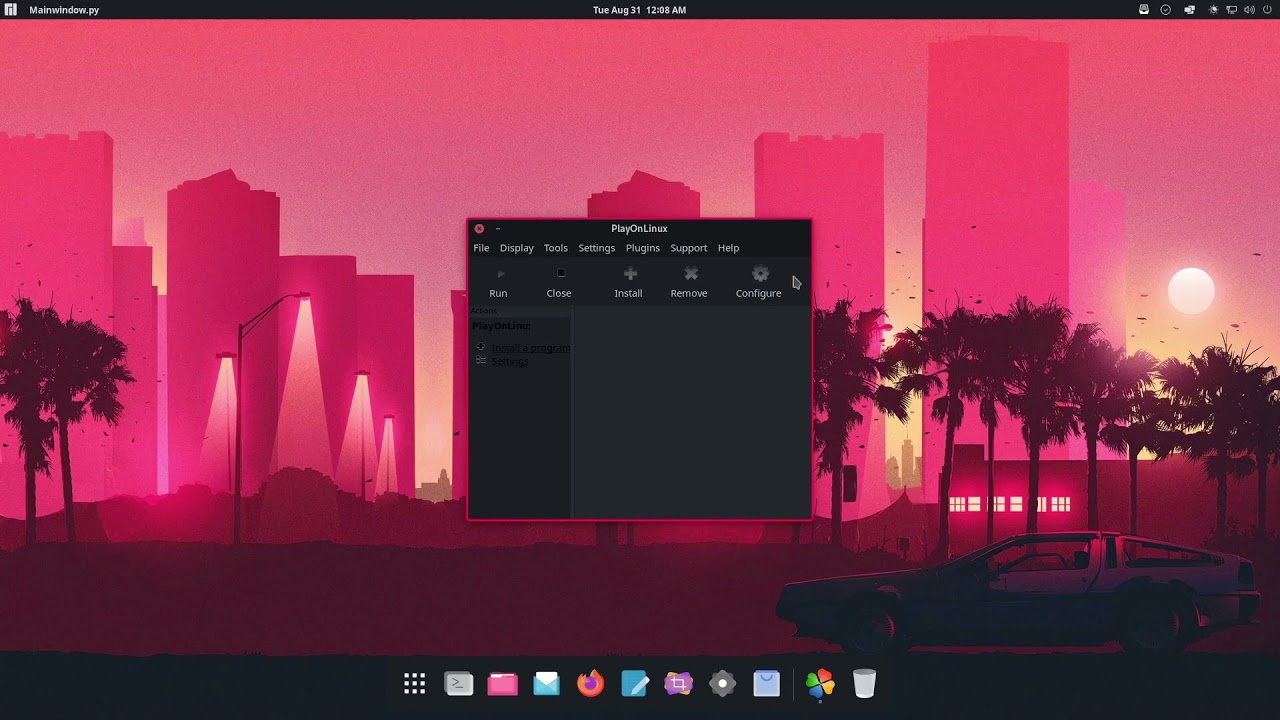
At some point, I’m sure someone, either a user or dev, could also put together a shell script or a PlayOnLinux script that would make installation happen with just a few clicks. That’s probably one of the bigger headaches here, just having to sit there and install each and every component (and make sure you’ve not messed up any individual thing). After that, the program runs surprisingly well, maybe not ca. $600 well, but definitely well enough to do some real work in. This last part I imagine I’ll get to eventually if no one else does, but it’s just slightly above my paygrade at the moment (as was the rest of this a year or two ago).

All that to say that, yes, I agree with Ben; I wonder how many people actually want to make the switch (I actually think it could be a decent amount, potentially moreso because of prospective users, but it just as easily might not be). And even if it did turn out to be a whole lot of people, would they be best served by a native Linux client given that the team is already maintaining several different versions on each of three different operating systems? I think probably not.

Ooohh goss, where can I find this commotion?

What a fun mega thread :slight_smile: “please can we have a Linux version?” “I think Mac’s better’, “no windows” ‘wait what?”
Tale as old as time…

As a general enthusiast (and probably a little more computer geeky than the average user) I’ve tried all sorts of Linux distros on VM over the years, and even tried to get them working on old laptops etc. It scratches a geeky itch but it rarely goes further than “huh. This is working now. Now it is taking up too much space and I have nothing to do with it. Aaand delete”.

The trouble as I see it is the same as with Lilypond. Yes, you can get better results. Yes, it is transparent and open, customisable and less corruptable. No - the user experience is not good. It is unintelligible, takes hours to learn the basics and even then you have to learn loads more just to have basic customisation and control. You have to become a total expert at it if you want any sort of control. Even with the nicest graphic UIs, Linux distros are reliant on the apparently good package system, which is about as inviting as the “man” help system.

It’s hard enough maintaining two platforms (each have the same problems as deploying to Linux btw, linus’s comments above notwithstanding).

For us users of notation software - is it not enough to learn an instrument or two, spend years at college, learn the intricacies of notation and all of the quirks. Discover alternative notations and spend hours working out how to accomodate them. Now we have to learn how to compile from a github tree or wrestle with Wine (something I have given up on many times)

Addendum - Valve is working with a closed system - they control both the Linux base and the wine layer which makes it successful - it would be fairly impossible to make it compatible with all Linux distros.

What’s worth spending your life on I wonder, and how many users really would benefit from a Linux distro?

Firstly, there are privacy issues (according to Open Source proponents) with both Audacity and MuseScore, then there’s other issues that rub Linux users up the wrong way.)

Eh. A bit over-played I think. “Hey guys stop using the software to share pirated editions”. For that matter, not musescore (the open source bit) but the musescore sharing tools which are proprietary….

Not to get too off track since I don’t think it is hugely material to the larger discussion, but I do believe both are actually open source. A quick Google search turns up what looks to be Proton’s Github page, and while the new incarnation of SteamOS (3.0?) hasn’t been released yet, I’m under the impression that they intend for it to be open source it just like their previous versions of it (now, old Debian-based SteamOS did come with Steam installed, which isn’t open, as well as “proprietary drivers,” which I just assume means Nvidia drivers, but plenty of distros come with precisely these two things without anyone considering said distros to be closed).

So I hate to spam this thread, but it seemed like it might be useful if my little Dorico installation video also had the instructions via narration in the video itself instead of as a big huge wall of text in a separate location. So I went ahead and did a quick and dirty remake. Hopefully anyone currently looking to use Dorico on Linux will find it much more useful, so here you are:

Enjoy!

P.S. One thing to note, I mention this in the video, but this install is on a virtual machine (since I already have it installed on my actual hardware). Performance is not great, particularly for Noteperformer, but both are much improved on actual hardware, again particularly for Noteperformer, which goes from not really usable to quite usable. Cheers!

Dear snakeeyes,
I will probably never use this but I wanted to express my admiration and gratitude for such a great source of information you’re providing here. I always read you with great interest.

Many thanks, Marc! I’m happy to hear that, since I suppose we would all hope that the things we post are making a contribution to the community, but I seem to find myself not posting that much these days (so many of the things that I would’ve had to say in the early days have been fixed or addressed or thoroughly discussed already!)

I still do have my pet topics though, and this is certainly one of them, and as you can see, when it comes to those, I could talk for days :sweat_smile:

I’ve been working the Linux/Windows border with applications since version .56 of Linux. FWIW it makes absolutely no sense for Steinberg to support it on any of their apps, niche application and huge PITA.

Quark Xpress, Photoshop, Dorico and Cubase.

If I could get those four on Linux then I would be gone from Apple and MS faster than you can say “privacy issues”.

Why anyone would use those terrible OSs to only use software as abominable as MS Office has always bewildered me!

Welcome to the forum, Rob!

So without all four of those as a package deal, I doubt this is much help to you, but we’ve got Dorico 3.5 running mostly fine on Linux, and I’m pretty sure that Cubase will work just as well (pretty sure the usual barrier there is/was the eLicenser control center, which we’ve got up and running, though sadly sans dongle support), though I can’t remember if I’ve tested it or not.

Photoshop and Quark Xpress (I haven’t heard of this one before) are likely to be your continued sticking points, as I don’t think it will be too too long before Dorico 4 is up and running. Current status is I’m having trouble getting my browser to talk to the Steinberg Activation Manager–it’s a protocol handler thing, which I’m not tremendously familiar with, but I think it’s actually a decently simple problem. I’m in the middle of a big project til mid-March, so I haven’t really had any time to devote to it, but it’s coming!

I haven’t used QXP since versions 6 or so, (and from v3.3), but it was always pretty klunky from a UI point of view. InDesign was a breath of fresh air. To say nothing of the company’s attitude.

Scribus is pretty much a Quark-u-likee, isn’t it?

I wonder I still have the Quark XPress muscle memory, deep down in the abyss of my subconscious… from back when I made some sort of a living as a DTP operator. On second thought, I doubt it, as I lost most of the Sib 7 automation quite soon.