Hi,
I have just purchased the lifetime licence for Dorico for Ipad and have a feature request(s) for guitar/fretted instrument notation.
The attached video clip discusses new tablature features that were made possible in the Engrave mode for desktop Dorico 3.
From 3:41-4:21 discusses the features that I feel are most important to include for tablature in Dorico for Ipad future updates.
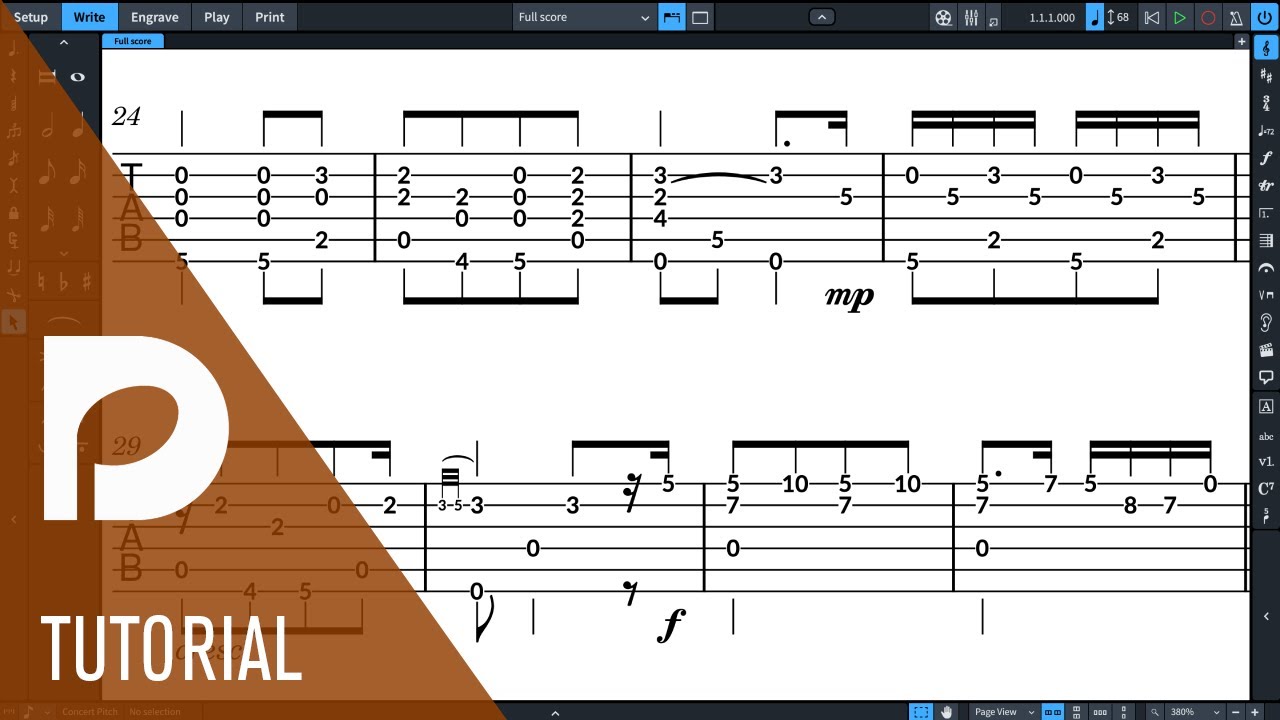
- Default Stem Directions
- Stem end position
- Position of rhythm dots
- How to display tied notes
- Eliptical enclosures/how to display
Having unlocked the full features of Dorico for Ipad I see that there is very little in the current engrave mode to improve the stem length of tablature. It is not ideal to use the stem lengthening and shortening function in engrave mode because it requires me to manually alter each individual note and ultimately it does not look nearly as good as the default settings introduced for desktop 3.0.
Perhaps the above features could be added under: Notation Options > Fretted Instruments, which currently only offers an option for ‘Coincident pitches in other voices’.
There could also be an easier and less customizable solution: changing the way that the tablature displays in Dorico for Ipad by default. As a fretted string player and private teacher it is highly desireable for rhythms, rhythm dotes, stem directions, stem end positions, ties etc. to be displayed as close to how they would appear in standard notation as possible.
It is not desireable to have a 2 stave system with standard rhythm notation on the upper stave and fret numbers on a blank tablature stave below. This is not space efficient and is more difficult to read (especially for students).
My suggestion for the default display of tablature in dorico for ipad would include at minimum:
- Stem end position: Outermost Note
- Tied notes in tablature: 1) Show fret numbers, with ties OR 2) Parenthesize fret numbers, with ties
- Tie Appearance: solid line
- Enclosures: 1) Ellipse OR 2) Rounded Triangle
- Rhythm Dots: YES
I know that I am not likely your typical user who is scoring for large ensembles and would unlock the full features of Dorico for Ipad to expand the number of parts I can write for.
But, I believe you have done the harder part of tablature with all of the bends, hammer, pull-off capabilities etc. I believe there could be a large market of potential Dorico for Ipad subscribers or lifetime memberships customers with some more customizeability on the iPad or at the least a better default notation setting for tablature.
I do not have a desktop computer or a laptop. I am strictly an iPad Pro user and also have Cubasis in addition to Dorico for Ipad. There is a market of folks who are iPad only users and I want to thank Steinberg for serving this market with everything they have provided to date. I hope that these would be easy features for you to implement but I understand that there could be some technical reasons for not included these features at this time.
Edit: Yes I’m suggesting that the inclusion of these tablature options could/should be something that is only accessible though subscription or membership. It creates a reason for fretted instrument players such as myself to get the subscription. I will NOT be asking for a refund because Dorico for Ipad is otherwise amazing but I do confess that I have not gained much by way of my Lifetime Membership other than to demonstrate my deserved support to the Dorico team - there is already so much on offer for free that the Membership is not likely worthwhile to fretted instrument players at this time. But, added tablature customizeability I think would have a very wide appeal worthy of membership/subscription for many others like me.
Thanks,
Richard