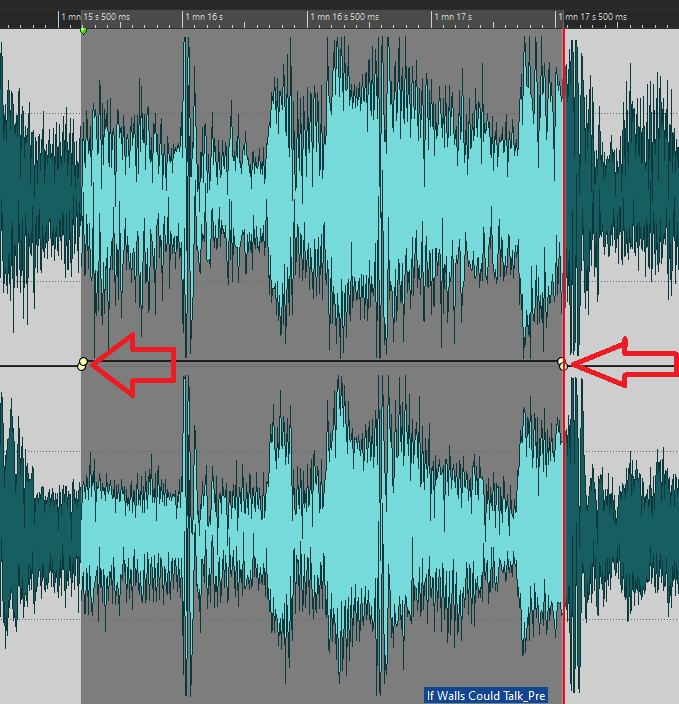
I love the way you can easily select a clip region and raise or lower the volume envelope just by adjusting the level line. Saves so much time and is an elegant implementation of the concept.
One thing that would be nice is … after making the change in the envelope … the points remained ‘active’ (red). This is because it’s usually the case that you might want to change the initially selected level (even to audition an alternative level).
And thank you again for implementing the ‘tab to next envelope point’ that I requested.
OK … so I’m typically using this to lower or raise the volume envelop in a specific section of the track … effectively changing the gain into the chain.
It is typically pretty subtle. Say you lower the envelope by -0.3 … but want to immediately audition what it sounds like at -0.5.
Having made the initial adjustment the points are no longer red. Meaning, before you can make the -0.5 audition you have to select he two points again.
Unless there is another way to do this, it takes time and etc
This behavior contrasts to the ‘envelope>raise selection’ where the points remain ‘active’ (red).
So I guess what I was really asking was for this to mimic ‘envelope>raise selection’.
What I am doing presently is mostly using the ‘raise selection’ command for this reason.
Granted it is a small thing and there is an option: raise selection.
No need. Just point and drag up/down the envelope segment that has non-selected points while pressing the Control key (Command on Mac). This will automatically select these points while you drag