I have to admit that this had been driving me crazy with Dorico, and I have not found a solution on the web or in this group. I frequently enter chords via MIDI keyboard, for example in a guitar or organ part. The voicings are close (eg. 1-3-5-7) , and clearly represent a single voice. However, for no known reason, Dorico separates the chord into multiple voices, and not reasonably (eg. with 5 repeated chords, the top note of chords 1 and 3 and 5, the top 3 of chord 2, the top 2 of chord 4), It becomes a nightmare to try to force the voices to be a single voice. I am hoping there must be a way to ‘force’ a single voice, or instruct Dorico to create one from multiple voices. 4 simple bars has taken me 30 minutes of repeated tries and repeated editing efforts, and it is still ugly.
Are you using simple MIDI step-entry, or recording to a click?
Select all the notes, press one number to make them an equal duration, and set them to Upstem Voice 1. I have set this in the Jump Bar to lowercase u. So it’s j, u, Enter.
Thanks, Dan, but this suggestions is not practical for my purposes. I am recording in real time to a click. Most of the chords are syncopated combinations of everything from dotted quarter notes to sixteenths. Making them all the same duration to force the stems means I have to manually enter the rhythms, which is as complicated that just starting with individual note entry one at a time. Kind of defeats the purpose of playing a keyboard in real time. The only functional workaround I have found is to enter an entire bar of 16th note chords, then adjust the note durations. It gets me there, but is not elegant. And the fact I can enter those chords in step entry without them breaking into multiple voices makes the Dorico behaviour even more bizarre.
Sorry, still not following. You mean you’re playing chords, and Dorico is breaking them up? Can you show a pic?
I really do not understand what your complaint is. I certainly do not experience Dorico changing voicings…
Have you watched the Dorico tutorial on MIDI input?
Real-time MIDI Input | Note Input
Maybe this will help:
Unfortunately, the article is not helpful, as I have already set latency compensation, and my issue is not related to note starting or ending points. It is the random voice-splitting that happens when I use my MIDI keyboard and record to a click to enter 1-hand chords (of 3 to 5 notes) in a single-staff keyboard or guitar part. Frequently Dorico unintelligently divides those chords into 2 separate voices (i.e. groups of noteheads with stems going both up and down, despite the notes all having the same starting point and note duration), and inconsistently – if I play a syncopated pattern with 5 or 6 of the same chords, the split points are never consistent (e.g. top note, then top 3 notes, then top note, then top 2 notes…), so doing a choose and command, either forcing stems or changing voices, is near impossible. Worse, there is no intuitive way (that I have discovered) of ‘telling’ Dorico that I am recording a single voice and should be notated as such, either before the recording process, or after. I can understand that in some grand staff situation this ‘intelligent’ voicing feature might be of use, but PLEASE try to find a way to be able to turn it OFF, at least in single staff parts.
Can you upload a picture or project that shows what’s happening?
I’m suspecting - based on my own inadequacies if you like -  that the note start and release/overlap is not in fact truly the same when played. And that the inconsistency you see is an artifact of that after it has been quantized by your settings. Showing us the score might help refute or confirm.
What are your settings under Preferences→ Play →Quantization and Preferences → Play →Recording ?
I will take screen shots when it next occurs. As mentioned, my ‘workaround’ was to manually enter an entire bar of the same 1/6 note chords, then change durations. My Recording Settings are all selected except (a) Suspend in background (b) Filter out MIDI controllers (c) Preserve note velocities (d) Add articulations. Unless I am wrong, none of those should affect note duration or voice splitting. Would you consider de-selecting Preserve note positions?
The settings I’m thinking of have to do with quantizing the notes you play to the nearest 1/8 or 1/16 or 1/32 or whatever, how sensitive it is to consider a variation in your playing to be considered a triplet - stuff like that.
Long-time pianist; generally good technique. 4/4 meter, Set to 16th note quantization. Here is something I just played; even stranger, it is now splitting the voices but forcing all stems the same direction (maybe something I forced it to do yesterday while trying to edit before deleting everything and using my ‘workaround’)


Hi @alexajcable, I think playing accuracy contributes to the result: Dorico assigns voices based on the played velocities (see below). Edit: another reason why Dorico add a voice is when you play a chord where the notes are held a little differently (a little longer or shorter then the other notes .
I just tried to record your last screenshot.
Here the result on my first attempt:

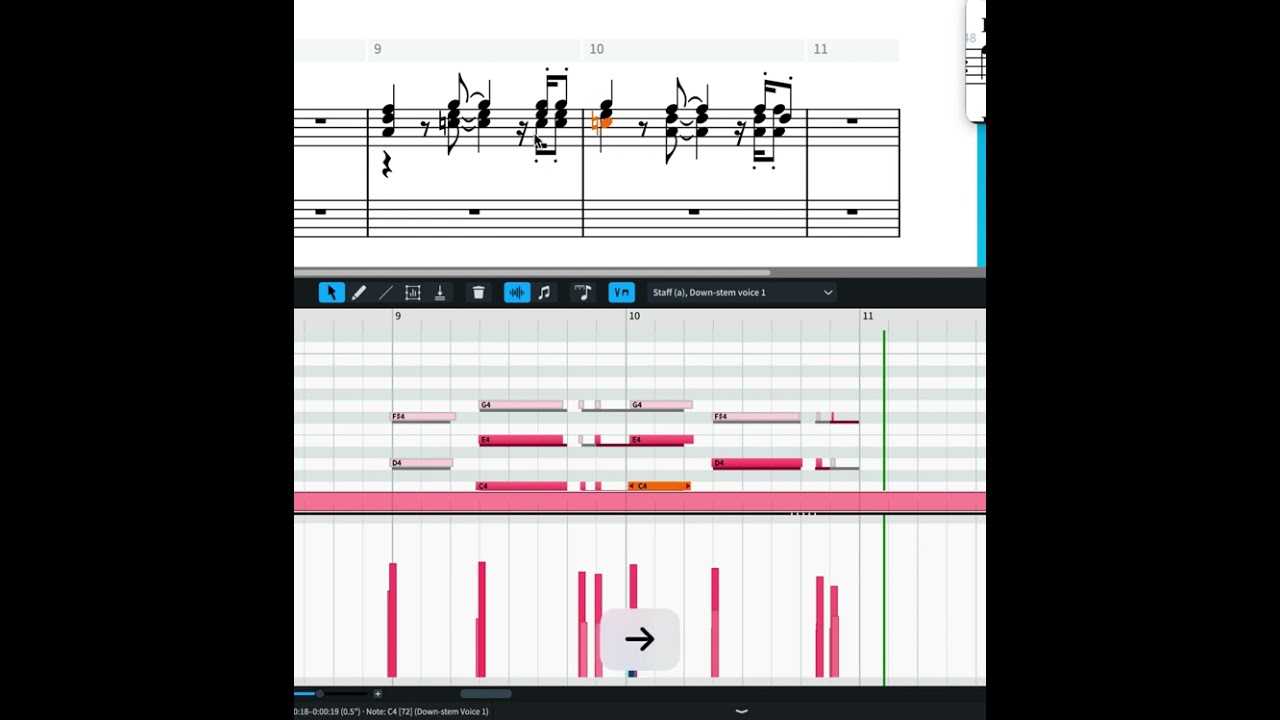
I saw that Dorico creates voices (probably) based on the recorded velocities: in the second bar for example I played the G and the two F with a much higher velocity than the two lower notes in each chord, (and Dorico assigned separate voices for them). In the first bar I played very similar dynamics, (and there is only one voice).
test midi recording.dorico (1.4 MB)
Can you show your result with the played duration visualisation? (possibly uploading the Dorico file to check the velocities?)
Edit:
I made a video showing that indeed Dorico assigns voices (in live MIDI recordings) based on the velocities: notes with similar velocities will be in the same voice. If a note has a very different velocity, Dorico puts it in a separate voice:
test midi recording-sloppy.dorico (1.4 MB)
Something I did not know, much appreciated.
Interesting, and much appreciated information. So the logical follow-up question would be 2-parts: Ideally, how does one adjust or constrain Dorico’s MIDI note sensitivity BEFORE recording, as I am not interested in performance subtleties that affect voice-splitting. And if that is not possible, how does one do that to the file after recording?
Look in the configuration software of your MIDI keyboard: there should be the possibility to set constant velocity (in the velocity curve settings).Here an example of the Korg microKEY:

Select the passage>Right click >Voices > Change Voice > Up-stem voice 1 (you can also use shortcuts for this):


Thanks, I will try to set the keyboards. I use several (iRig Keys PRO when I travel, 2 different M-Audio controllers in studios, a key station in my office, and Kurzweil PC3s at gigs).
If so, make sure you save different configurations in your keyboard software (if available) so you can switch to a normal Velocity curve setting: it would be not optimal to be on stage and discover that you don’t have velocities/dynamics 
Thanks, I will look at this when able. For the time being I am being very careful about entering everything at low velocity.
If you know, for my iRig Keys Pro, can I do that within Dorico settings or preferences, or must I do some kind of configuration in an IK application?