I’ve been trying to recreate a free harp glissando from a handwritten score by using slurs with multiple segments, and although it doesn’t look that good, it might be good enough.
However, is there a simple way to get that shape into the harp part? It seems it’s not possible to propagate properties in this instance.
In theory, if you have kept the property editing scope to Globally during the editing of that slur in the full score, it should at least resemble that in the part.
In any case, if you select the slur and go to Edit > Propagate Properties, it should propagate all local properties to any layout where the harp is present.
That’s the thing, propagate properties doesn’t seem to work with the slur. Perhaps it doesn’t apply to engraving mode? (Where you have to do all these slur manipulations.)
I’m not 100% sure now, but it may be that you need to be in Write mode for this command to work.
According to this support article, though, it should be possible in both modes.
Would you be able to share a cut-down version of the project for us to give a look?
This feature would be really helpful. Curved ad lib. lines are a standard notation device for contemporary orchestral writing and it looks so much better than the current work arounds.
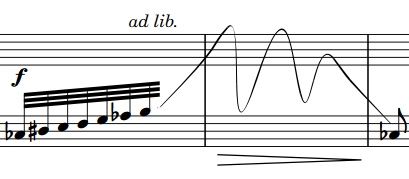
 I’d love official support for “gliss ad lib.” lines.