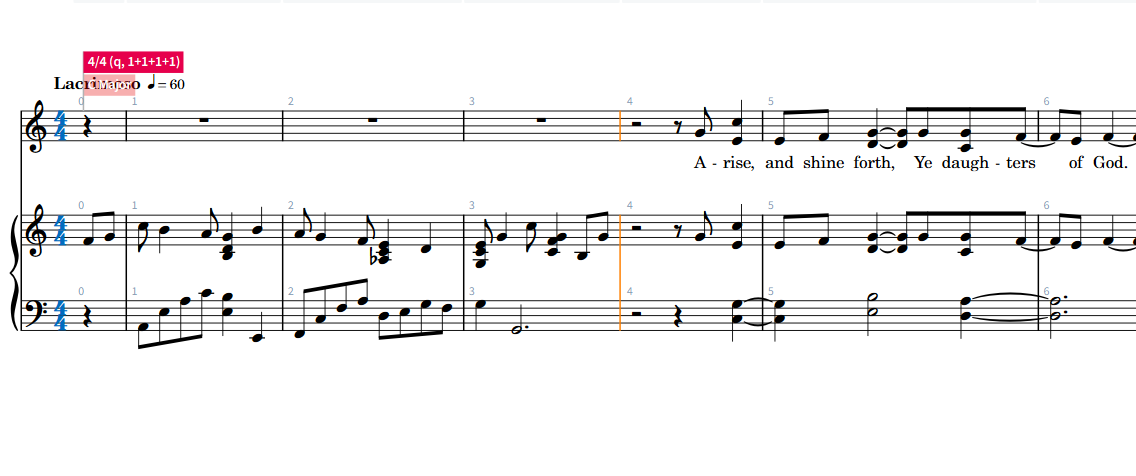
I’ve created a mess! My project was ready for fine-tuning when I created four measures to write an intro. I’m not certain how I did this, but I’ve pushed the actual project off base. Instead of an upbeat eight note, I now have that note at the space “3 1/2” and the first count of the next measure moved back to the 4th count in the previous measure. I’ve invested some serious time and there is a deadline. Is there a fix without rewriting everything? Ugh! I’m including a screenshot. The “A” on rise should be at 4.5. “Rise” is the 1st count in measure 5. I hope this makes sense.
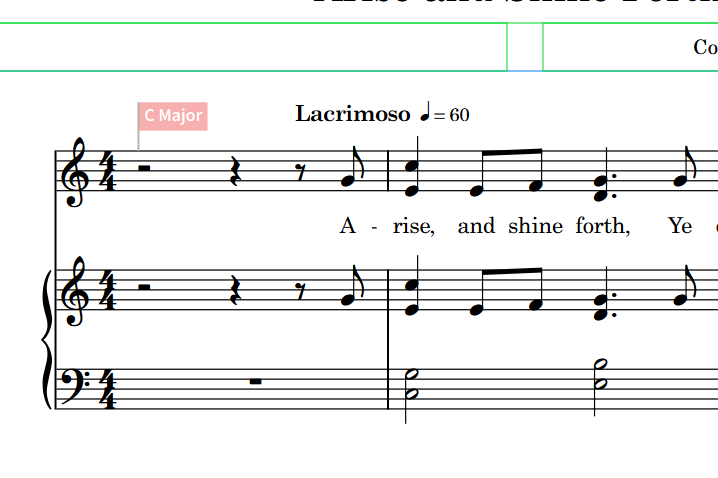
This is what it looked like before I inserted measures up front.
I would love to take you to lunch or something. Good grief! Thank you so much.
This is what it looks like now. I never dreamed I was creating such a mess. How do I delete the rests in measure 4 now? I started to hack and I don’t dare. I guess I should say that the last beat is measure 4 should be the last beat in measure 3.
Thank you so much! I hope I’ll be able to help somebody someday. That was so easy, but you have to know. Sifting through the numerous tutorials or manuals is rarely productive. You are a very good person!
Thank you so much! I hope I’ll be able to help somebody someday. That was so easy, but you have to know. Sifting through the numerous tutorials or manuals is rarely productive. You are a very good person!
Connie
I replied too quickly. I’m still grateful for your help. It worked perfectly with earlier version so I didn’t dig myself deeper into trouble. I tried the exact same thing with the latest version, and this is what I created. I’m stunned. I’ve done it a few times to be sure I hadn’t done something different.
This is the most recent version with the notes shifted after I did the same thing with an older version that worked beautifully. A head scratcher. I can send you the one that worked. I could go back to that version, but I’d be redoing a lot of work. Thanks!
What I’m asking for is really your Dorico project file, not a PDF. And If you’d like help fixing the project, then the project needs to have all of the notes, including the intro – it looks like this PDF is missing the intro.
But also, since double-posting on this forum can be confusing, please continue the discussion over on your other post. Did the suggestions there help?
I apologize about the “double posting”. After I had checked the “solution”, it looked like it wouldn’t let me continue. The “pdf’s” were indeed a mistake. I was so anxious to move on that I didn’t see I was sending the wrong format. The “R3” version is the most current. However, it has the content shifted. “R4” is an older version that worked beautifully with your suggestions. Here goes:
Bless you, my friend! I resisted using your version and correcting my work. It wasn’t one-and-done, but I’m back to where I messed up. I have one more question though. I’m happy to research this, but I’m not certain what the letters are about when you do “Shift+B, i.e. +1e, and +1g. I spent time last night researching in the Steinberg manual. I didn’t get an explanation before my window of time was gone. Here’s one example in the manual:
One of the things this popover can do is add or remove bars, or fractions of bars. +1q says to insert one quarter note before the selected note (and push everything else later); +1e says to insert one eighth note.
This problem was solved so easily. I’m struggling again with the same thing in another project.
I have clicked the quarter note and in the Popover B -3q. What I get is the 4th beat in M9 moves to M10. Not what I want. What I want is to delete the half note rest plus the quarter rest in the first bar.
The difference between this one and your earlier ones is that this one doesn’t have the pickup time signature, so if you start deleting beats, Dorico will still try to fit everything into regular 4/4 bars.
Try this: Double click the time signature, and change it to 4/4,1. That should give you something like this:
That worked. The following dialog is really for my benefit as I did it a second time. Is this the translation of 4/4,1? Changing the time to have 1 beat in the first measure. After that, I had a quarter rest in “upbeat” position and a half rest in measure 2. Typing -3q in the bar popover put the upbeat in the correct position. Thanks again for your help.