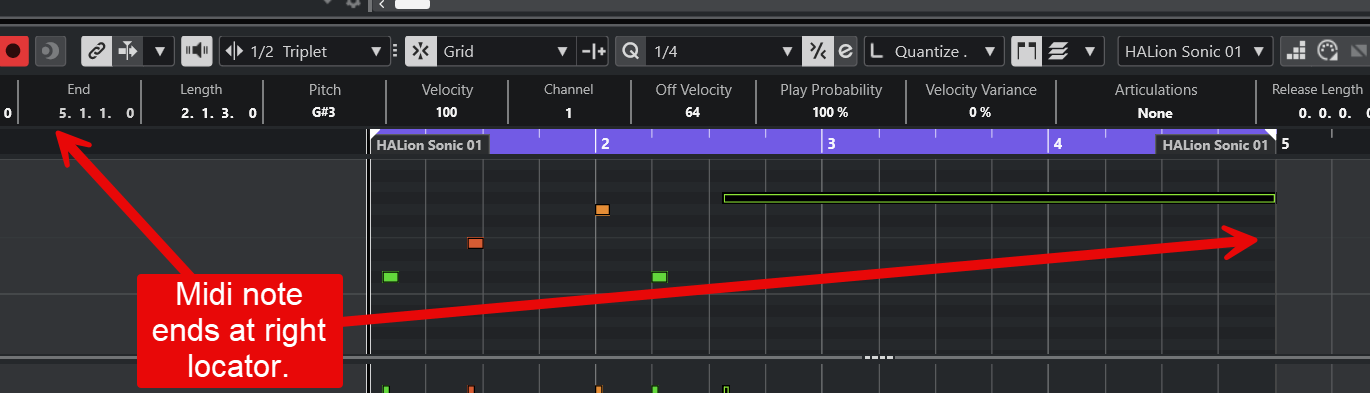
I’m trying to automatically extend a single MIDI note so that it reaches the end of the right locator. However, the Legato function doesn’t seem to work in this case — it only adjusts notes relative to each other, not to the project locator range.
Is there a way to make a selected MIDI note extend exactly to the end of the right locator, maybe via a command, Logical Editor preset, or macro?
Yes, and that’s what I’am saying. So the picture shows that the midi note ends exactly at the locators position. What am I missing here? You have to explain!
And my point is that you can set the midinote end to whatever value you want by by using the infor line.
I’m just saying that the question is not as straightforward as it may at first seem.
I would just click and drag. But that’s a manual edit, as is entering a value in the info bar. It isn’t “automatic”, which I would take to mean using a macro or the LE, as is stated in the question.
Hi everyone,
Sorry, I used the wrong term earlier! Here’s the corrected version:
I’m trying to automatically extend a single MIDI note so that it reaches the end of the MIDI part end through a macro or shortcut.
Sorry for the confusion!
Thanks,
When there are multiple notes starting at different positions, they don’t extend to the end of the MIDI part as expected. I’m looking for a quicker way to do this — for example, by using the Logical Editor or a shortcut.
Sorry, I meant the end of the MIDI part, not the locator.
Apologies for the confusion!
is it workable maybe via a command, Logical Editor preset, or macro?