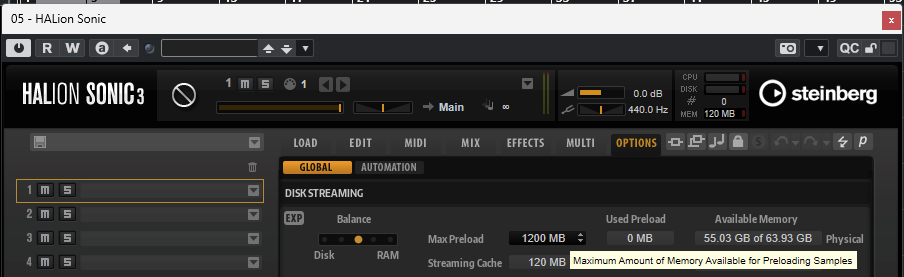
Can someone please explain to me what do (step x step) to rectify this situation?
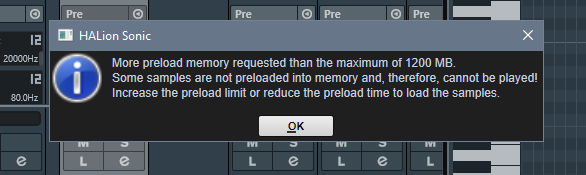
Thanks in advance
Daniel
Can someone please explain to me what do (step x step) to rectify this situation?
Thanks in advance
Daniel
Hi m.c
Thanks for getting back to me so quickly. I increased the max Preload to 16MB. The used preload now reads 1418 MB and the Available memory is 3GB of 15 GB. The streaming cache is 50 MB.
Would those numbers be reasonable?..
Well this is not 16MB, it’s actually 16GB from what I understand. Why setting such a high preload? I would suggest using something around 2GB and see how it goes. That being said, I’m nowhere near an expert on VSTs optimization, so perhaps other users would be of much more help here.
Just to make sure I’m on the page.

When compared to the numbers from your screen shot, Your Max Preload setting is 1200MB - my Used Preload setting is much higher than yours and my available memory is substantially less…
I’m not Tech savvy either. As you say… maybe someone could explain it to us.
Anyways, the info pop-up did disappear. So something positive took place. But I would prefer to know the why of it all.
Thanks m.c 
Well, the sample that needed to be loaded had a trace above the 1.2 gb default setting. Preload is there to help keeping latencies/pops away from our performance by not giving our disks-cpus a hard time, the way I understand it.
You’re welcome