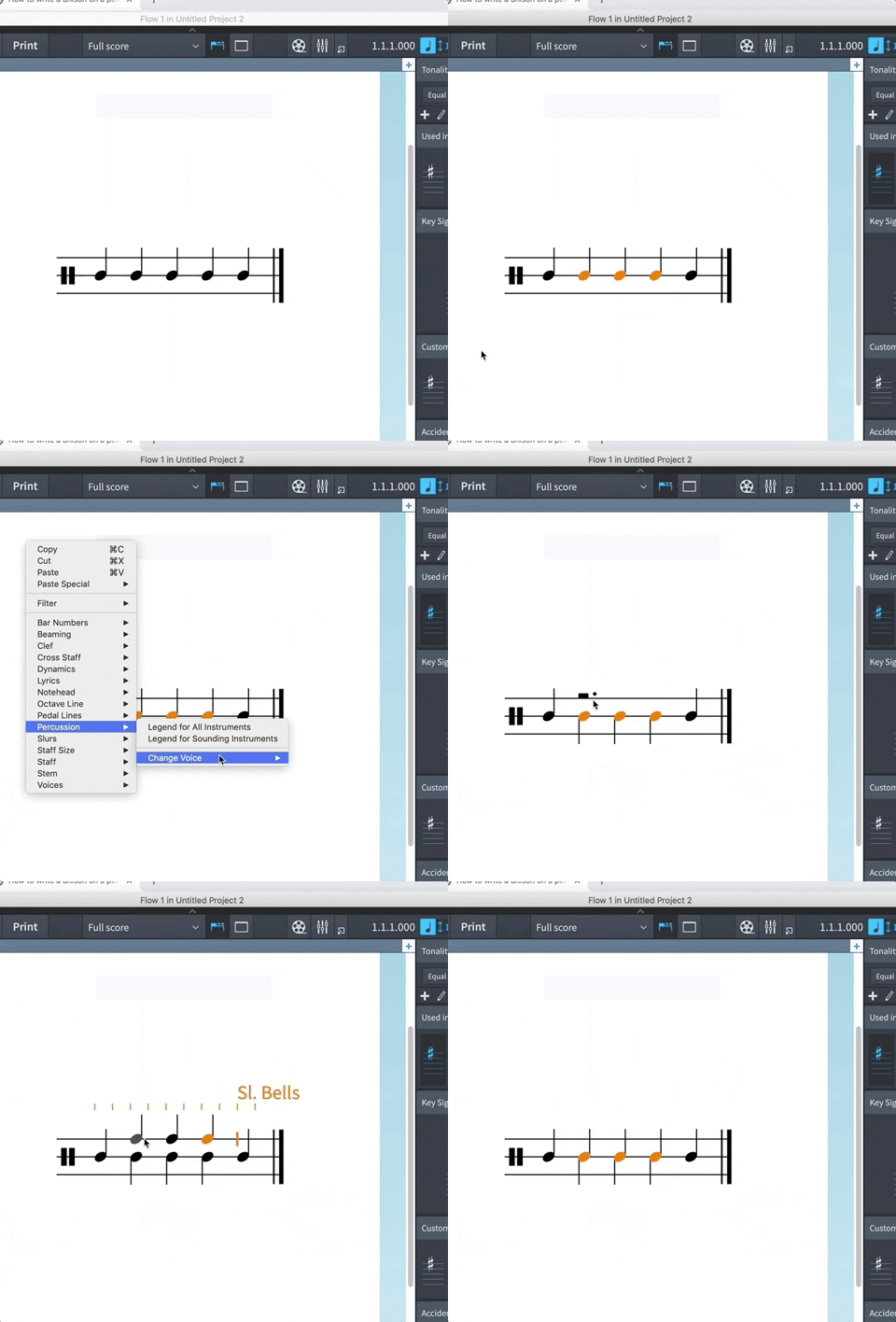
I have a complex percussion grid with 11 instruments for a contemporary score. My issue is that I am unable to write in a ‘unison’ - e.g. a single note with both and up and down stem to indicate it is being hit with both mallets.
The solution for a percussion kit - to add another instrument on the same staff line - does not apply to the grid layout. I also don’t seem to be able to add a unison (stems in the same direction), which would also be a suitable solution.
No, unfortunately that thread does not solve my problem - I already searched and attempted these solutions otherwise I would not have posted (I have read the community guidelines!)
That solution (adding another instrument on the same staff) only works on a five line staff kit, but not in the GRID setting.
That is why I wrote “The solution for a percussion kit - to add another instrument on the same staff line - does not apply to the grid layout. I also don’t seem to be able to add a unison (stems in the same direction), which would also be a suitable solution.”
I have a percussion kit setup with several instruments, 5 line staff display. The composer wants … a particular surface. Under the percussion kit, I am having trouble ttrockstars adding in this unison to represent the double stop. I tried using an alternate method of notating this.
When I try to use this method on a phrase involving 8th/quaver triplets, the beaming disappears when I change the voice. I end up with what appear to be 3 quarters/crotchets (see below). Does anyone know why this happens or how to fix it?
Is there a variation on this method for if I only have a single line instead of a multiline grid?
When you see notes with incorrect durations like this, it means that the notes and the required tuplet that should contain them are not both present in the same voice. The way percussion grids and five-line staves are notated using component voices is complicated, but if you temporarily switch to viewing the kit using the single-line staff presentation type (on the Players page of Layout Options) you should be able to correct things such that when you switch back to the grid presentation type, the notation is correct.
Hmmm. When I switch to single-line presentation, I no longer have the option of changing the voice. If I switch to single-line presentation after changing the voice, the tuplet gets re-associated with the notes, but then I can’t move them to the proper instrument to create the unison. If I then switch back to grid presentation, the tuplet gets dissociated from the notes again. Am I missing any steps?
I’ve not tried this myself, so forgive me if this doesn’t help, but what happens if you include the triplet bracket/number in the selection before you change voice?
Sorry for the delayed reply. No, including the triplet bracket/number in the selection before changing the voice doesn’t make a difference. However, I’ve found that if I “change” the voice to the normal up-stem voice 1 (which is what it already was, I thought), instead of trying to make it the “extra up-stem voice,” the triplet converts with the notes, and I’m still able to move it down to the next line down for a unison.
I’m still not sure how to get. unison for a player with only one single-line stave, though.
If you have Dorico Pro, you can get the appearance and playback you want by using a pitched single-line instrument which behaves like an unpitched percussion instrument. For example, suppose you want notes with both up-stems and down-stems for the HSO Snare Drum. In Library > Instruments, create a new instrument based on Treble staff and give it one staff line, a percussion clef and no key signatures. In Setup mode, add a single player holding the Treble staff copy you just created and change the instrument name to Snare Drum. In Play mode, assign the VST and channel for this player to an instance of HALion Sonic with the program Snare Combi Key loaded in the chosen slot.
Placing a note on the single staff line for this player is equivalent to placing a note on the bottom line of a treble staff, so the pitch is E above middle C (MIDI note 64). Inspecting the percussion map HSO Snare Combi Key shows that a hit with the Natural playback technique uses MIDI note 36 and a long roll with the Tremolo playback technique uses MIDI note 96. In Library > Expression Maps, create a new map and set the base switch Natural to transpose 36 - 64 = -28 semitones. Add a base switch triggered by the Tremolo playback technique and set it to transpose 96 - 64 = 32 semitones. Now assign this expression map to the pitched Snare Drum player.
You can now use up-stem and down-stem voices to create unison notes and a roll like this: