I’d really like to know how the (import/export Cubase) fixes are progressing. And how long will it take to get these fixes?
And the problem has been known since March! And thank God, it’s already October. I haven’t seen any activity on the solution. How can you not solve one problem in six months? And this isn’t a new feature, as many here like to claim (trying to cite beta versions).
And it should have been working since the release of VST Live 2! And this is exactly what we pay money for!
Finally, the media project import/export from Cubase to VST Live works correctly!
No ghost notes, the bars are the same length as in Cubase – beautiful!
But the dawproject import/export is a bit buggy. The number of bars doesn’t match, for some reason it imports 82 instead of 84. But thankfully, there are no ghost notes either.
But I’m sure you’ll overcome this too!
The main thing is that the media project import/export from Cubase to VST Live works correctly!
A deep bow to you, developers, for your hard work! It’s finally done!
No, Michael imports back into Cubase incorrectly - 2 cycles, which means it’s a Cubase export problem? Here is the original and you have the same project that I sent you.
Greetings, Michael!
Here’s a simple example:
Create an instrument track, even a blank MIDI part from bars 1 to 84, set the time signature from bars 1 to 21 to 4/4, and from bars 21 to 84 to 12/8, save it, and export the dawproject.
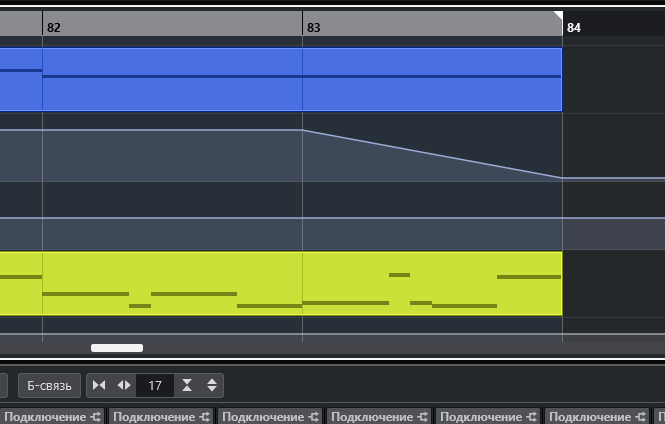
Close Cubase, then open and import the newly saved dawproject. This is what we see in the screenshot: the total number of bars has decreased to 80.8, and the start of the transition to 12/8 has shifted from bar 21 to bar 11, something like that.
The same thing happened with the Cubase 14.0.40 update that was released today.
Michael, maybe we should move this thread from dawproject to the Cubase section?
Although, as far as I understand from the Cubase threads, it’s up to you to decide.
In short, I figured out how to make it work. (maybe it’ll be useful to someone). It’s just that when you export the dawproject, you need to add a separate tempo track (it’s essential to create it in Cubase, and it doesn’t even matter if it’s the same throughout the entire song) and export separately it!
Because the tempo that dawproject itself creates inside its export file (apparently there are errors in it) and it shifts the beats relative to the original
Then you import the dawproject in reverse order, and then add the tempo track to it, and then everything fits perfectly – all the bars line up. Everything’s clear with Cubase, everything’s great!
But you can’t easily add a separate tempo track to a VST live tempo track in a dawproject like you can in Cubase, so we simply use the media project import/export feature in VST Live from Cubase.
But I think dawproject doesn’t need any separate tempo track, it should remember it itself and this is just a bug at the moment that I hope will be fixed too!